

Media Size and Filter
Media Sizer and Filter used by the media to get size and filter options for the admin panel
Maintenance 40/100200d since update
Active installs
20
Downloads
838
Reviews
4
Age
1.1y
Plugin info
Total downloads: 838
Active installs: 20
Total reviews: 4
Average rating: 5
Support threads opened: 0
Support threads resolved: 0 (0%)
Available in: 1 language(s)
Contributors: 1
Last updated: 9/15/2025 (200 days ago)
Added to WordPress: 3/1/2025 (1 years old)
Minimum WordPress version: f
Tested up to WordPress version: f
Minimum PHP version: f
Maintenance & Compatibility
Maintenance score
Stale • Last updated 200 days ago • 4 reviews
40/100
Is Media Size and Filter abandoned?
Likely maintained (last update 200 days ago).
Compatibility
Requires WordPress: f
Tested up to: f
Requires PHP: f
Similar & Alternatives
Explore plugins with similar tags, and compare key metrics like downloads, ratings, updates, support, and WP/PHP compatibility.
WP Media Size
Rating 0.0/5 (0 reviews) • Active installs 20
Description
Media Sizer and Filter used by the media to get size and filter options for the admin panel
Installation
For an automatic installation through WordPress:
- Go to the ‘Add New’ plugins screen in your WordPress admin area
- Search for ‘Media Size filter’
- Click ‘Install Now’ and activate the plugin
- A dropdown of categories will show up in the media library
For a manual installation via FTP:
- Upload the ‘Media Size and filter’ directory to the ‘/wp-content/plugins/’ directory
- Activate the plugin through the ‘Plugins’ screen in your WordPress admin area
- A dropdown of categories will show up in the media library
To upload the plugin through WordPress, instead of FTP:
- Upload the downloaded zip file on the ‘Add New’ plugins screen (see the ‘Upload’ tab) in your WordPress admin area and activate.
- Activate the plugin through the ‘Plugins’ screen in your WordPress admin area
- A dropdown of categories will show up in the media library
Frequently Asked Questions
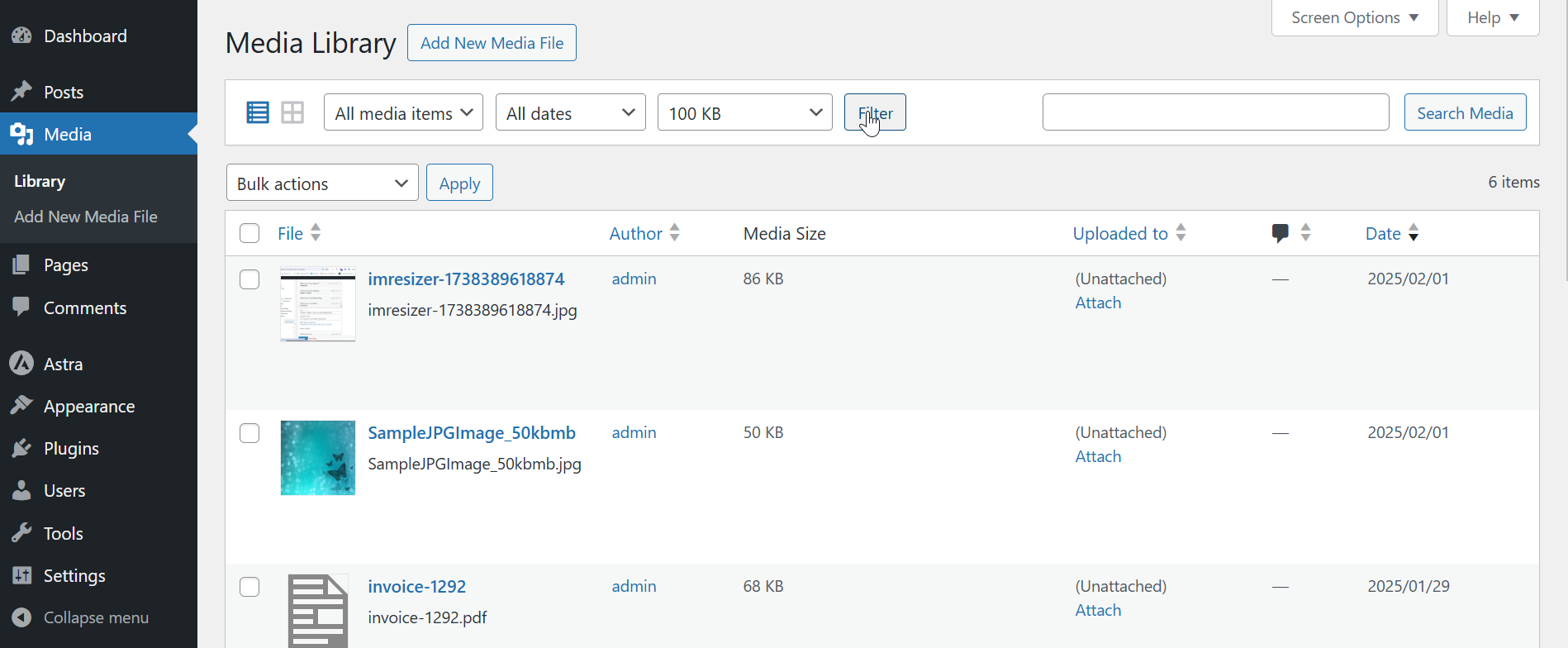
To filter media in the library by size, use the size dropdown in list mode. Once a size is selected, the media library will display files matching the chosen size range.
Review feed
No reviews available
Screenshots


Changelog
1.0.1 (2025/09/08)
- Added the option in Grid view the filter size.
- Added Logo and banner
1.0.0
- A Add media filter size.