

Meks Quick Plugin Disabler
Temporarily disable (and restore) all currently active plugins with a single click
Plugin info
Maintenance & Compatibility
Maintenance score
Possibly abandoned • Last updated 612 days ago • 7 reviews
Is Meks Quick Plugin Disabler abandoned?
Possibly abandoned (last update 612 days ago).
Compatibility
Similar & Alternatives
Explore plugins with similar tags, and compare key metrics like downloads, ratings, updates, support, and WP/PHP compatibility.
Description
Main purpose of Meks Quick Plugin Disabler is to quickly find out if any recent issue you are having on your website is related to the one of currently active plugins.
It is made for developers, techical support engineers, as well as for regular WordPress users. Sometimes, usually after updating your plugins, themes or WordPress installation, strange issues may appear and mess the things up. This plugin provides a really neat way to check the problem.
Benefits
- Huge time saver when debugging websites with lots of plugins
- Neat solution instead of forced plugin deactivation via FTP (i.e. changing the plugins folder name)
Meks Quick Plugin Disabler is created by Meks
Installation
- Upload meks-quick-plugin-disabler.zip to plugins via WordPress admin panel or upload unzipped folder to your wp-content/plugins/ folder
- Activate the plugin through the “Plugins” menu in WordPress
Frequently Asked Questions
For any questions, error reports and suggestions please visit https://mekshq.com/contact
Review feed
Nice and useful plugin
Screenshots
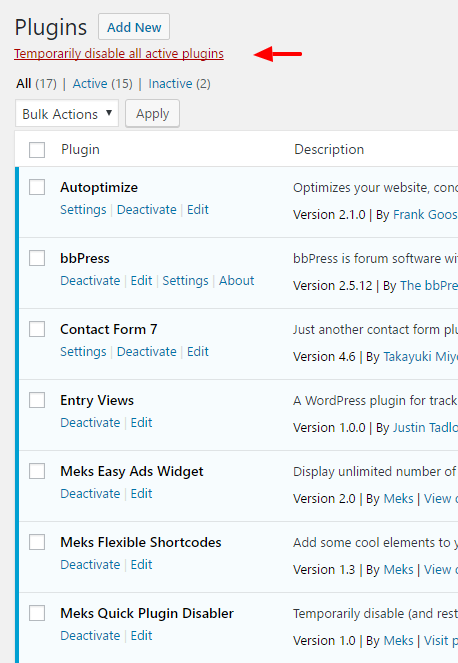
Disable
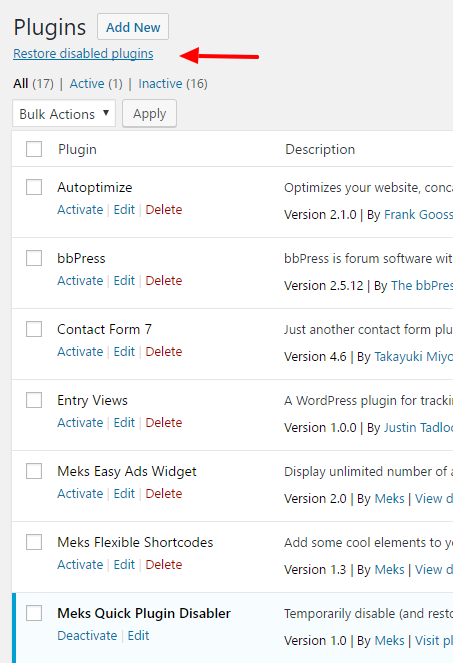
Restore
Changelog
1.0
- Initial release