

WP Courseware for MemberSonic
This plugin adds integration between MemberSonic and WP Courseware which allows you to associate course(s) to products for automatic enrollment.
Plugin info
Maintenance & Compatibility
Maintenance score
Possibly abandoned • Last updated 1210 days ago
Is WP Courseware for MemberSonic abandoned?
Possibly abandoned (last update 1210 days ago).
Compatibility
Similar & Alternatives
Explore plugins with similar tags, and compare key metrics like downloads, ratings, updates, support, and WP/PHP compatibility.
Description
Fly Plugins presents MemberSonic for WP Courseware.
Would you like to sell an online course with MemberSonic?
The MemberSonic Addon for WP Courseware will add full integration with WP Courseware. Simply assign WP Courseware course(s) to a MemberSonic product. When a student purchases the product, they will automatically be enrolled into the associated course(s).
With this addon, you will be able to create a fully automated Learning Management System and sell online courses.
MemberSonicship Plugin Integration with WP Courseware
Basic Configuration Steps
- Create a course with WP Courseware and add module(s), unit(s), and quiz(zes)
- Create a course outline page using [shortcode]
- Create a product and set a price
- Associate one or more WP Courseware courses with the product
- New student pays for the product, and WP Courseware enrolls them to the appropriate course(s) based on the purchased product
Check out Fly Plugins
For more tools and resources for selling online courses check out:
- WP Courseware – The leading learning management system for WordPress. Create and sell online courses with a drag and drop interface. It’s that easy!
- S3 Media Maestro – The most secure HTML 5 media player plugin for WordPress with full AWS (Amazon Web Services) S3 and CloudFront integration.
Follow Fly Plugins
Disclaimer
This plugin is only the integration, or “middle-man” between WP Courseware and MemberSonic.
Installation
- Upload the
MemberSonic for WP Courseware addonfolder into the/wp-content/plugins/directory - Activate the plugin through the ‘Plugins’ menu in WordPress
- Configure the plugin by going into Training Courses–>MemberSonic, then associate courses with products (this assumes you already have courses and products created).
Frequently Asked Questions
Yes!
Yes!
Review feed
Screenshots
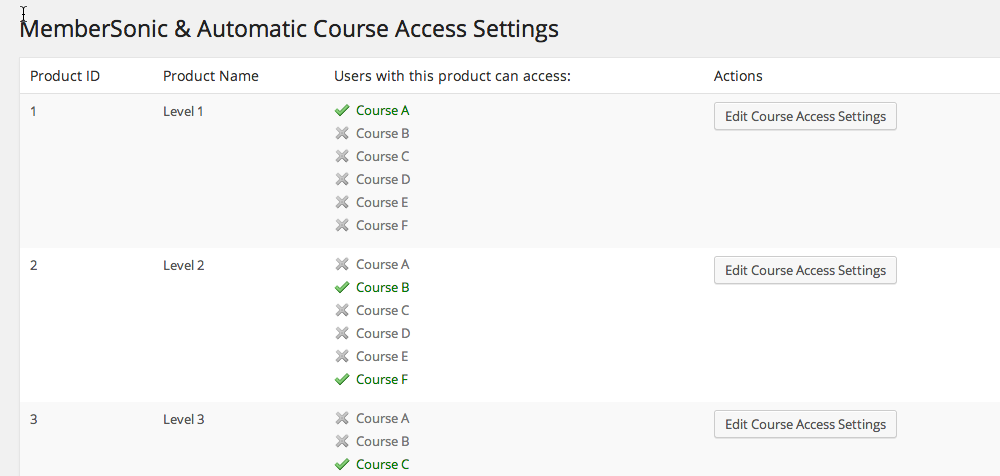
The Course Access Settings screen will display the courses associated with products

This is the screen where specific courses are selected to be associated with the product. The retroactive function will enroll students to courses that were recently associated to the product.
Changelog
1.3
- Fix: Access check on the course if a user has multiple subscriptions which are associated with the same course.
- Tweak: Improved performance when access needs to be verified.
1.1
- New: Added ability to retroactively enroll students when a course is added to product that already exists.
1.0
- Initial release