

Menu By User Roles
Menu By User Roles allows you to control the visibility of menu items based on user roles.
Plugin info
Maintenance & Compatibility
Maintenance score
Stale • Last updated 183 days ago • 3 reviews
Is Menu By User Roles abandoned?
Likely maintained (last update 183 days ago).
Compatibility
Similar & Alternatives
Explore plugins with similar tags, and compare key metrics like downloads, ratings, updates, support, and WP/PHP compatibility.
Description
Menu By User Roles is a WordPress plugin that allows you to control the visibility of menu items based on user roles. You can assign specific user roles to each menu item, ensuring that only users with those roles can see and access the corresponding links.
For more information and usage instructions, visit the GitHub Repository.
Support
For support and inquiries, please open an issue on GitHub.
License
This plugin is released under the GPL-2.0+ License. See LICENSE for more information.
Author
Installation
- Upload the
menu-by-user-rolesdirectory to the/wp-content/plugins/directory. - Activate the plugin through the ‘Plugins’ menu in WordPress.
- Go to ‘Appearance’ > ‘Menus’ in your WordPress dashboard to start assigning user roles to menu items.
Frequently Asked Questions
- Go to ‘Appearance’ > ‘Menus’ in your WordPress dashboard.
- Edit a menu item, and you will find a new option to assign user roles.
- Choose the desired user roles for the menu item.
- Save the menu.
Yes, this plugin should be compatible with most WordPress themes. If you encounter any compatibility issues, feel free to report them on GitHub.
Review feed
Awesome!
Screenshots
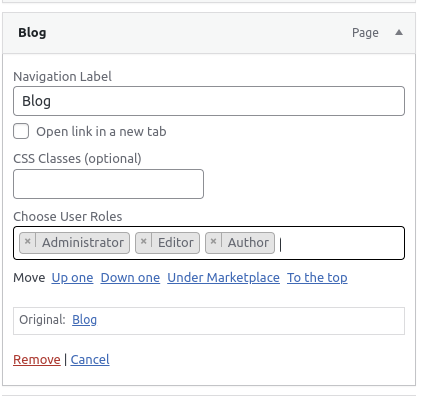
Here is an example of a menu item with user role selection options.
Changelog
2.0.4
- Bug Fix: User roles save issue fixed
2.0.3
- Update: Tested with latest WordPress 6.8.3
- Update: Helper added to initialize select2
2.0.2
- Update: Tested with latest WordPress 6.8
- Bug FIx: Select2 user roles dropdown issue fixed
2.0.1
- Update: Block-Based Navigation Issue Fixed
2.0.0
- Feature: Added WordPress Block Theme Navigation Support – Now fully compatible with block-based themes using the Navigation block.
- Update: Multi-Role Selection for Block-Based Navigation – Users can now select multiple roles when configuring menu items in block-based navigation settings.
- Update: Fixed Elementor Select2 Conflict – Resolved UI issue where the role selection dropdown was not displaying correctly when Elementor was installed.
- Update: Enhanced UI & UX – Improved overall appearance and user experience for better usability.
1.0.5
- Update: Tested with latest WordPress 6.7.1
1.0.4
- Update: Tested with latest WordPress 6.6.2
1.0.3
- Update: Tested with latest WordPress 6.5.2
1.0.2
- Feature: Multiple user roles added
1.0.1
- Update: New version of the plugin released
1.0.0
- Initial release