

MB FacetWP Integration
Integrates Meta Box custom fields with FacetWP. Make custom fields filterable.
Plugin info
Maintenance & Compatibility
Maintenance score
Maintained • Last updated 129 days ago
Is MB FacetWP Integration abandoned?
Likely maintained (last update 129 days ago).
Compatibility
Languages
Similar & Alternatives
Explore plugins with similar tags, and compare key metrics like downloads, ratings, updates, support, and WP/PHP compatibility.
Description
MB FacetWP Integration is a free plugin that integrates Meta Box and FacetWP, which makes custom fields of Meta Box searchable and filterable in the frontend.
Meta Box Lite
We recommend using Meta Box Lite, a feature-rich free UI version of Meta Box that provides UI and all free features for managing custom fields and dynamic content on WordPress, including post types, taxonomies, custom fields, and relationships.
For an e-commerce or a listing website, the product or listing requires custom data such as price, location, color, etc. And users need to search or filter the products / listings in the frontend based on these criteria.
- With the help of Meta Box, you can create any kind of data (custom fields) for your product / listing or any custom post type.
- And FacetWP will make products / listings searchable, filterable by those data.
This plugin doesn’t require any configuration. Just install it and you will see Meta Box custom fields appear in the list of options in FacetWP settings.
Plugin Links
Other products
If you love this plugin, please try our other great products:
- Slim SEO: A lightweight and full-featured SEO plugin for WordPress
- Slim SEO Schema: The best schema plugin for WordPress
- Slim SEO Link Manager: Build internal links easier in WordPress
- Auto Listings: The car sale and dealership plugin for WordPress
- GretaThemes: Beautiful and easy to use WordPress themes
Installation
You need to install Meta Box first
- Go to Plugins | Add New and search for Meta Box
- Click Install to install the plugin
Install MB FacetWP Integration
- Go to Plugins | Add New and search for MB FacetWP Integration
- Click Install to install the plugin
Make sure you have a license of FacetWP.
Go to Settings | FacetWP to configure your facets.
Frequently Asked Questions
Review feed
Screenshots
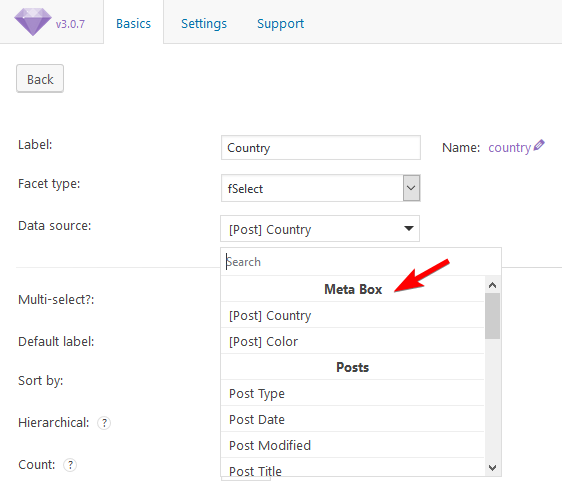
Plugin in action
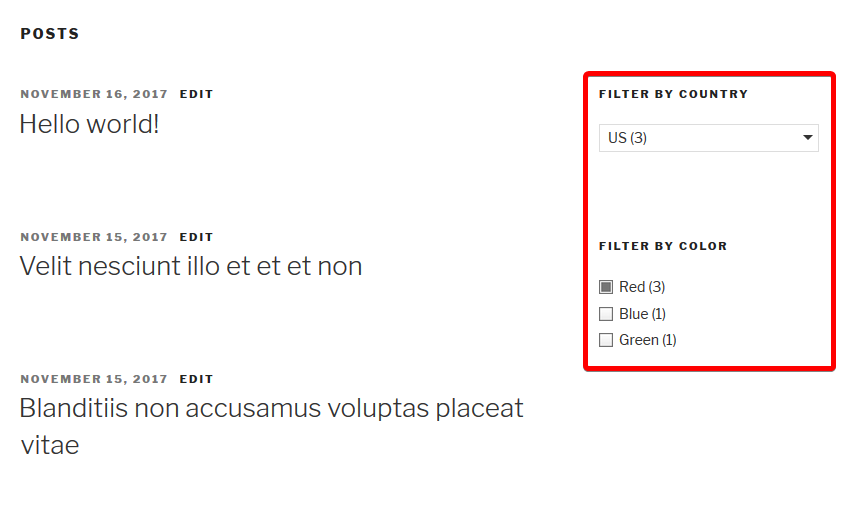
Changelog
1.1.6 – 2025-11-24
- Update compatibility with the latest WordPress version.
1.1.5 – 2024-10-14
Fix Plugin Check
1.1.4 – 2024-05-16
Fix error when using at the same time with Meta Box AIO.
1.1.3 – 2023-06-17
Fix undefined when index select option field
1.1.2 – 2023-04-03
Support filtering the maps (Google Maps, Open Street Maps)
1.1.1 – 2023-03-21
Fix compatibility with the latest version of FacetWP
1.1.0 – 2023-01-04
Add MB Relationships integration
1.0.4 – 2022-10-22
Fix PHP warnings
1.0.3 – 2020-02-07
Fixed missing readme file
1.0.2 – 2020-02-07
Fixed PHP warning if post type doesn’t exist
1.0.1
Fixed undefined function rwmb_get_field_data (changed from Meta Box 4.13.2)
1.0.0
First release