

Meta Generator and Version Info Remover
This plugin will remove the version info appended to enqueued style and script urls along with Meta Generator in the head section and in RSS feeds.
Plugin info
Maintenance & Compatibility
Maintenance score
Stale • Last updated 191 days ago • 28 reviews
Is Meta Generator and Version Info Remover abandoned?
Likely maintained (last update 191 days ago).
Compatibility
Similar & Alternatives
Explore plugins with similar tags, and compare key metrics like downloads, ratings, updates, support, and WP/PHP compatibility.
Description
This plugin will remove the version information that gets appended to enqueued style and script URLs. It will also remove the Meta Generator tag in the head and in RSS feeds. Adds a bit of obfuscation to hide the WordPress version number and generator tag that many sniffers detect automatically from view source. Option available to selectively exclude any style or script file from version info removal process.
You can enable/disable each removal options from admin dashboard:
- Remove WordPress Meta Generator Tag
- Remove WPML (WordPress Multilingual Plugin) Meta Generator Tag
- Remove Slider Revolution Meta Generator Tag
- Remove WPBakery Page Builder Meta Generator Tag
- Remove Easy Digital Downloads Meta Generator Tag
- Remove Master Slider Meta Generator Tag
- Remove LayerSlider Meta Generator Tag
- Remove Site Kit by Google Meta Generator Tag
- Remove Divi Theme Meta Generator Tag (By default disabled; if required enable from Settings)
- Remove Elementor Website Builder Meta Generator Tag (By default disabled; if required enable from Settings)
- Remove Image Placeholders Meta Generator Tag
- Remove Performance Lab Meta Generator Tag
- Remove Performant Translations Meta Generator Tag
- Remove WEBP Uploads (Modern Image Formats) Meta Generator Tag
- Remove WP Admin Footer Version & Thank You Note (By default disabled; if required enable from Settings)
- Remove Version from Stylesheet
- Remove Version from Script
- Exclude files from version info removal process (by providing comma separated file names)
- Remove Yoast SEO comments
- Remove WP Rocket comments backlink and mention
- Remove Google Analytics (MonsterInsights) comments
- Remove Admin Bar WordPress Logo
- Remove Admin Login Page Logo
- Remove WordPress Text from Admin Login Page Title
- Remove WordPress Text from Admin Pages’ Titles
- Remove Admin Dashboard Help Tab
You have any suggestions to make this plugin better? Please share your thoughts in the support thread.
Dashboard > Settings > Meta Generator and Version Info Remover
This plugin is trusted since 2013.
If you like this plugin, please rate and review this plugin. If you want to support development of this plugin, please Donate.
Installation
- Unzip the zipped file and upload to the
/wp-content/plugins/directory - Activate the plugin through the ‘Plugins’ menu in WordPress
- Manage individual options from Dashboard > Settings > Meta Generator and Version Info Remover
Frequently Asked Questions
Yes! You can exclude any script/css files by providing the file names in comma separated format.
Not at all! It will cause no problem with WordPress update process.
Please go to plugin settings: Dashboard > Settings > Meta Generator and Version Info Remover. Check if all the relevant checkboxes are enabled.
Review feed
Works as intended
Screenshots
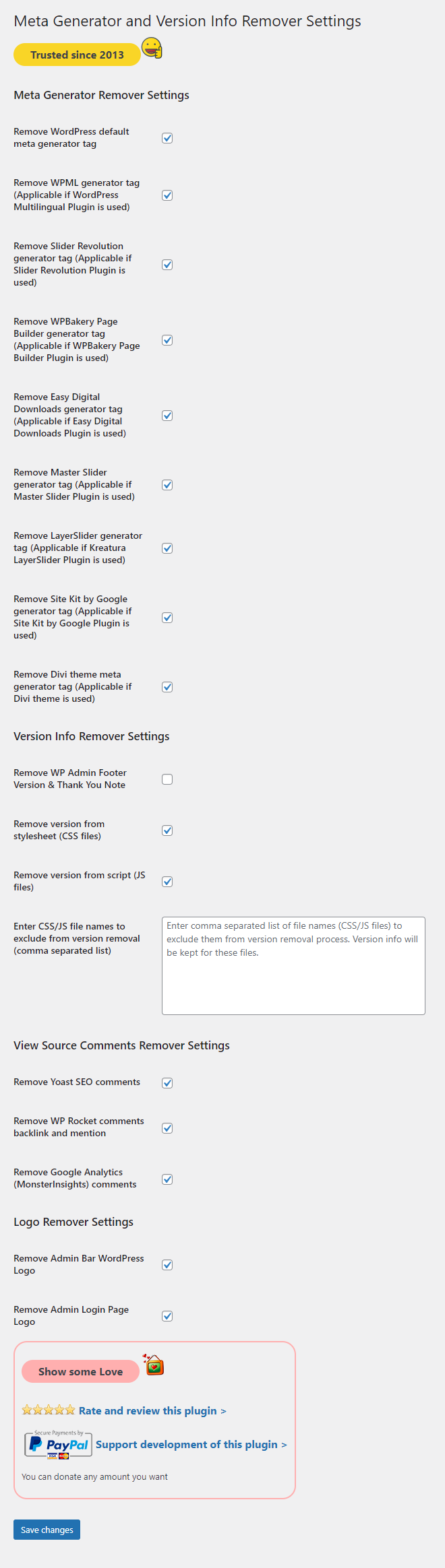
Settings page

Settings page with a list of files (comma separated list) to exclude from version info removal process
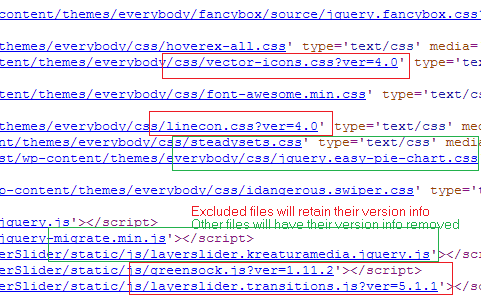
View source demo
Changelog
17.1
- Updated: Elementor Website Builder Meta Generator Removal code updated.
17.0
- Added: Elementor Website Builder Meta Generator Removal.
16.0
- Added: Image Placeholders Meta Generator Removal.
- Added: Performance Lab Meta Generator Removal.
- Added: Performant Translations Meta Generator Removal.
- Added: WEBP Uploads (Modern Image Formats) Meta Generator Removal.
15.1
- Added: Remove ‘Powered by WordPress’ from Admin Login Page source code.
15.0
- Added: Remove Admin Dashboard Help Tab.
14.0.2
- Updated: OB Flush null check added.
14.0.1
- Updated: OB Flush Hook from wp_head to shutdown.
14.0
- Added: Remove WordPress Text from Admin Login Page Title.
- Added: Remove WordPress Text from Admin Pages’ Titles.
13.1
- Updated: Google Analytics (MonsterInsights) comments removal.
13.0
- Added: WP Rocket comments backlink and mention removal.
12.2
- Added: Admin Footer Version Removal.
- Added: Admin Footer Thank You Text Removal.
12.1
- Removed: Deprecated screen_icon function.
12.0
- Added: Site Kit by Google Meta Generator Removal.
11.0
- Added: Divi Theme Meta Generator Removal.
10.0
- Added: Admin Bar WordPress Logo Removal.
- Added: Admin Login Page Logo Removal.
9.0
- Added: LayerSlider Meta Generator Removal.
8.0
- Added: Master Slider Meta Generator Removal.
7.0
- Added: Easy Digital Downloads Meta Generator Removal.
6.2
- Updated: Yoast SEO comments removal code updated.
6.1
- Updated: Eliminate any PHP Notices and to meet PHP Strict Standards requirements.
6.0.4
- Removed: Other language translation files to fix display errors.
6.0.3
- Updated: Supported generator name.
6.0.2
- Updated: PHP notice fix for screen_icon.
6.0.1
- Updated: Language translations.
6.0
- Updated: Version removal feature – Added version argument checking.
5.1.1
- Updated: Code improvements.
5.1
- Added: Google Analytics (MonsterInsights) comments removal.
5.0
- Added: Yoast SEO comments removal.
4.4.1
- Updated: Language translations.
4.4
- Added: WPBakery Page Builder Meta Generator Removal.
4.3
- Added: Slider Revolution Meta Generator Removal.
4.2
- Added: WPML (WordPress Multilingual Plugin) Meta Generator Removal.
4.1
- Added: German language translations.
- Added: Spanish language translations.
- Added: French language translations.
- Added: Italian language translations.
4.0
- Added: i18n (Internationalization) support.
3.4
- Updated: Refactoring and improvements.
3.3
- Updated: Data persistence logic on plugin re-activation hook.
3.2
- Updated: Eliminate any PHP Notices and to meet PHP Strict Standards requirements.
3.1
- Updated: Support for servers running PHP 5.3 or less added. Version 3.0 used a code that was supported only for PHP 5.4+. This has been modified to support all servers.
3.0
- Updated: Feature enhancement – Exclude files from version info removal process (by providing comma separated file names).
- Added: Screenshots
2.2
- Updated: WordPress Tested Upto Info. WordPress 4.0 supported.
2.1
- Updated: Generator Remover Filter.
2.0
- Added: Options to manage the settings from Administrator Dashboard.
1.0
- Initial Commit.