

Plugin info
Maintenance & Compatibility
Maintenance score
Possibly abandoned • Last updated 1711 days ago • 2 reviews
Is MetaTrader Web Terminal abandoned?
Possibly abandoned (last update 1711 days ago).
Compatibility
Similar & Alternatives
Explore plugins with similar tags, and compare key metrics like downloads, ratings, updates, support, and WP/PHP compatibility.
Description
What is MetaTrader Web Terminal?
In the web terminal, you can analyze quotes of financial instruments, perform trading operations and view trading history. Pending orders, One Click Trading in the Market Depth, 30 technical indicators and 24 graphical objects — all main features of the popular MetaTrader 4 and MetaTrader 5 desktop platforms are available from a browser. The web terminal is fully compatible with the entire MetaTrader ecosystem. The application is secure since all transmitted data is heavily encrypted. The plugin can be installed only on HTTPS websites.
Web trading features
- Trading from any browser and compatibility with any operating system
- Reliable data protection
- One Click Trading
- 30 indicators for technical analysis
- Real-time quotes in Market Watch
- History of trading operations
- Graphical objects
- All types of trading operations
- 9 timeframes
Installation
To install the plugin, please follow these steps:
- Upload plugin files to the directory
/wp-content/plugins/metatrader-web-terminal - Activate the plugin in the ‘Plugins’ section of the WordPress console
Frequently Asked Questions
Yes, the web terminal plugin can be installed on any website for free. Terms of use.
MetaTrader 4 and MetaTrader 5
The website the plugin is located at has no access to the platform data, including information entered during login and demo account opening. User data are securely protected and cannot be accessed even by the owner of the website the web terminal is used on.
No, the plugin works only on HTTPS websites for security reasons.
MetaQuotes Software Corp. is a software development company and does not provide or offers any kind of financial, investment, brokerage, trading and data feed services in any local or international currency, stock market or exchange. End-User License Agreement
Review feed
ужас
Screenshots

Widget content
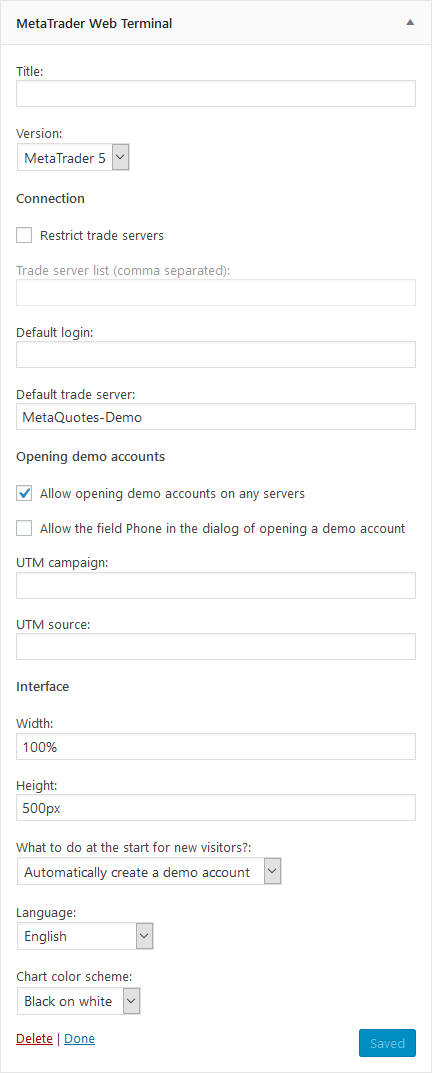
Widget settings

Adding the widget in the block editor

Adding the widget in the classic editor
Changelog
1.0
- Initial version