Meteo
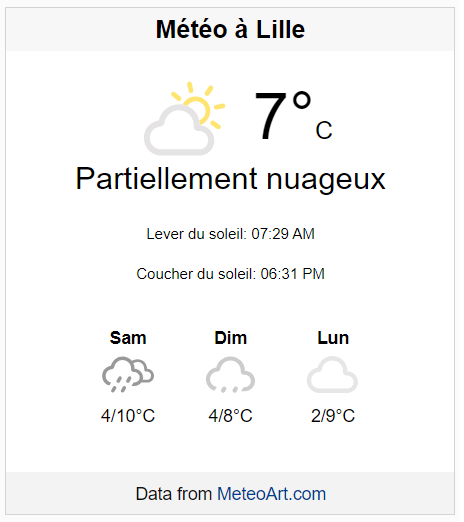
Add an accurate French weather forecast to your site. Choose any city and country, then embed the customizable MeteoArt widget.
Plugin info
Maintenance & Compatibility
Maintenance score
Stale • Last updated 325 days ago • 3 reviews
Is Meteo abandoned?
Likely maintained (last update 325 days ago).
Compatibility
Similar & Alternatives
Explore plugins with similar tags, and compare key metrics like downloads, ratings, updates, support, and WP/PHP compatibility.
Description
The best French weather forecast widget plugin!
MeteoArt.com offers an accurate weather forecast for all cities around the world.
Set the city and country and embed the widget in your website/blog.
- Widgets are free of charge
- Widget style can be customized
- Responsive weather widget
- No development skills are needed
- High performance and lightweight code
- SEO friendly – no iframes
- Select your display language – French/English
- Block editor / Shortcode support / Classic Widgets / Legacy widgets
** For special customization requests, please contact this mail -> [email protected]
The Meteo plugin is relying on a 3rd party as a service, the widget is using weather services provided by MeteoArt.com.
* Service provider link – Meteo Art
* Service provider terms of use link – https://www.meteo.com/terms
* Service privacy policy link – https://www.meteo.com/privacy
Easy Installation
There are several options for installation
Block Editor
- Open the Block Editor for the post or page where you want the widget.
- Add the “MeteoArt Widget” block.
- Customize the widget settings as desired.
Shortcode
Insert [meteo city="Paris" country="France"] into your content, replacing CityName and CountryName with your location.
Classic Widgets
- Go to
Appearance > Widgets. - Add the “MeteoArt Widget” to your sidebar.
- Configure the settings and save.
Installation
- Download the plugin from the WordPress repository or upload the plugin files to your
/wp-content/plugins/meteoartdirectory. - Activate the plugin through the ‘Plugins’ screen in WordPress.
- Add the widget to your site using the Block Editor, a shortcode, or the Widgets screen.
Frequently Asked Questions
The widget is free of charge, no small print.
Yes, the location is being set dynamically when you add the widget
Yes, you can
Yes, send mail to [email protected] we are highly responsive.
Yes, the MeteoArt Widget is fully compatible with the WordPress Block Editor.
Simply use the shortcode format [meteo city="CityName" country="CountryName"] in your posts or pages.
Absolutely, the MeteoArt Weather Widget is free. We encourage fair usage and reserve the right to limit the service for any abuse.