

MilesWeb Tools
MilesWeb Tools is a powerful WordPress plugin designed to enhance your site's functionality and security. It helps you manage security settings, …
Plugin info
Maintenance & Compatibility
Maintenance score
Stale • Last updated 251 days ago
Is MilesWeb Tools abandoned?
Likely maintained (last update 251 days ago).
Compatibility
Similar & Alternatives
Explore plugins with similar tags, and compare key metrics like downloads, ratings, updates, support, and WP/PHP compatibility.
Description
MilesWeb Tools is a powerful WordPress plugin designed to enhance your site’s functionality and security. It helps you manage security settings, maintenance mode, enforce HTTPS, disable file editing, log user activity, track storage usage, and provides detailed insights into active and inactive themes and plugins.
Features:
- Enable/disable maintenance mode.
- Force HTTPS redirection.
- Disable file editing in the WordPress admin panel.
- Disable XML-RPC to prevent security vulnerabilities.
- Track user logins.
- Display active theme details and inactive theme storage usage.
- Show active/inactive plugins, including their size, and memory usage.
- Identify outdated plugins and themes.
Short Description
Manage security, maintenance, and user logging while monitoring storage usage in one plugin.
License & Credits
This plugin is licensed under GPLv2 or later. Contributions from the WordPress community are appreciated.
Support
For support, visit MilesWeb Support or the WordPress support forums.
Installation
Minimum Requirements:
– WordPress 5.6 or higher
– PHP 7.4 or higher
Automatic Installation:
– This plugin will be automatically installed if you set up a WordPress site on MilesWeb’s managed WordPress hosting account.
Install via WordPress Admin:
1. In your WordPress admin panel, navigate to ‘Plugins’ > ‘Add New’.
2. Search for “MilesWeb Tools” in the search bar.
3. Click ‘Install Now’ next to the plugin.
4. Once the installation is complete, click ‘Activate’.
5. Access the plugin settings via the ‘MilesWeb’ menu in the WordPress admin panel.
Manual Installation:
1. Download the plugin ZIP file from WordPress.org.
2. Extract the ZIP file and upload the milesweb-tools folder to the /wp-content/plugins/ directory on your server.
3. Go to the ‘Plugins’ menu in your WordPress admin panel and activate the plugin.
4. Access the plugin settings via the ‘MilesWeb’ menu in the WordPress admin panel.
Frequently Asked Questions
Yes, it is compatible with all WordPress themes and plugins.
The plugin scans installed plugins and themes for vulnerabilities.
Yes, each feature has a toggle switch in the admin panel.
- Malware-Secured Report: Get detailed reports on potential security risks and malware threats detected on your site. This new feature scans your website for malware and provides a comprehensive report to help you take action.
- Resolved Maintenance Mode Issues: Fixed the issue where some users were experiencing problems with the maintenance mode feature. The site now behaves correctly during updates, ensuring smoother operations
Review feed
Screenshots
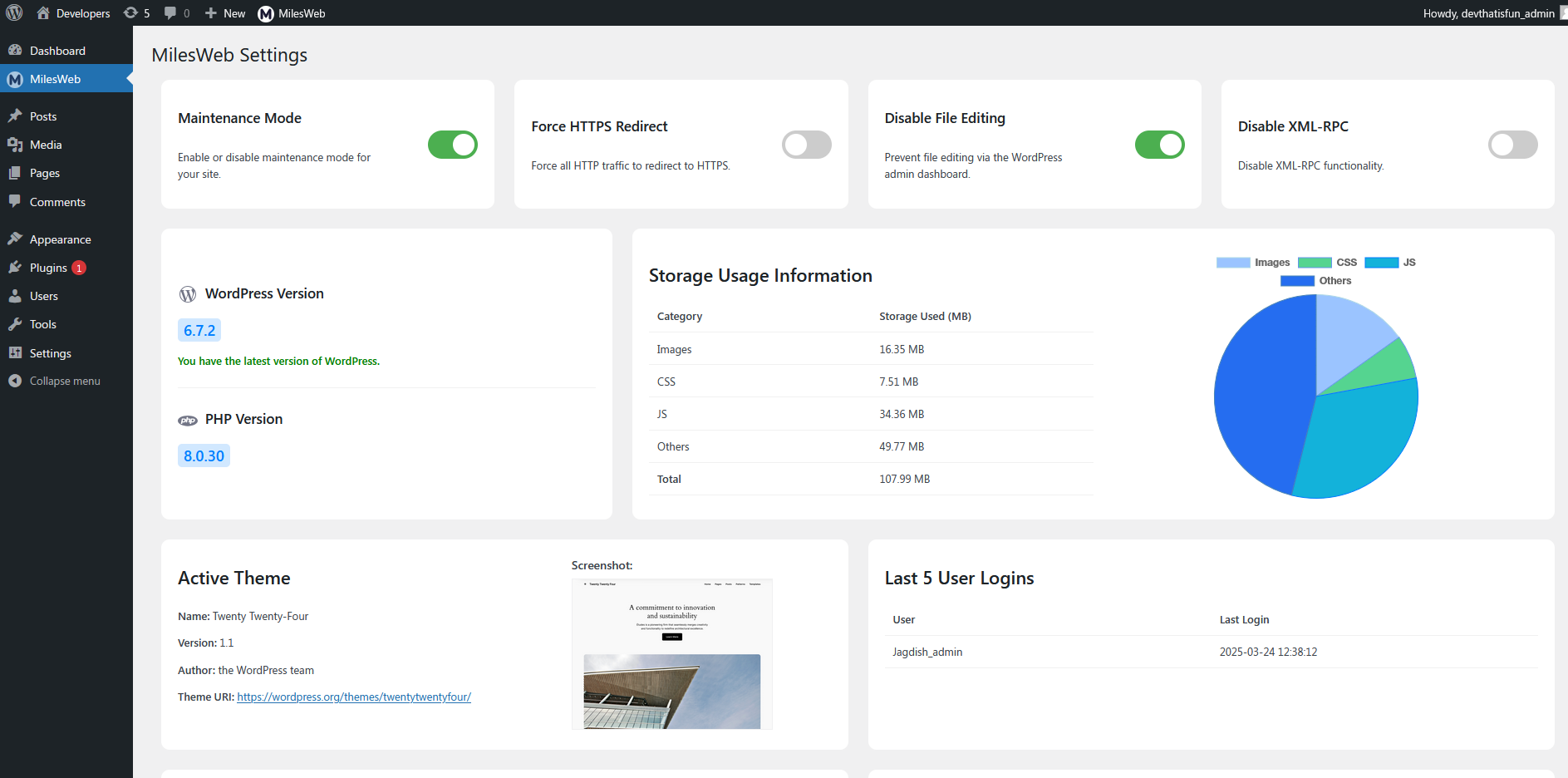
Admin dashboard overview.

Security settings panel.
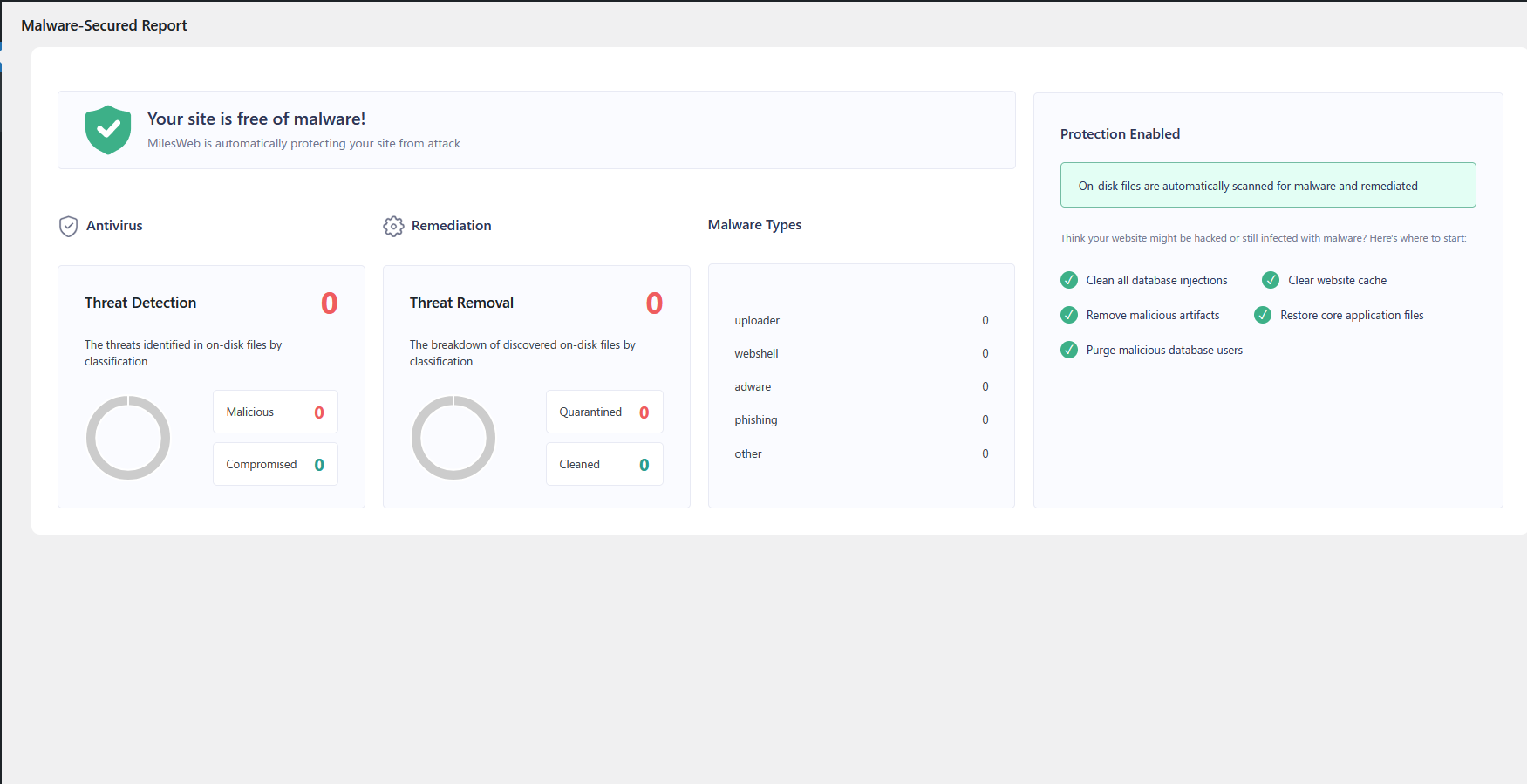
Active & inactive plugins list with performance metrics.
Changelog
1.0.2
- Added Malware-Secured Report to identify and resolve potential security issues.
- Fixed maintenance mode issues that affected some users during updates.
1.0.1
- Fixed issues related to maintenance mode display and behavior.
- Minor UI improvements for the admin panel.
1.0
- Initial release.
- Added maintenance mode.
- Implemented HTTPS redirection.
- Disabled file editing & XML-RPC.
- Logged user activity.
- Added theme and plugin information tracking.