

Mime Types Plus
Add the mime type that can be used in the media library to each file type.
Maintenance 54/100127d since update
Active installs
10,000
Downloads
82,503
Reviews
10
Age
10.3y
Plugin info
Total downloads: 82,503
Active installs: 10,000
Total reviews: 10
Average rating: 3.8
Support threads opened: 0
Support threads resolved: 0 (0%)
Available in: 7 language(s)
Contributors: 1
Last updated: 11/25/2025 (127 days ago)
Added to WordPress: 12/30/2015 (10 years old)
Minimum WordPress version: 4.7
Tested up to WordPress version: 6.9
Minimum PHP version: 8.0
Maintenance & Compatibility
Maintenance score
Maintained • Last updated 127 days ago • 10 reviews
54/100
Is Mime Types Plus abandoned?
Likely maintained (last update 127 days ago).
Compatibility
Requires WordPress: 4.7
Tested up to: 6.9
Requires PHP: 8.0
Developers
Similar & Alternatives
Explore plugins with similar tags, and compare key metrics like downloads, ratings, updates, support, and WP/PHP compatibility.
No similar plugins found yet.
Description
Edit Mime Type
- Add Mime Type
- Remove Mime Type
- Change File Type
Edit Users
- Specify uploadable extensions for each user
- Specify non-uploadable extensions for each user
Installation
- Upload
mime-types-plusdirectory to the/wp-content/plugins/directory - Activate the plugin through the ‘Plugins’ menu in WordPress
Frequently Asked Questions
none
Review feed
Tyler Tork
Does the job but could be greatly improved
The UI is unclear. There are greyed-out checkboxes beside the types which are recognized by WordPress already. You can NEVER enable or disable them, so showing disabled checkboxes beside them is confusing, as it implies there's some way to enable them, but there isn't. Just LIST the built-in types, please, without implying that they can be edited. Also label them as the built-in types.
Checking a box beside something is generally considered to mean that you're enabling it. Here, checking a box means you want to delete it. Counterintuitive. Please use a red-X or minus control rather than a checkbox to mark things for deletion.
It would be VERY HELPFUL to have a built-in list of the more common unrecognized filetypes that could be enabled with one click or check, rather than having to look up the MIME type online every time. epub, mobi, and azw formats in particular.
Screenshots
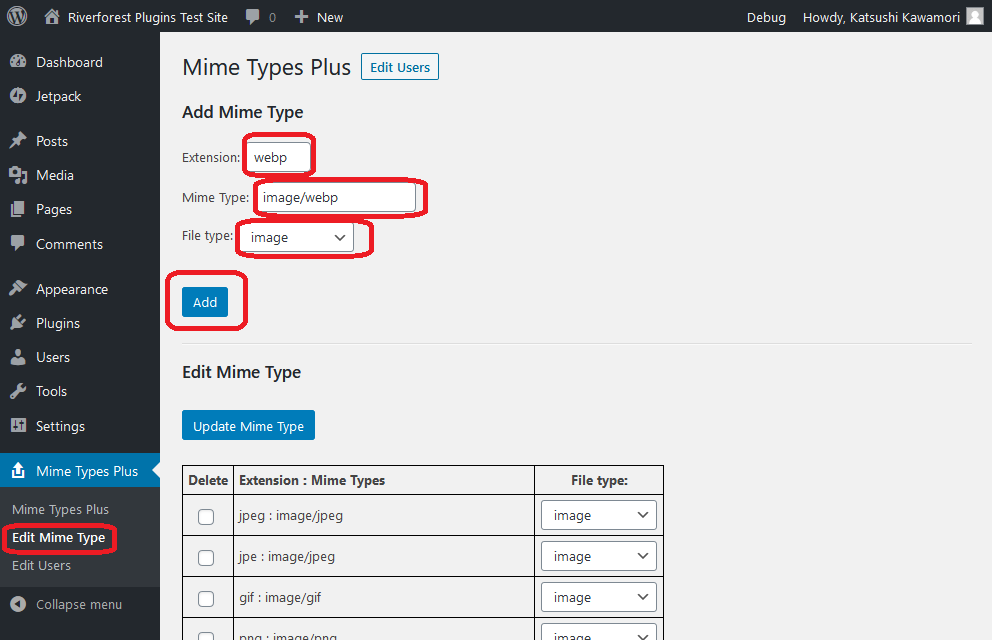
Add Mime Type
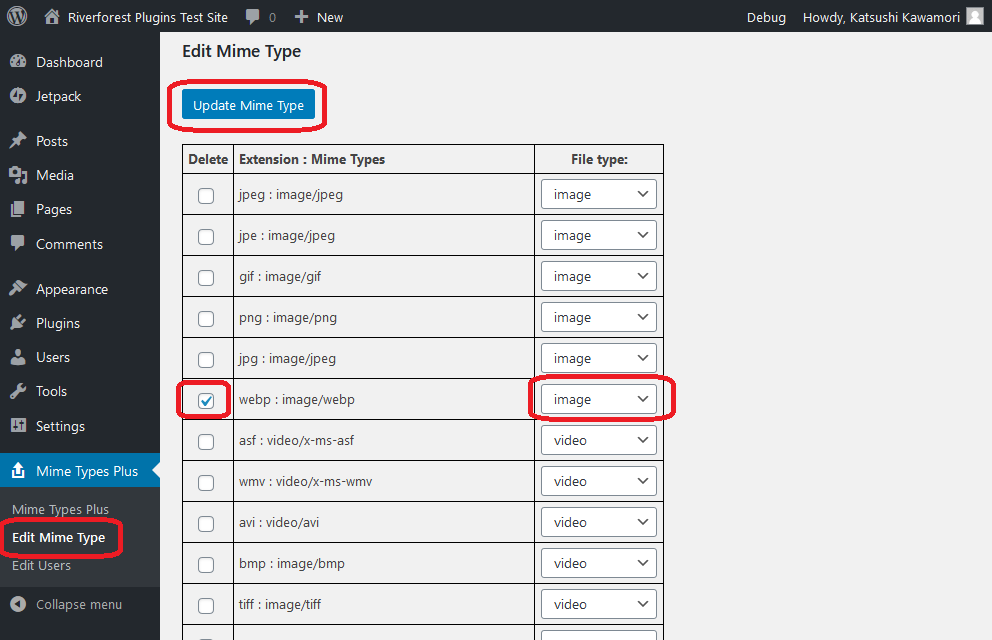
Edit Mime Type

Specify extensions
Changelog
[2.05] 2025/04/18
- Fix – Loading the management screen.
2.04
Supported WordPress 6.4.
PHP 8.0 is now required.
2.03
Supported WordPress 5.7.
2.02
Fixed uninstall.
2.01
Fixed finfo_file issue.
2.00
Uploadable files can be specified for each user.
1.12
Conformed to the WordPress coding standard.
1.11
Removed unnecessary code.
1.10
Fixed fine problem.
1.09
Changed donate link.
1.08
Security measures.
1.07
Delete unnecessary code.