

Minimalist Stripe Checkout for WooCommerce
High-efficiency plugin establishing a WooCommerce payment gateway for Stripe Checkout, supporting both Checkout Block and classic shortcode checkout.
Plugin info
Maintenance & Compatibility
Maintenance score
Maintained • Last updated 124 days ago • Support resolved 100%
Is Minimalist Stripe Checkout for WooCommerce abandoned?
Likely maintained (last update 124 days ago).
Compatibility
Similar & Alternatives
Explore plugins with similar tags, and compare key metrics like downloads, ratings, updates, support, and WP/PHP compatibility.
Description
High-efficiency plugin establishing a WooCommerce payment gateway for Stripe Checkout, supporting both Checkout Block and classic shortcode checkout.
Feature: Stripe Checkout payment method
Adds a WooCommerce Checkout payment method for Stripe Checkout. After they submit their checkout they get redirected to Stripe Checkout to pay via one of the many payment methods that Stripe offers.
Useful for offering eCheck / ACH payment method where rates are very low compared to credit card processing.
Feature: Subscriptions
Use the keyword “monthly” or “annually” within your product SKU to trigger recurring subscription functionality.
Feature: Link customers to their Stripe Billing Portal
Useful for allowing customers to manage their subscriptions. Supports a custom My Account area link (or elsewhere) to authenticate users into their Stripe Billing Portal.
Installation
Frequently Asked Questions
Yes! This works with both the classic WooCommerce shortcode based checkout experience as well as the newer Block based checkout experience.
To report bugs, please click the Support tab, search for any preexisting report, and add yourself to it by commenting or open a new issue.
To request new compatibilities or features, please consider hiring the developer of this plugin or another developer who can provide us with code enhancements for review.
Paid premium support is also available for those looking for one-on-one help with their specific WordPress installation. Visit our website in the link above and contact us from there.
See Stripe’s description here: Stripe Billing Portal
This is a developer-level feature and needs interface development. We may build this out a little in a future version of the plugin.
The link is /ccom_stripe/v1/billing_portal?_wpnonce= and will redirect users to their account. You will need to include the WP REST Nonce in order to authenticate the user with the WordPress REST API. Obtain that using a method provided in the WordPress RSST API documentation such as wp_create_nonce( 'wp_rest' ).
At present we do not automatically set-up Stripe customer accounts and all transactions are in guest mode. In order to use the Stripe Customer Portal the Stripe Customer ID must be saved into user meta data as _stripe_customer_id either from another Stripe plugin paired with this one or using an Advanced Custom Fields field that you may set-up.
Currency is set-up within your WooCommerce > Settings area. Developers may logically switch currencies using the Woo core filter woocommerce_currency. It’s our expectation that the various Currency Switcher plugins are compatible with this.
Yes, Stripe supports one coupon per order of percentage or fixed amount. This plugin will combine all coupons and negative fee line items into a Stripe coupon.
This plugin is funded by clients of Coded Commerce, LLC funding feature requests for development. When we develop useful code under GPL licensing we share it on our site as Code Snippets and in some cases package great features like these into free plugins so everybody can benefit, including the originating client via bug fixes and others’ funded feature requests.
We also welcome donations via the “Donate to this plugin” button towards the bottom of the right sidebar on the WordPress.org plugin page.
Review feed
Screenshots
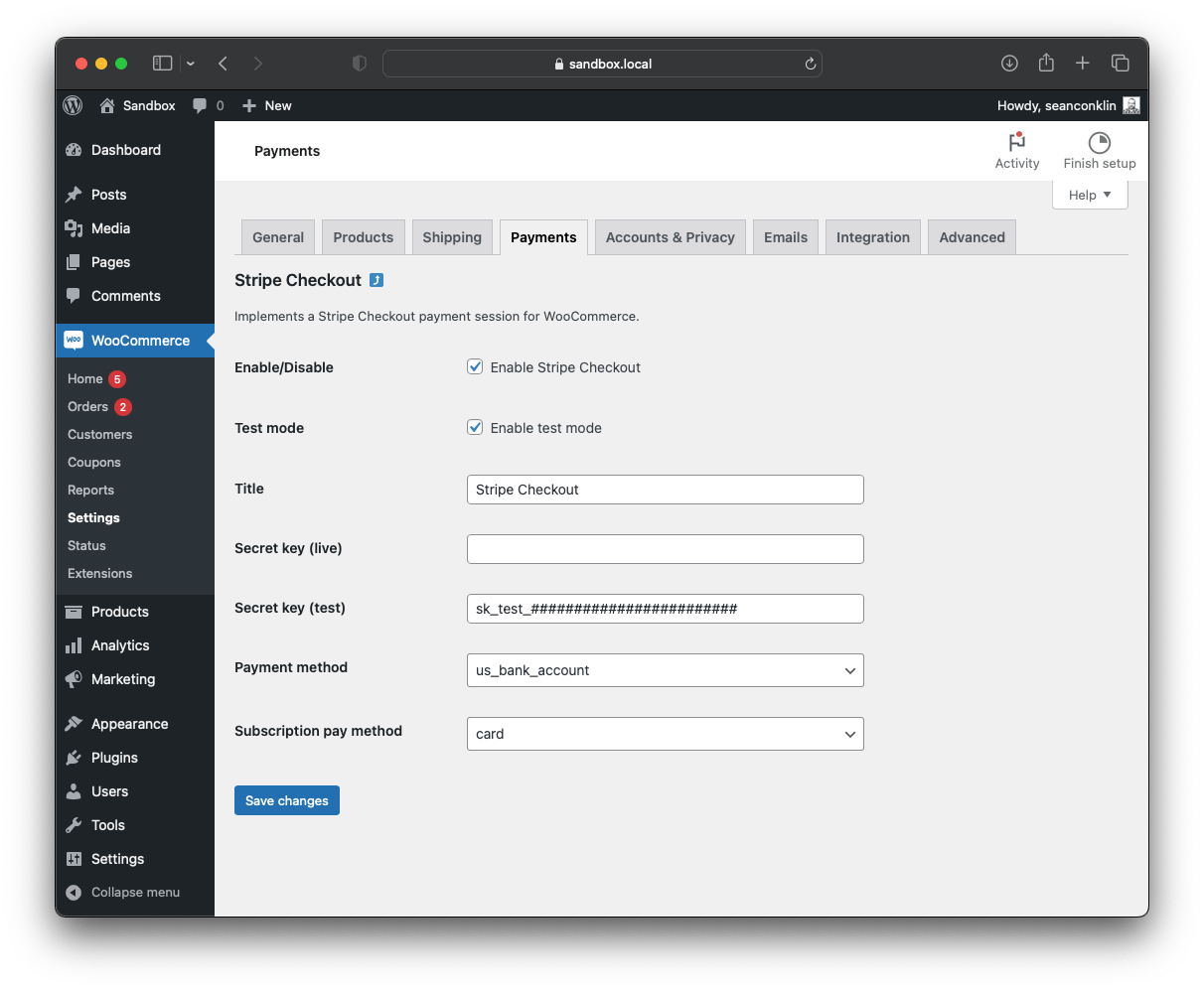
Admin settings panel

Sample WooCommerce classic checkout page

Sample WooCommerce Checkout Block page

Sample Stripe Checkout session

Sample Thank You page from a test purchase

Admin order edit page showing order notes

Sample Stripe Checkout with a subscription and mixed cart
Changelog
1.7.2 on 2025-11-29
- Added: setting customer email address in the Stripe Checkout object pre-filled data.
1.7.1 on 2025-04-17
- Added: Stripe’s auto locale setting for testing.
1.7 on 2024-08-21
- Added: support for Woo coupons and negative fee line items to a Stripe coupon.
- Added: support for shipping costs to be added as a Stripe line item.
1.6 on 2024-04-16
- Added: (dashboard) option for default payment method type selection.
- Removed: function that limited available gateways when product SKU contains subscription terms.
1.5.2 on 2024-03-14
- Fixed: line item subtotal to come from line item rather than product record.
1.5.1 on 2024-01-10
- Fixed: Hard coded currency is now based on WooCommerce setting.
- Fixed: Payment error specifics now display in the Checkout Block.
1.5 on 2024-01-06
- Added: Description setting and presentation on checkout.
- Fixed: Namespacing within Checkout Block JS file.
1.4 on 2023-08-19
- Added: Checkout Block support.
1.3.1 on 2023-07-21
- Fixed: Deprecated notices with PHP 8.2.
1.3 on 2023-05-07
- Added: Support for annual subscriptions.
1.2.2 on 2023-03-20
- Fixed: Plugin settings link based on current plugin slug.
1.2.1 on 2023-01-28
- Fixed: PHP error from yesterday’s update.
1.2 on 2023-01-27
- Added: Function to eliminate all other gateways when subscription is on cart.
- Fixed: Direct access bail.
- Changed: Eliminated the separate file for the small REST API endpoint.
1.1 on 2023-01-23
- Added: Support for monthly subscriptions using SKU designator.
- Fixed: Admin payment method drop-down cleanup.
1.0 on 2023-01-23
- Initial commit of plugin.