

Mixmat
Mixmat Page Mixer gives editors an easy way to sectionalize the posts and pages without knowing CSS or HTML.
Plugin info
Maintenance & Compatibility
Maintenance score
Possibly abandoned • Last updated 1389 days ago
Is Mixmat abandoned?
Possibly abandoned (last update 1389 days ago).
Compatibility
Similar & Alternatives
Explore plugins with similar tags, and compare key metrics like downloads, ratings, updates, support, and WP/PHP compatibility.
Description
Mixmat Page Mixer gives editors an easy way to sectionalize the posts and pages without knowing CSS or HTML. The plugin comes with a set of shortcodes that you can copy into your Visual Editor while writting content and make your content stand out by creating boxes or sections that will separate each content section by one third, one fourth, one half or one of several other widths. Divisions are set up using a percentage layout system to gaurantee that your blog or website will show the pages perfectly on any device. Please note that this is not a mobile first plugin so do not expect miracles.
There is a background color picker built into the Mixmat Control Panel. This will set the background color universally and if you decide you want all the backgrounds the same; you can use you can style it through the Customizer CSS that comes with WP. The option to change background color is mostly for those who have themes with set backgrounds that may cause the text to be unreadable. Have fun and enjoy. New in version 1.0.2 is a box-shadow color selector.
Notes
Have a wonderful time!
Installation
This section describes how to install the plugin and get it working.
1. Upload mixmat.php to the /wp-content/plugins/ directory
2. Activate the plugin through the ‘Plugins’ menu in WordPress
3. If user is Editor or above, they will see a Selection button in the Editor
Frequently Asked Questions
Q.: Can I change the background colors of individual boxes?
A.: There is a chart in your admin page with the names of all the selectors. If you know CSS then you can use any CSS editor to add
your background colors to.
Review feed
Screenshots

Page with background color

Admin instruction and Options panel
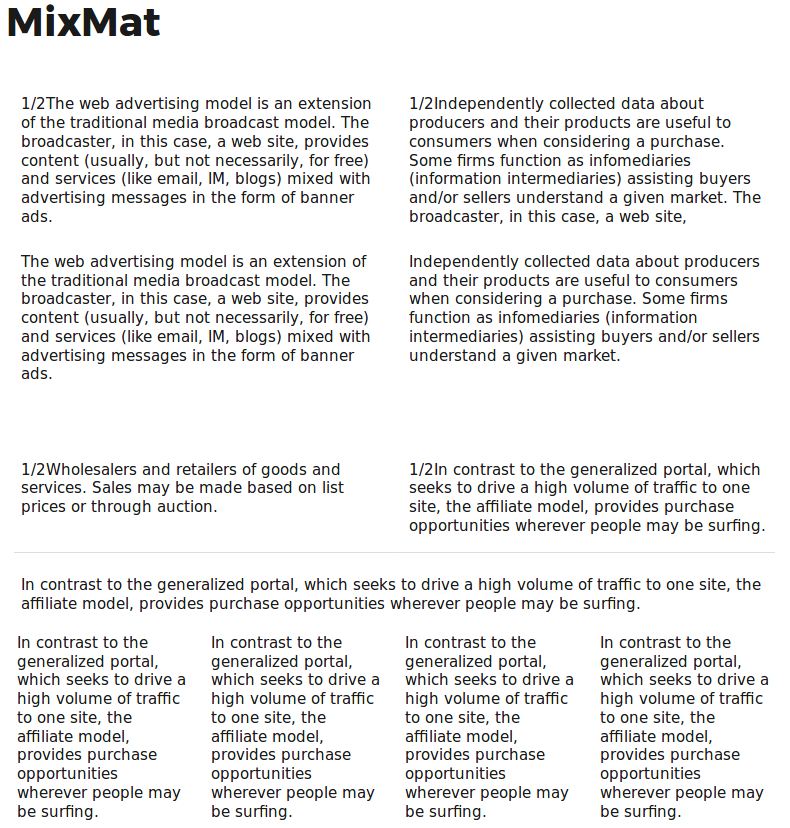
Page with Mixmat sections and a blank divider

Shortcode popup to help select divs
Changelog
= 1.0.63
* fixed jQuery error
= 1.0.62
* fixed undefined index
= 1.0.61
* added margin configurater
= 1.0.6
* added init as one function for all shortcodes
* removed border on empty row
* added box-sizing property to selectors
= 1.0.51
* added margin adjuster option
= 1.0.5
* added four wide to two wide adjuster option
= 1.0.4
* updated admin-page
* updated admin-editor
* updated required PHP
= 1.0.3
* August 30 2018
– added conditional check for admin page
– added conditional wrapper for ob_get_clean
= 1.0.2
* June 25 2017
– added box-shadow with color picker option
– added defaults to color pickers
– added fallback to clear both colors
– removed PHP ver check
1.0.1
- June 20 2017
- removed defines
- added longer slugs
- updated readme paragraphs
- fixed readme header
1.0.0
- June 2017