

Mopinion Feedback Form
Easy add feedback buttons and feedback forms to your website with the Mopinion.com Wordpress Plugin. Easy install, fast user insights.
Plugin info
Maintenance & Compatibility
Maintenance score
Possibly abandoned • Last updated 1935 days ago • 12 reviews
Is Mopinion Feedback Form abandoned?
Possibly abandoned (last update 1935 days ago).
Compatibility
Similar & Alternatives
Explore plugins with similar tags, and compare key metrics like downloads, ratings, updates, support, and WP/PHP compatibility.
Description
Let’s say that you want to capture user feedback on your WordPress website. This Feedback Form plugin makes that easy and is completely free.
Simply go to Settings → Mopinion Feedback Form in your website admin dashboard, and activate the Mopinion feedback form on your website.
A feedback button will be visible on your website. With the feedback form you can capture suggestions, bugs and compliments, and collect visual feedback (screenshots) about individual page elements. All feedback collected will be available on your personal Mopinion account, at https://app.mopinion.com, or it can be emailed straight in to your email inbox. The feedback form is completely customisable, so easily add or change feedback questions, add your own design and logo, setup your own language and use pro-active and exit-intent triggers to decide where you want to show or hide your feedback form.
If you want to add the feedback form to specific articles (post, page, custom post type), then you can use the deployment section within your Mopinion account: https://app.mopinion.com/survey/manage#tab_deployment_pane.
Works or broken?
Please, consider to vote for this plugin. When you vote for broken, be so kind and tell in the Forum what is broken. Maybe we might be able to fix it to make the plugin also work for you.
We need your support
It is very hard to continue development and support for this free plugin without contributions from users like you. If you enjoy using our plugin and find it useful, please consider for registering a paid version in your Mopinion account: https://app.mopinion.com/account/billing. Your paid plan will help encourage and support the plugin’s continued development and better user support. Also it offers many additional features such as advanced dashboarding/reporting and text analytics.
Features
- Feedback forms: Improve the performance and user experience of your website with fully customisable feedback forms.
- Visual user feedback: Collect visual feedback (screenshots) to understand what your visitors want and what’s preventing them from achieving it.
- Feedback form triggering: Ask the right questions at the right moment to truly understand why your visitors are not converting…
- Reporting & analysis: Take full control of your feedback data visualisations and analyses.
- Text and sentiment analytics: Our native text analysis technology helps you explore huge amounts of data.
- Collaborate & Engage: We bring you from insights to action.
On plugin uninstall Mopinion options data is also deleted from your database.
Installation
Installation of this plugin is fairly easy as any other WordPress plugin.
Standard procedure
- Go to Plugins → Add New.
- Search for Mopinion Feedback Form.
- Enter to Search Plugin field
Mopinion Feedback Formand press Enter key. - Locate plugin Mopinion Feedback Form and click Install Now button.
- After successfully installed plugin click link Activate Plugin.
- Visit the Settings → Mopinion Feedback Form.
FTP procedure
- Unpack
mopinion-feedback-form.zip - Upload the whole directory and everything underneath to the
/wp-content/plugins/directory. - Activate the plugin through the ‘Plugins’ menu in WordPress.
- Visit the Settings → Mopinion Feedback Form.
Frequently Asked Questions
Why another feedback form plugin?
Mopinion is not just another WordPress plugin… Mopinion is a rapidly growing SaaS provider and market leader in the field of online customer feedback analysis for websites and apps. Our solution turns feedback from digital touch-points into actionable data to drive strategy, improve online channels and empower digital teams. Mopinion is a partner of major national and international players such as Microsoft, Toshiba, KIA, TomTom, TUI, Daily Mail and BMW.
Review feed
Deceptive
Screenshots

Feedback Forms: By adding Mopinion to your site, you enable users to give feedback in a user-friendly way.

Visual Feedback: Allow users to select page elements that they want to provide feedback on. This page element is then submitted as a screenshot together with all other feedback.

Feedback inbox: Easily browse through all your feedback items with our intuitive feedback inbox. Search, filter and organise your feedback.

Easy setup and full control: Build your own feedback forms with various question elements, such as open comments and scores (including NPS and Csat).
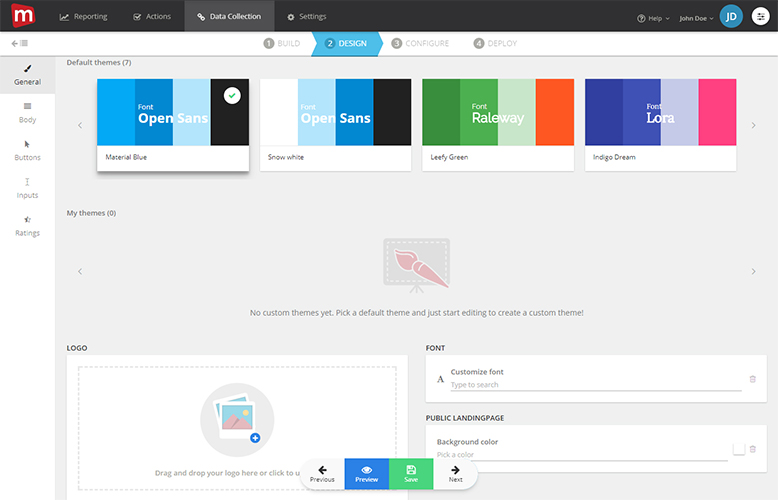
Complete customisation of look and feel: Customise the complete look and feel of your feedback forms and buttons to give your visitors a fully branded experience.
Changelog
1.1.1
- Compatibility fix
1.1.0
- Added Dutch translation
- Added country selector
1.0.1
- Compatibility fix
1.0.0
- Initial release.