

Motorsports Calendar Widget
Add customizable countdown widgets for various motorsport series to your WordPress site.
Plugin info
Maintenance & Compatibility
Maintenance score
Possibly abandoned • Last updated 418 days ago
Is Motorsports Calendar Widget abandoned?
Possibly abandoned (last update 418 days ago).
Compatibility
Similar & Alternatives
Explore plugins with similar tags, and compare key metrics like downloads, ratings, updates, support, and WP/PHP compatibility.
Description
Motorsports Calendar Widget allows you to easily add countdown timers for various motorsport series to your WordPress website. Support for Formula 1, MotoGP, WEC, NASCAR, and many more racing series.
Features:
* Support for multiple racing series
* Customizable themes (light/dark)
* Weather information display
* Compact and full display modes
* Color customization options
* Responsive design
* Easy to use widget interface
* Shortcode support for use anywhere in your content
The plugin can be used either as a widget or via shortcode in your posts and pages.
Shortcode Usage:
Basic usage:
[motorsports_calendar]
With parameters:
[motorsports_calendar series=”f1″ theme=”dark” display=”full” color=”#ff0000″ weather_display=”full” weather_bg_color=”rgba(0,0,0,0.1)” weather_text_color=”#ffffff” time_size=”2em” label_size=”1em”]
Available shortcode parameters:
* series: all, f1, f2, f3, f1-academy, indycar, indylights, formula-e, wec, lemans, imsa, nascar-cup, nascar-xs, nascar-truck, nascar-euro, super-formula, supergt, dtm, v8supercars, motogp, moto2, moto3, wsbk, wrc, dakar, aslms, intercontinental-gt-challenge
* theme: light, dark
* display: compact, full
* color: Any hex color code
* weather_display: no, minimal, full
* weather_bg_color: Any hex color code
* weather_text_color: Any hex color code
* time_size: Any valid CSS font size value
* label_size: Any valid CSS font size value
External Services
This plugin utilizes the MotorsportsCalendar.com API service to provide accurate race countdown and weather information. The following data is transmitted to MotorsportsCalendar.com:
- Calendar Data Service
– Purpose: To fetch upcoming race schedules and countdown information
– Data Transmitted: Only the selected racing series preference
– Frequency: When the widget loads on a page
– Service Provider: MotorsportsCalendar.com
– Terms of Service: https://motorsportscalendar.com/terms
– Privacy Policy: https://motorsportscalendar.com/privacy
- Weather Information Service (Optional)
– Purpose: To display weather forecasts for race events
– Data Transmitted: Race location coordinates (only when weather display is enabled)
– Frequency: When viewing races with weather display enabled
– Service Provider: Open-Meteo via MotorsportsCalendar.com
– Weather Data Terms: https://open-meteo.com/en/terms
– Weather Data Privacy: https://open-meteo.com/en/privacy
All data transmission is done securely via HTTPS. No personal user data is collected or transmitted.
Installation
- Upload the plugin files to the
/wp-content/plugins/motorsports-calendar-widgetdirectory, or install the plugin through the WordPress plugins screen directly. - Activate the plugin through the ‘Plugins’ screen in WordPress
- Use the plugin in one of two ways:
- Go to Appearance > Widgets to add and configure the widget
- Use the [motorsports_calendar] shortcode in your posts or pages
Frequently Asked Questions
The widget supports Formula 1, Formula 2, Formula 3, MotoGP, WEC, NASCAR, IndyCar, Formula E, and more.
Yes, the widget automatically adjusts to fit your theme’s widget areas.
Yes, you can use the [motorsports_calendar] shortcode to add the calendar anywhere in your posts or pages. See the Description section for full shortcode documentation.
Yes, both the widget and shortcode support customization options including:
* Light and dark themes
* Custom accent colors
* Compact or full display modes
* Weather display options
Review feed
Screenshots
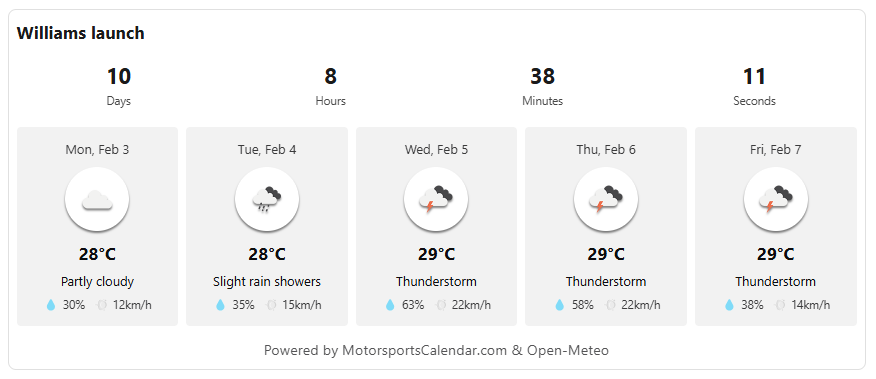
Full display of the widget including weather
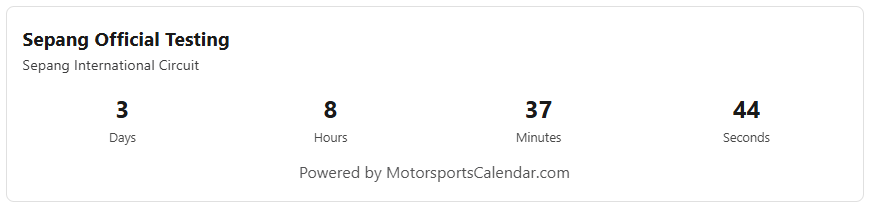
Small display of the widget
Changelog
1.0.0
- Initial release
- Added widget functionality
- Added shortcode support
- Added customization options
- Added weather display options