

Multiloca Lite – Multi Location Inventory Management for WooCommerce
Manage WooCommerce multi-location inventory for stores, warehouses & locations. Show locations stock availability on product pages.
Plugin info
Maintenance & Compatibility
Maintenance score
Maintained • Last updated 129 days ago • 1 reviews
Is Multiloca Lite – Multi Location Inventory Management for WooCommerce abandoned?
Likely maintained (last update 129 days ago).
Compatibility
Similar & Alternatives
Explore plugins with similar tags, and compare key metrics like downloads, ratings, updates, support, and WP/PHP compatibility.
Description
Multiloca is the ultimate WooCommerce multi-location inventory management solution for retail chains, franchises, warehouses, and regional stores. It allows you to manage Products stock across multiple physical locations and display real-time availability to customers.
⭐ Trusted by over 1,500 WooCommerce businesses worldwide – 4.7/5 average rating • More than 5 years on Envato Marketplace
Transform your single-location WooCommerce store into a powerful multi-location operation. Multiloca replaces global stock numbers with per-location inventory tracking, allowing you to assign products to unlimited stores, warehouses, or pickup points. Customers can see real-time availability and select their preferred location for pickup or delivery—all from one centralized dashboard.
» Buy Pro | » Live Demo | » Documentation
🏢 FREE VERSION FEATURES
📍 Unlimited Location Management
- Create Unlimited Locations: Add as many stores, warehouses, pickup points, or regional centers as you need without restriction.
- Detailed Location Profiles: Add comprehensive business info including address, contact details, email, phone numbers, and business hours for each location.
- Bulk Assignment using Product Central: Easily assign products to one or multiple locations in bulk to save time.
- Hide/ Show Locations: Hide or Show locations temporarily (e.g., for renovations) without deleting data.
📦 Location-Based Inventory Tracking
- Centralized Stock Control: Manage inventory for all locations from one unified WooCommerce dashboard.
- Separate Stock Quantities: Set unique stock levels for every product at each location (e.g., Store A: 10, Store B: 5).
- Real-Time Status: Instantly view which locations have stock, which are low, and which are sold out.
- Stock Status Management: Control “In Stock”, “Out of Stock”, and “Backorder” statuses individually per location.
🎨 Frontend Display
- Real-Time Availability: Show customers exactly where items are in stock directly on product pages.
- Flexible Layouts: Choose from multiple display styles: Tables, Lists, Cards, Expanded panels, or Simple text to match your theme.
- Customizable Messages: Translate or customize “In Stock”, “Out of Stock”, and “Available at:” messages.
- Responsive Design: Fully mobile-optimized layouts ensure a perfect experience on phones and tablets.
🛒 Customer Experience (UX)
- Customer Location Selection: Allow shoppers to select their preferred store or warehouse before adding to cart.
- Smart Validation: Automatically prevent overselling by validating the cart quantity against the selected location’s stock.
- Persistent Selection: Remembers the customer’s chosen location across their session using smart cookies.
- Shortcode Support: Use shortcode to place inventory info anywhere on your site (widgets, page builders, etc.).
📋 Order Fulfillment & Management
- Location-Tagged Orders: Every order line item is tagged with the specific fulfillment location chosen by the customer.
- Automatic Stock Reduction: Inventory is automatically deducted from the correct location immediately upon purchase.
- Order Filtering: Filter WooCommerce orders by location in the admin panel to streamline fulfillment workflows for different stores.
- Restock on Cancellation: Cancelled or refunded orders automatically restore stock to the original fulfillment location.
- Admin Order View: Quickly see the fulfillment location for every item directly in the order details screen.
🔧 Advanced Technical Features
- HPOS Compatible: Fully supports WooCommerce High-Performance Order Storage for maximum speed.
- REST API Support: Extend functionality with full REST API endpoints for locations and stock.
- Developer Hooks: Extensive actions and filters for customization by developers.
- AJAX Operations: Smooth, dynamic frontend updates without page reloads.
- Secure Code: Implements nonce verification and data sanitization for enterprise-grade security.
🚀 PRO VERSION FEATURES
Unlock the full power of multi-location commerce with Multiloca Pro. Includes everything in Lite, plus:
🌍 Smart Geolocation & Store Finder
- Auto-Detect Customer Location: Automatically detect user IP or ask user to share location to show stock and prices from the nearest store.
- Interactive Store Locator: Google Maps or OpenStreetMap integration with store markers, directions, and info cards.
- Distance-Based Sorting: Automatically sort locations by distance from the customer to show the most relevant options first.
- Radius Search: Allow customers to search for stores within a specific km/mile radius.
- Geolocation Privacy: Uses IP technology to detect locations (processing IP only for city/country determination, no personal data stored). Feature can be disabled in settings.
🚚 Advanced Shipping & Logistics
- Universal Shipping Compatibility: Compatible with most WooCommerce shipping plugins to calculate rates from all locations.
- Location-Specific Shipping Zones: Assign specific Shipping Zones and Methods to individual locations so they only ship to permitted areas.
- Distance Rate Shipping plugin Campatible: Calculate shipping costs dynamically based on the exact distance from the fulfillment center to the customer.
- Compatible with Advanced Shipping Plugin: Set different conditinal shipping rules for different locations (e.g., Free shipping over $50 for Local Store, $100 for Warehouse).
- Carrier Integration: Works seamlessly with major shipping carriers and label printing plugins.
- Shipping Classes: Apply different shipping classes per location for granular control.
🧾 Regional Pricing & Payments
- Location-Based Pricing: Set different regular and sale prices for different regions or stores (e.g., higher prices in city centers).
- Location-Based Payment Gateways: Enable or disable specific payment gateways based on the selected location (e.g., “Cash on Delivery” only for physical stores).
- Currency Support: Display prices in different currencies based on location (requires multi-currency setup).
- Tax Rules: Apply specific tax rates based on the fulfillment location’s jurisdiction or the customer’s location.
🎯 Marketing, SEO & Reviews
- Location-Specific SEO: Generate structured data (Schema.org) and unique meta titles/descriptions for each location page to boost local ranking.
- Local SEO Pages: Dedicated landing pages for each location to capture “near me” search traffic.
- Store-Specific Reviews: Show Google Place-based reviews for individual locations to build authentic local trust.
- Promotions: Run location-specific discounts and coupons (e.g., 20% off at the Downtown branch only).
- Location Ratings: Display aggregated star ratings for each store location.
- Stock Threshold Messages: Display custom low-stock messages per location (e.g., “Only 2 left at Downtown!”) to create urgency.
👥 Team Management
- Store Manager Roles: Assign “Store Manager” roles with access restricted strictly to their specific location’s orders and stock.
- Location-Based Notifications: Send new order emails only to the manager responsible for that location.
🔄 Smart Routing (Premium plan)
- Smart Routing Logic: Automatically assign orders to the most appropriate location based on Rules / Conditions.
🏢 Advanced Operations (Premium Plan)
- Rule-Based Order Routing: Define advanced, custom rules to route orders based on priority, stock levels, location type, and more.
- Vendor & PO Management: Manage suppliers, track costs, and automatically generate purchase orders when stock is low.
- Stock Transfer System: Robust tools to transfer stock between warehouses/stores with full history tracking and status updates.
- Business Hours Automation: Automatically Hide/show specific locations when they are closed or on holiday.
- Conditional Stock Messages: Display custom stock level messages based on conditional rules e.g products, category
📊 Analytics & Reporting
- Per-Location Reports: Get detailed reports on sales, stock levels, and profit margins for each individual location.
- Low Stock Alerts: Receive automated email notifications when specific locations run low on inventory.
- Export/Import: Advanced CSV export/import tools for bulk updating stock, prices, and location data.
- Transfer History: Complete audit logs of all stock movements between locations.
💎 WHY CHOOSE MULTILOCA?
- Native WooCommerce Experience: Built to feel like a core part of WooCommerce, ensuring ease of use and compatibility.
- Performance Optimized: Fully compatible with HPOS (High-Performance Order Storage) for blazing fast speed and scalability.
- Developer Friendly: Comprehensive REST API support and standard WooCommerce taxonomy structure for custom integrations.
- Reliable Support: Backed by a dedicated team with 5+ years of experience in the WordPress ecosystem.
- Regular Updates: We release frequent updates to ensure compatibility with the latest WooCommerce and WordPress versions.
- Translation Ready: Fully compatible with WPML, Polylang, and Loco Translate for multilingual stores.
🧰 USE CASES
Retail Chains
Unify your physical POS inventory with your online store for a seamless omnichannel experience. Allow customers to browse online and pick up at the nearest branch, increasing foot traffic and cross-selling opportunities.
Multi-Warehouse Logistics
Optimize logistics by shipping from the warehouse closest to the customer. This significantly reduces shipping costs and delivery times, improving overall customer satisfaction and margins.
Click & Collect (BOPIS)
Empower customers to buy online and pick up in-store (BOPIS). Multiloca handles the complex inventory logic, ensuring that customers can only select stores that actually have the item in stock.
Franchise Networks
Allow individual franchise owners to manage their own stock and orders within a single network. Store managers get their own dashboard view, restricted to their specific location.
Multi-Vendor Marketplaces
Enable multi-vendor setups where each vendor manages their own stock locations. Perfect for platforms like Dokan or WCFM where vendors need location-specific inventory control.
Service Centers
Manage parts inventory across multiple service center locations. Technicians can check stock at other branches instantly and request transfers.
Pop-up Stores & Events
Quickly spin up temporary locations with their own stock tracking for events, markets, or seasonal pop-ups. Disable them easily when the event ends without losing data.
🔌 THIRD-PARTY COMPATIBILITY
Multiloca is tested and compatible with the most popular WooCommerce extensions and page builders:
* Page Builders: Elementor, Divi, Beaver Builder, WPBakery.
* Multilingual: WPML, Polylang, Loco Translate.
* Shipping: WooCommerce Shipping, Advanced Flat Rate Shipping, Table Rate Shipping.
* POS: WooCommerce POS, Point of Sale for WooCommerce.
* SEO: Yoast SEO, RankMath, All in One SEO.
👨💻 FOR DEVELOPERS
Multiloca is built with developers in mind, offering a flexible architecture for customization:
* REST API: Full endpoints to Create, Read, Update, and Delete locations and stock levels.
* Hooks & Filters: Multiple actions and filters to modify behavior, display, and logic.
* Design Overrides: Use CSS classes in your theme to customize the frontend display completely.
* Documentation: Detailed developer documentation available for advanced integrations.
Support
We are here to help!
* Free Users: Please post your questions on the WordPress.org support forum.
* Pro / Paid Users: Please contact us via email at [email protected] for priority assistance.
Installation
Automatic Installation
- Go to Plugins Add New in your WordPress admin.
- Search for “Multiloca Lite”.
- Click Install Now and then Activate.
- Navigate to Products Locations to begin setup.
Manual Installation
- Download the plugin ZIP file.
- Upload via Plugins Add New Upload Plugin.
- Choose the ZIP file and click Install Now, then Activate.
Configuration Steps
- Create Locations: Go to Products Locations. Add your stores/warehouses with names and addresses.
- Assign Products: Edit any WooCommerce product. Find the “Locations” tab/box, assign it to locations, and enter stock quantities.
- Configure Settings: Go to Multiloca Lite Settings to choose your frontend display style (Table, List, Card) and other preferences.
- Test: Visit a product page to see the location availability block in action.
Troubleshooting
- Stock not showing? Ensure you have assigned the product to a location and entered a stock quantity > 0.
- Location selector missing? Check if the product is “In Stock” globally.
- Styling issues? Use the “Custom CSS” field in settings to fix theme conflicts.
Frequently Asked Questions
Yes. Multiloca Lite is designed specifically as a WooCommerce multilocation solution. It adds per-location stock, location availability on product pages and location-aware order handling on top of a single WooCommerce store, so you can manage multi-store and multi-warehouse inventory from one dashboard.
Yes, Multiloca Lite requires WooCommerce to be installed and activated.
You can create and manage unlimited locations in both the lite and pro versions.
Yes. Customers can select their preferred location on the product page in the location availability block before adding to cart. The selected location is stored with the order so you can fulfill from the correct store or warehouse.
Yes. Each warehouse can be a location. You can assign products to multiple warehouses, manage stock per warehouse and display availability per warehouse on the product page.
Yes. Create locations for each pickup store, assign products and manage per‑store stock. Customers see which store has stock and can select their preferred pickup location when adding to cart.
Multiloca Lite is designed to work with any well-coded WooCommerce-compatible theme. The plugin uses standard WooCommerce hooks and follows WordPress coding standards for maximum compatibility.
Yes, location inventory displays automatically on product pages once you assign locations and stock. You can choose different display views (table, list, card, expanded, simple text) from the settings.
Yes. Multiloca Lite declares compatibility with WooCommerce HPOS and works with the new order storage system.
Yes, the plugin doesn’t collect any personal customer data beyond what WooCommerce already handles. All data processing follows WordPress and WooCommerce privacy standards.
Yes, the Pro version includes advanced CSV export and import tools for locations and stock levels.
Yes, Multiloca supports both simple and variable products. You can manage stock per variation per location.
Yes, the Pro version allows you to set different regular and sale prices for each location or region.
Yes, when paired with a multi-currency plugin, you can display different currencies based on the selected location.
Review feed
Screenshots
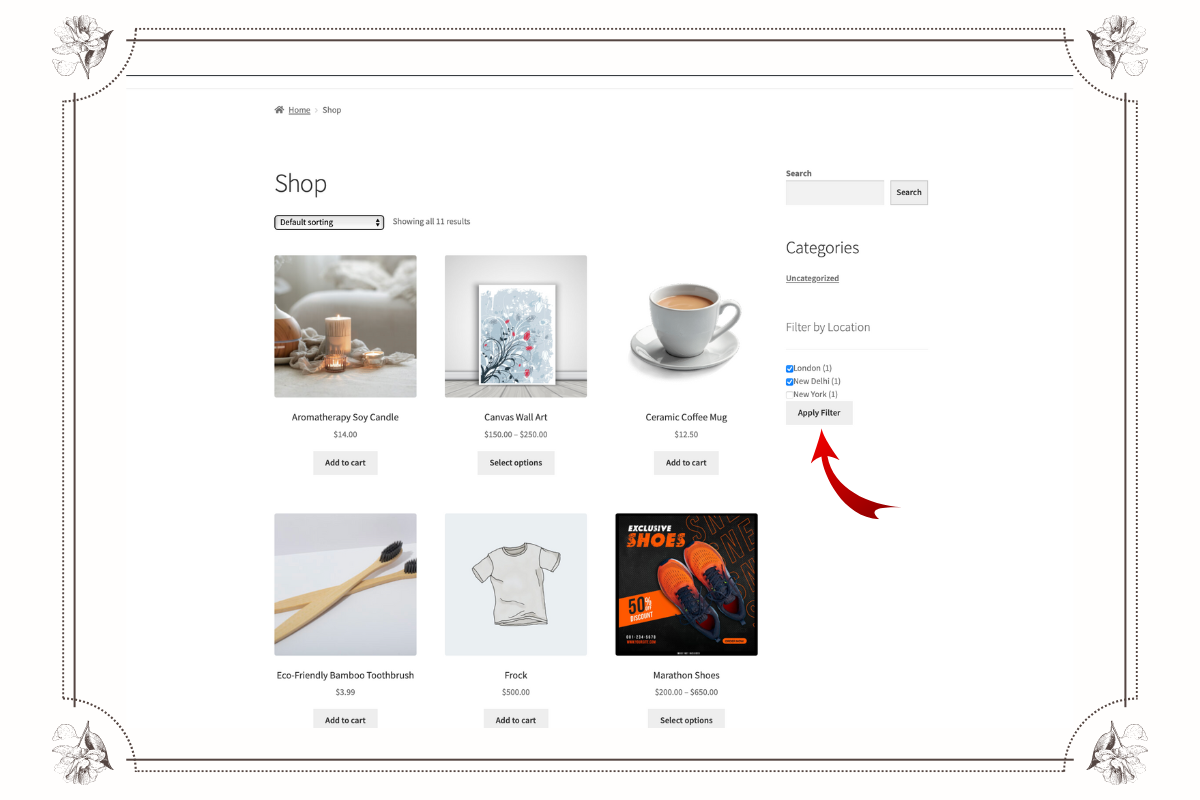
Allow shoppers to filter products by different WooCommerce store or warehouse locations.
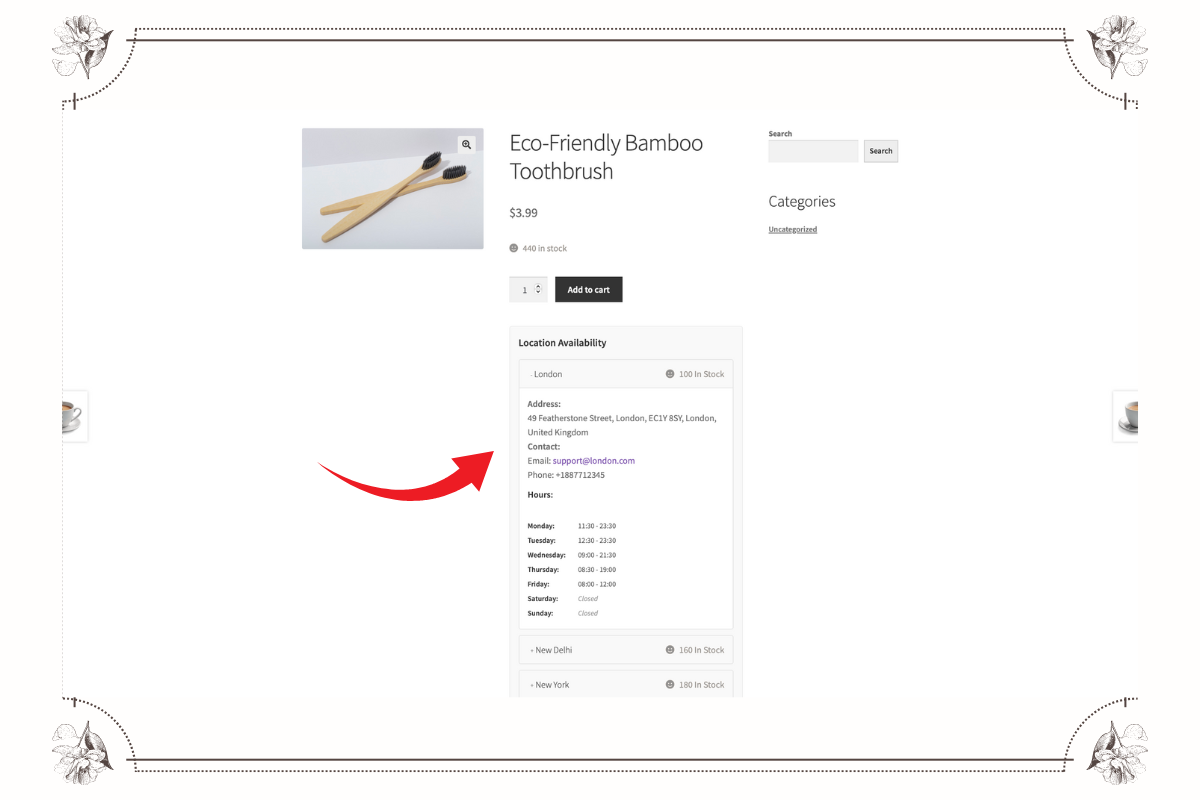
Show location-based stock availability on product pages for multiple WooCommerce locations.
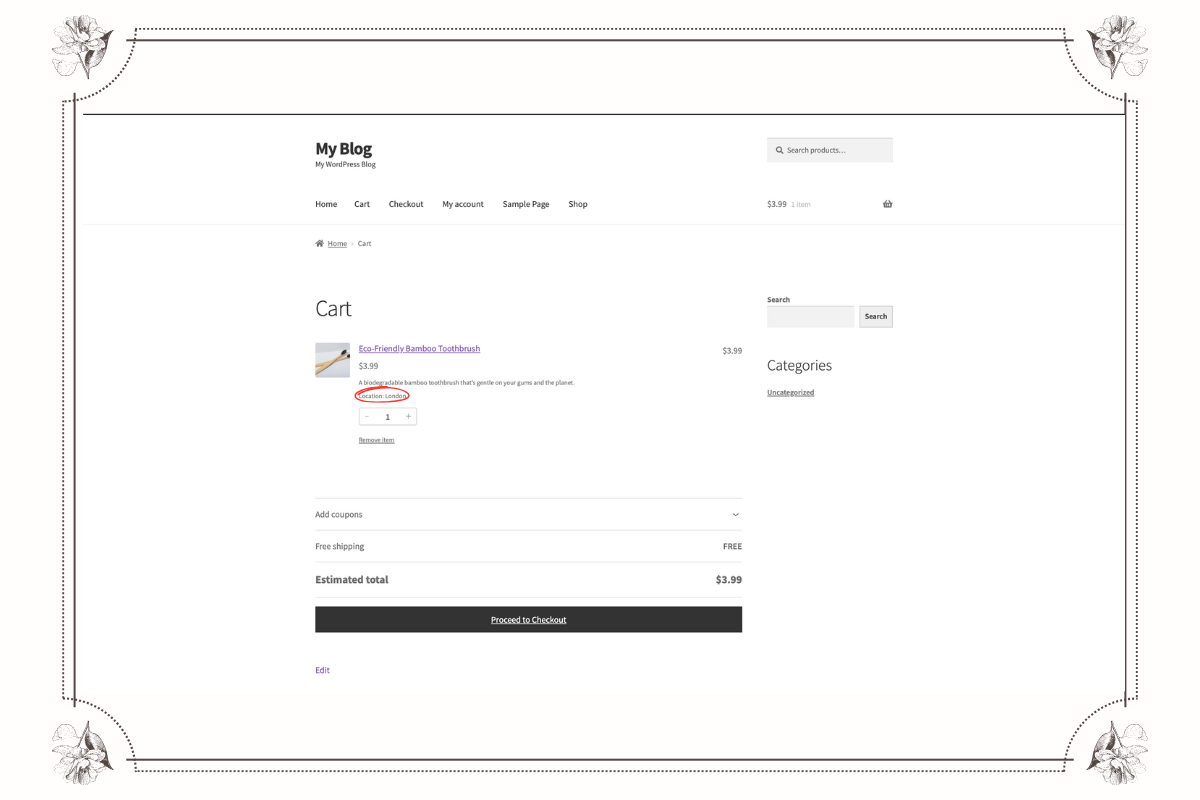
Display the selected store or warehouse location during the WooCommerce cart review.
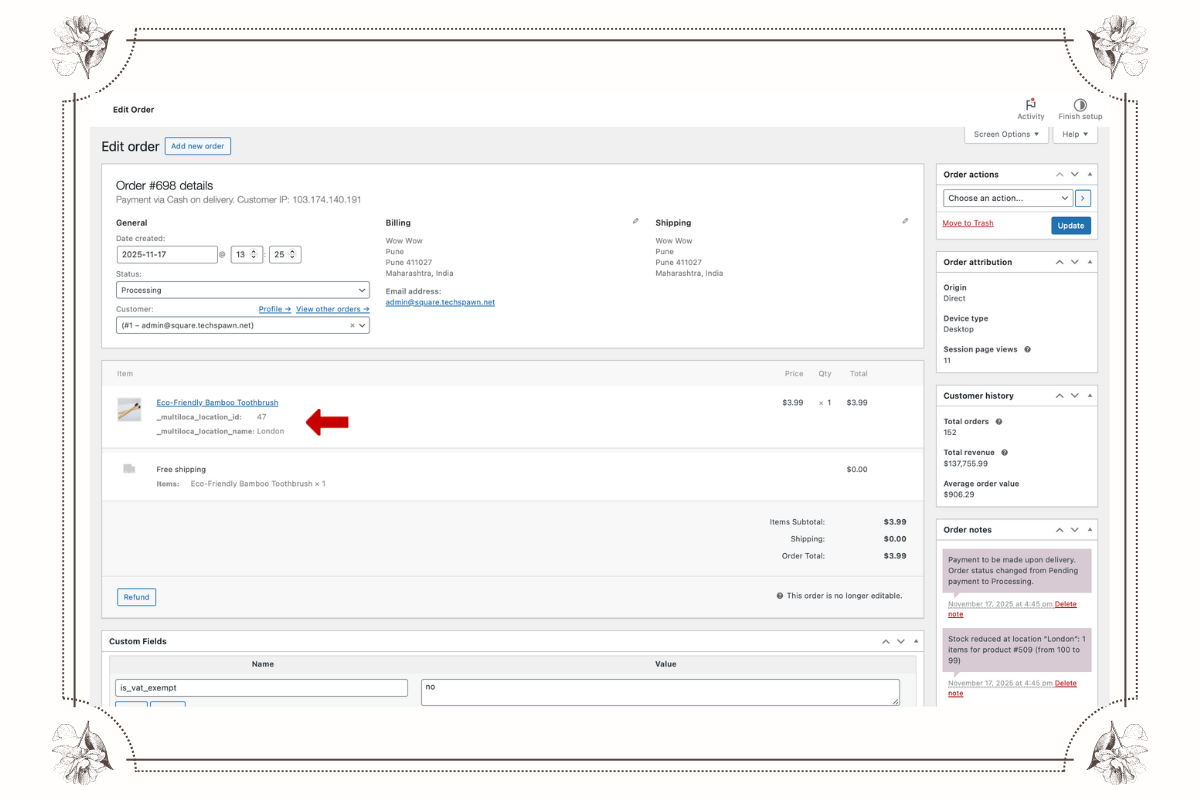
Add chosen WooCommerce multi-location details directly into the customer’s final order summary.
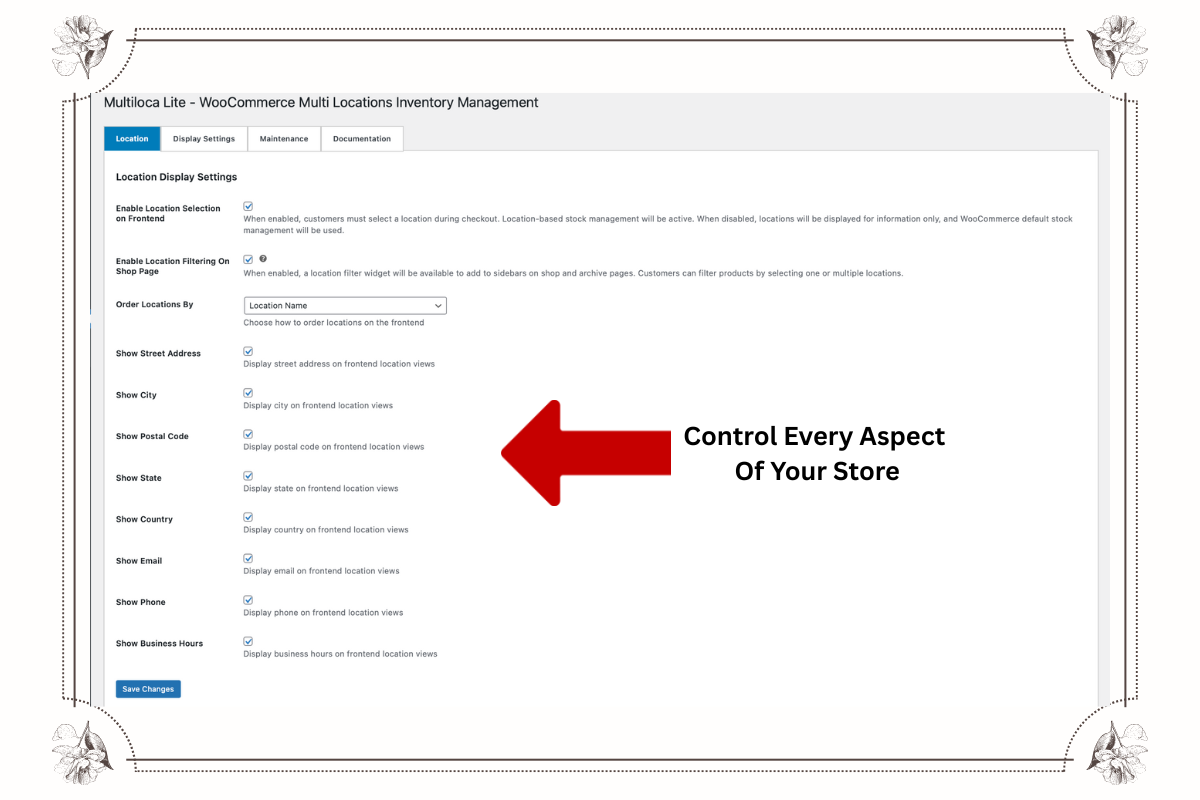
Configure store, warehouse, and pickup points using flexible WooCommerce multi-location inventory settings.
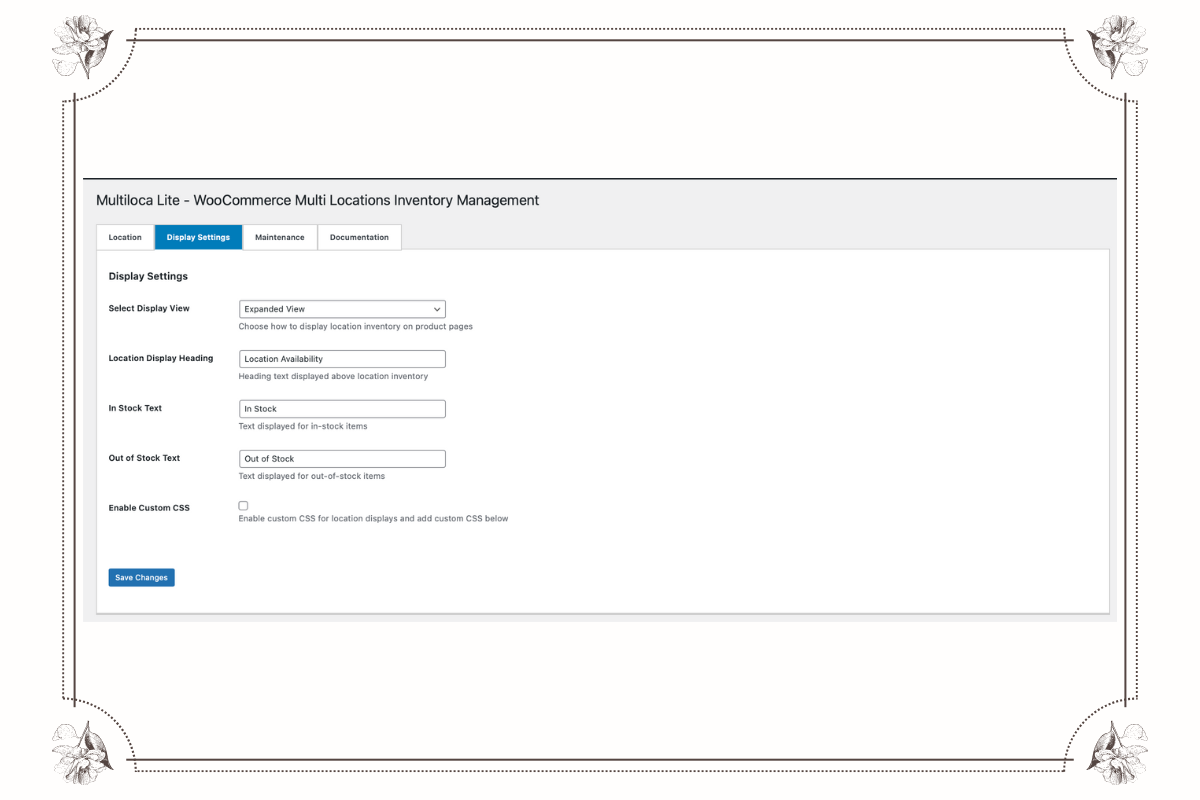
Control how WooCommerce location-based stock information appears across storefront and product pages.
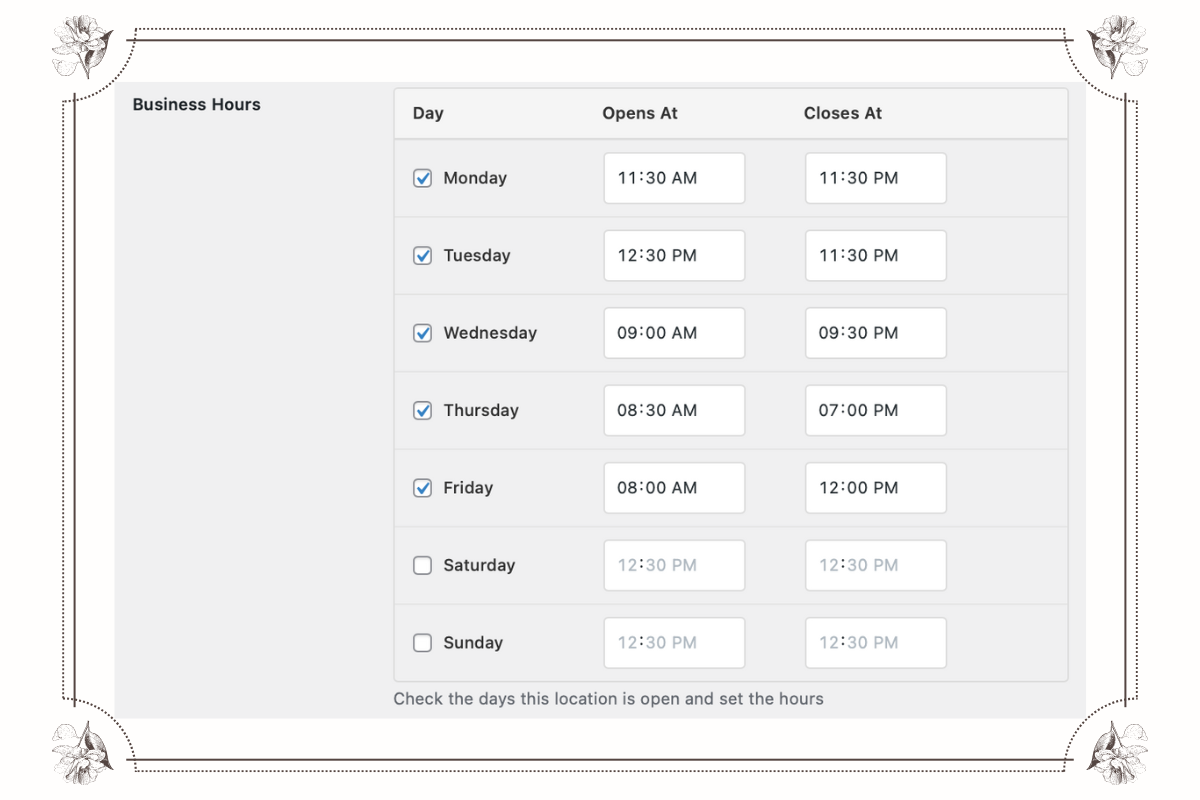
Set specific business hours for each branch using WooCommerce multi-store location management.
Changelog
1.1.0 – October 2025
- NEW: Customer location selection for order fulfillment
- NEW: Enhanced order management with location-based fulfillment
- IMPROVEMENT: Better mobile responsiveness across all display styles
- IMPROVEMENT: Performance optimizations and faster loading times
- IMPROVEMENT: Enhanced compatibility with latest WooCommerce versions
- FIX: Minor CSS styling issues in certain themes
- FIX: PHP 8.1 compatibility improvements
1.0.2
Added new display views for location stock display on frontend
1.0.0
This is the initial release of Multiloca Lite.