

Multiple Post Type Order
Multiple Post Type Order plugin will generate multiple re-ordering interface for your same post types as well as individual custom post types as many …
Plugin info
Maintenance & Compatibility
Maintenance score
Possibly abandoned • Last updated 713 days ago • 6 reviews
Is Multiple Post Type Order abandoned?
Possibly abandoned (last update 713 days ago).
Compatibility
Languages
Similar & Alternatives
Explore plugins with similar tags, and compare key metrics like downloads, ratings, updates, support, and WP/PHP compatibility.
Description
This plugin helps to generate multiple re-ordering interface for your post types as well as custom post types as many times as you required for your custom development. With such a custom ordering facility, it will be much faster and easier for the crawlers to generate multiple ordering for same post types as well as individual post types.
This plugin development aims to get solutions when you want to display custom ordering for one post-type i.e. HomePage AND custom ordering for same post-type i.e. on Custom Post Page with the help of query code in your custom templates.
In order to configure settings, navigate to [ WordPress Admin -> Settings -> Multiple Post Types Order ], where you can see two options:
- Show/Hide Re-Ordering Interface for Post Types
- No of times Re-Ordering required
After configuring your settings, “MPT Order #” will be displayed on your desired post types and under it, you can drag and drop Re-Order by your Post Titles, hit ‘Save’ and click on Display Query Code. You can use this Query code in your custom templates and customize look-n-feel and your desired result will be displayed.
Example Display Query Code:
<?php $data = new WP_Query(
                    array(  'post_type' => 'post',
                            'post_status' => array( 'publish'),
                            'posts_per_page' => -1,
                            'orderby' => 'meta_value_num',
                            'meta_key' => 'custom_order_type_snv_1',
                            'order' => 'ASC',
                    )); ?>
have_posts() ) : $data->the_post(); ?>
Example Display shortcode:
[mpto post_type='post' meta_key='custom_order_type_snv_1']
OR
[mpto post_type='post' meta_key='custom_order_type_snv_1' posts_per_page='10' limit='250' readmore='Readmore' style='style11' google_font='Roboto' item_width='300' item_height='300' des_size='10' title_size='18' it_margin='2' title_color='#ffffff' des_color='#ffffff']
Shortcode Builder
- `post_type` – Your list of post types given in query code
- `meta_key` – Your meta key value given in query code
- `posts_per_page` – Display number of lists per page
- `limit` – Character limit for excerpt or content
- `readmore` – Custom label for more text with link
- `style` – You can choose amazing hover style effects from style1 to style22
- `google_font` – You can add your desired google fonts by name
- `item_width` – Set your desired width
- `item_height` – Set your desired height
- `des_size` – Set your desired description font size
- `title_size` – Set your desired title font size
- `it_margin` – Set custom right margin
- `title_color` – Set title color based on website color
- `des_color` – Set description color based on website color
Plugin Advantages
- Any Post Types multiple times Re-Order
- Supports Hierarchical Post Types Re-Order for Both – Parent & Child Posts
- Supports individual child posts re-ordering from any parent post
NOTE
If desired results are not displaying on front-end after setting up re-ordering in admin, please click “Reset Order” once and set re-ordering again. This will solve your issue.
We have this plugin compatible gutenberg.
Installation
- Upload
multiple-post-types-orderfolder to your/wp-content/plugins/directory. - Activate the plugin from Admin > Plugins menu.
- Once activated you should check with Settings > Multiple Post Types Order
- Use MPT Order # link which appear into each post types section to re-order.
Frequently Asked Questions
It is under Settings > Multiple Post Types Order.
Include a ‘orderby’ => ‘meta_value_num’, ‘meta_key’ => ‘custom_order_type_snv_#’ parameter within your custom query.
You can use below mentioned shortcode in order to display any pages or posts or CPT’s listings with amazing display effects for Title, Featured Image, Content with Pagination.
You can also customize your display options with additional shortcode parameters as shown below.
Example display shortcode
[mpto post_type='post' meta_key='custom_order_type_snv_1']
OR
[mpto post_type='post' meta_key='custom_order_type_snv_1' posts_per_page='10' limit='250' readmore='Readmore' style='style11' google_font='Roboto' item_width='300' item_height='300' des_size='10' title_size='18' it_margin='2' title_color='#ffffff' des_color='#ffffff']
This shortcode will also available when saving on MTPO Order options.
You can change desired values for posts_per_page, character limit and custom label for readmore button.
Check query code example below:
<?php $data = new WP_Query(
array( ‘post_type’ => ‘post’,
‘post_status’ => array( ‘publish’),
‘posts_per_page’ => -1,
‘orderby’ => ‘meta_value_num’,
‘meta_key’ => ‘custom_order_type_snv_1’,
‘order’ => ‘ASC’,
)); ?>
have_posts() ) : $data->the_post(); ?>
<?php wp_reset_query(); ?>
Yes. When re-ordering any parent post will automatically re-orders its child posts with them after clicking “Save Order” button. Apart from this, you can also re-order child posts within in the same parent post.
If desired results are not displaying on front-end after setting up re-ordering in admin, please click “Reset Order” once and set re-ordering again. This will solve your issue.
If previously or older posts/pages/cpts are not displaying then simply save/update it again.
Review feed
Ease to use ordering post
Screenshots

Multiple Post Type Order General Settings

Drag and Drop Re-Ordering interface
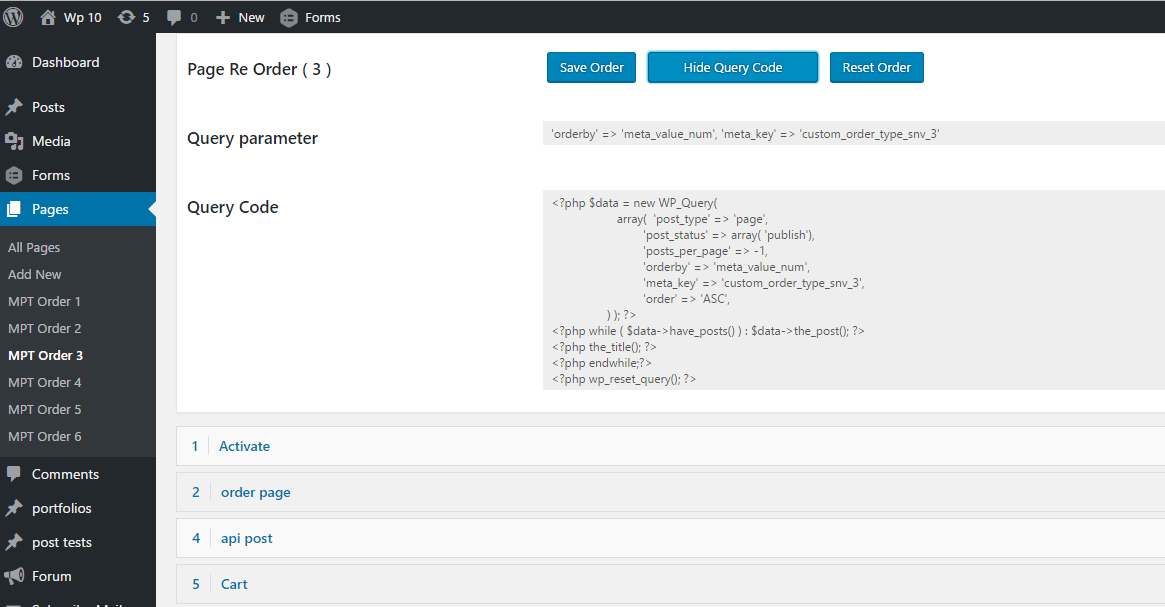
Re-Ordering interface with Display Query Code

Listing display with hover effects
Changelog
1.0
- Initial Release
1.1
- Display Reordering.
1.2
- Display any pages or posts or CPT's listings with Title, Featured Image, Content with limit and Pagination.
1.3
- Display any pages or posts or CPT’s listings with amazing display effects.
1.7
- We have changes for security hook.