

My Country States For WooCommerce
Enhance accuracy, reduce errors, optimize shipping and tax calculations on WooCommerce checkout with auto-populated states for 160+ countries.
Plugin info
Maintenance & Compatibility
Maintenance score
Stale • Last updated 191 days ago
Is My Country States For WooCommerce abandoned?
Likely maintained (last update 191 days ago).
Compatibility
Similar & Alternatives
Explore plugins with similar tags, and compare key metrics like downloads, ratings, updates, support, and WP/PHP compatibility.
Description
My Country States For WooCommerce, the ultimate solution to a common WooCommerce limitation. As any international e-commerce store owner knows, providing a smooth and efficient checkout process is crucial. However, WooCommerce doesn’t include states or provinces for all countries by default, leading to frustrating manual entry for customers.
We’ve taken this challenge head-on and are proud to present a feature-packed solution. Our plugin adds support for over 160 countries, ensuring that when a customer selects their country, the corresponding states or provinces are automatically populated. No more tedious typing, no more errors in state names—just a seamless checkout experience that boosts user satisfaction and trust in your online store.
Whether you’re dealing with orders from Afghanistan to Zimbabwe, our plugin has you covered. It’s not just a time-saver; it’s an accuracy-enhancer. Shipping rates and tax calculations will be spot on, creating a more reliable shopping experience for your customers.
Key Features
- Support for 160+ countries: No more missing states or provinces.
- Automatic population: States are populated based on the selected country.
- Error reduction: Eliminate mistakes from manual entry.
- Seamless integration: Easy setup with no coding required. No admin settings as well. Just install, activate, and enjoy.
- Works out of the box: A hassle-free enhancement to your WooCommerce store.
Upgrade your WooCommerce store today with ‘My Country States For WooCommerce.’ Elevate the user experience, increase operational efficiency, and drive customer satisfaction to new heights. Your global customers deserve nothing less.
Installation
Requieres WooCommerce
This section describes how to install the plugin and get it working.
From within WordPress
- Visit
Plugins > Add New - Search for
My Country States For WooCommerce - Install and activate
My Country States For WooCommercefor WordPress from yourPluginsmenu from WordPress.
Manually
- Download the plugin.
- Unzip the file.
- Upload the my-country-states-for-woocommerce/ folder to the /wp-content/plugins/ directory by using cPanel or SFTP/FTP.
- Activate the plugin through the
Pluginsmenu in WordPress.
Frequently Asked Questions
No configuration required. All states are automatically for countries whose states are not implemeted in the WooCommerce.
You can customize the list of states for any country by using the mcsfwc_states_of_{TWO_CHARACTER_COUNTRY_CODE_IN_LOWER_CASE} filter hook provided by the plugin. For example, if you want to override the states for Afghanistan, use mcsfwc_states_of_af filter hook, for Singapore use mcsfwc_states_of_sg filter hook
The mcsfwc_states_of_af filter hook allows you to customize the list of states for Afghanistan in your WooCommerce checkout or other parts of your site where states are listed.
Here is an example of how to use the filter in your theme’s functions.php file:
<?php
function custom_afghanistan_states( $states ) {
    $states = array(
        'BDS' => 'Badakhshan',
        'BGL' => 'Baghlan',
        'BAL' => 'Balkh',
        // Add your custom states here
        'KAB' => 'Kabul',  // Example: Adding a custom state
    );
    return $states;
}
add_filter( 'mcsfwc_states_of_af', 'custom_afghanistan_states' );
?>
No, currently you can customize the states list using the avaibale filter hooks. We are planning to implemente this feature in the next paid version.
Review feed
Screenshots

List of Sweden States.
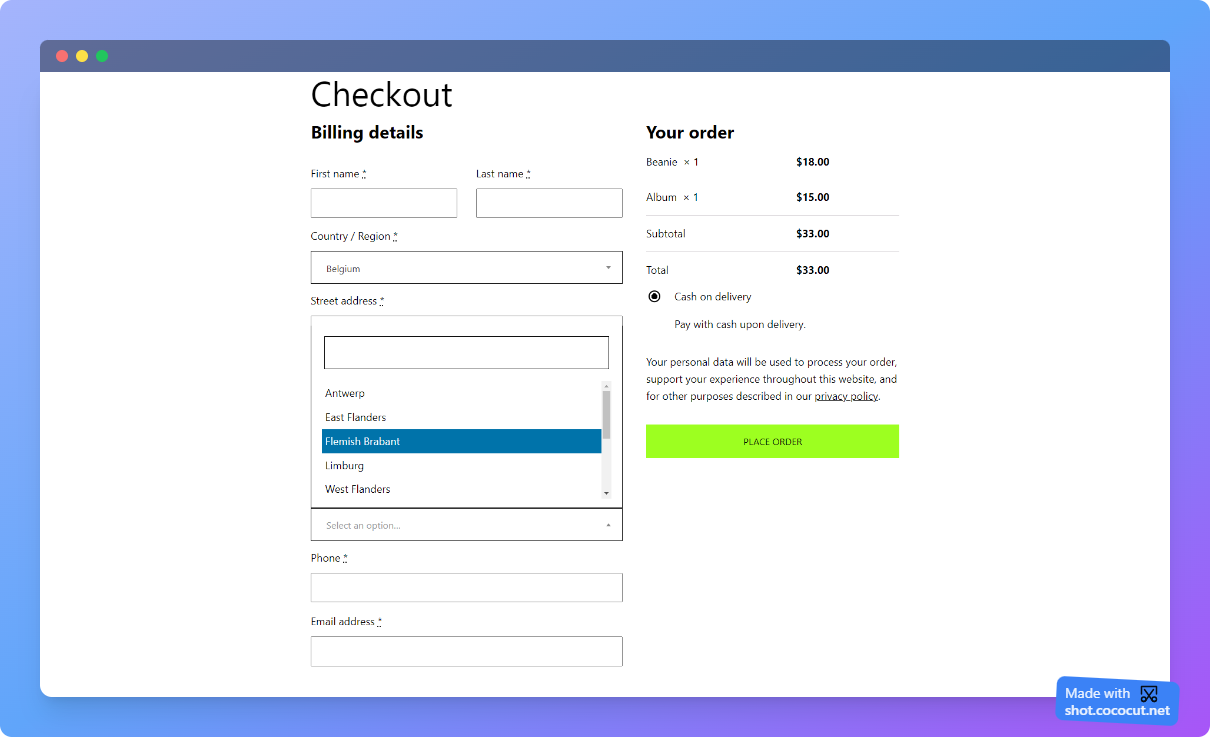
List of Belgium States.

List of France States.

List of Tajikistan States.
Changelog
1.1.0
- Update: Check for compatibility with WC 9.0.1 and WordPress 6.6.1
- New: Add support for the WooCommerce Cart and Checkout Blocks
- Improvement: Code readability
1.0
- Initial release.