

My Custom Ads Management
Ads Management helps you create Ads on front-end with many options like Text Widgets, Sidebar, Short Codes etc provided by Pixeltoweb.com
Plugin info
Maintenance & Compatibility
Maintenance score
Possibly abandoned • Last updated 2832 days ago
Is My Custom Ads Management abandoned?
Possibly abandoned (last update 2832 days ago).
Compatibility
Similar & Alternatives
Explore plugins with similar tags, and compare key metrics like downloads, ratings, updates, support, and WP/PHP compatibility.
Description
Features
Ads Management Plugin is an easy to use plugin to display custom advertising like google ads, banner ads on front-end side which includes any ads size ranging from 300×250, 160×600, 728×90 and etc..
Ads Management Plugin is used For Marketing Banners and logos of Affiliates and Marketing Purpose.
Ads Management Plugin will help you to Show Ads by Following way
- Create Ads from Admin Panel from Add New Ads Section.
- Create New Ads by Adding Title of the Ads, Short Description and Add Banner code with image tag or Google Adsense Code in to code box with status as “Available”.
- Admin will get Unique and Randomly Created Short Code which will be helpful to show custom ads on Front End.
- Copy Short Code example “[Customads id=123456]”.
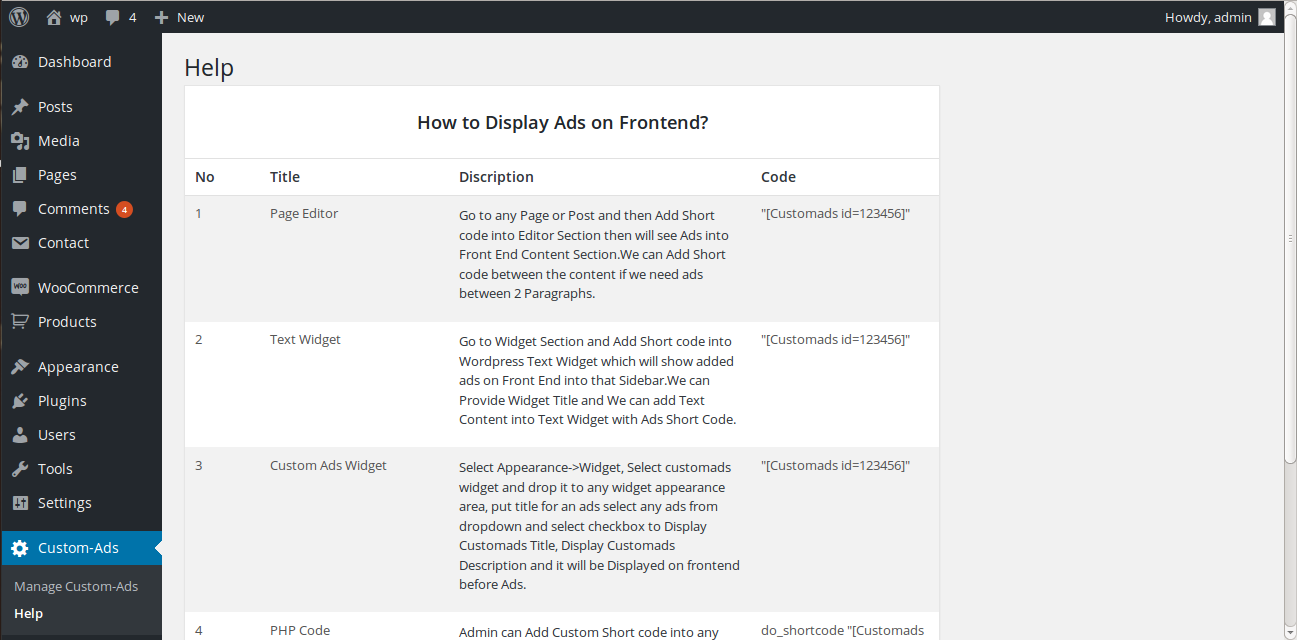
- Admin can show Ads on Front End by Text Widget, Ads Widget, Short Code into Page / Post Text Editor and PHP Short code in any Theme File.
- Then go to Widget Section and add Short code into WordPress Text Widget which will show added ads on Front End into that Sidebar.
- Admin can go to Widget Section and then add Custom Ads Widget and Select Ads with Checkbox as Show Title and Description on Front End.
- Admin can go to any Page or Post and then Add Short code into Editor Section then will see Ads into Content Section.
- To add in PHP file, go to Theme Page and add “startphptag echo do_shortcode(‘[Customads id=123456];endphptag” code into any theme file with replacing our custom code to show Custom Ads on Front End.
Installation
- Upload Custom Ads Plugin Folder to the
/wp-content/plugins/directory - Activate the plugin through the ‘Plugins’ menu in WordPress
- Create New Custom Ads from Admin Panel
- System will show Ads on Front End by Text Widget, Custom Ads Widget, Short Code into Page / Post Text Editor and PHP Short code in any Theme File.
Frequently Asked Questions
Installation Instructions
- Upload Custom Ads Plugin Folder to the
/wp-content/plugins/directory - Activate the plugin through the ‘Plugins’ menu in WordPress
- Create New Custom Ads from Admin Panel
- System will show Ads on Front End by Text Widget, Custom Ads Widget, Short Code into Page / Post Text Editor and PHP Short code in any Theme File.
How to Add Custom Ads on Front End Sidebar
- Go to Widgets Section, Add New Text Widget, Paste your Short code there and Save the Widget.
- Go to Widgets Section, Add New Custom Ads Widget, Select Ads from Drop Down then Save the Widget.
How to Add Custom Ads in Theme File
- Add “startphptag echo do_shortcode(‘[Customads id=123456]’);endphptag” in any theme file to with replacing our custom short code to show ads on front end.
How to Show Ads between Page Content
- Go to Page Editor Paste Short Code in Between Content then Click the Publish / Update Button.
Is this Plugin work in all version of WordPress
- Yes, it will work in all the version of wordpress.
Review feed
Screenshots
Manage Ads Display

Ads_ManageAdsListing

Ads_CustomWidget_Backend

Ads_Customwidget_Frontend

Ads_Textwidget_Backend

Ads_textwidget_Frontend

Ads_Help