

MZR Buy X Pay Y
Powerful "Buy X Pay Y" discount module for WooCommerce. Create dynamic promotions like "Buy 2 Pay 1", "Buy 3 Pay 2", and more!
Plugin info
Maintenance & Compatibility
Maintenance score
Stale • Last updated 323 days ago • 2 reviews
Is MZR Buy X Pay Y abandoned?
Likely maintained (last update 323 days ago).
Compatibility
Similar & Alternatives
Explore plugins with similar tags, and compare key metrics like downloads, ratings, updates, support, and WP/PHP compatibility.
Description
MZR Buy X Pay Y is a simple yet powerful WooCommerce plugin that allows you to set up flexible “Buy X Get Y Free” or “Buy X Pay Y” discounts for your customers. Encourage sales, move inventory faster, and improve your store’s conversion rate effortlessly.
Key Features:
🔥 Fully Customizable Buy X Pay Y Promotions
– Set X (number of products to buy) and Y (number of products to pay for).
– Supports any combination, e.g., Buy 3 Pay 2, Buy 5 Pay 3, etc.
🎯 Product & Category Inclusion/Exclusion
– Apply discounts to specific products or product categories.
– Exclude products or categories you don’t want to include in the promotion.
📅 Schedule Promotions
– Define start and end dates with precise time control.
– Run limited-time offers or ongoing promotions.
📝 Custom Discount Labels & Descriptions
– Customize the label shown in the cart (e.g., “Special Offer: Buy 3 Pay 2”).
– Optionally display a detailed description below the cart totals.
⚙️ No Coupons Needed
– Discount is applied automatically in the cart, no manual coupon entry.
🚀 Lightweight & Fast
– No bloat, clean code optimized for performance.
Installation
- Upload the plugin files to the
/wp-content/plugins/mzr-buy-x-pay-ydirectory, or install the plugin through the WordPress plugin screen. - Activate the plugin through the ‘Plugins’ menu in WordPress.
- Navigate to WooCommerce Settings General Buy X Pay Y tab to configure your discount rules.
Frequently Asked Questions
Currently, the plugin applies one rule globally but allows you to include or exclude specific categories and products to fine-tune where the discount applies.
Yes, there is no need for customers to enter a coupon code. The discount is applied automatically if conditions are met.
Absolutely! You can easily set a promotion period using the built-in date & time settings.
Yes! The plugin works with both simple and variable products.
Review feed
Screenshots
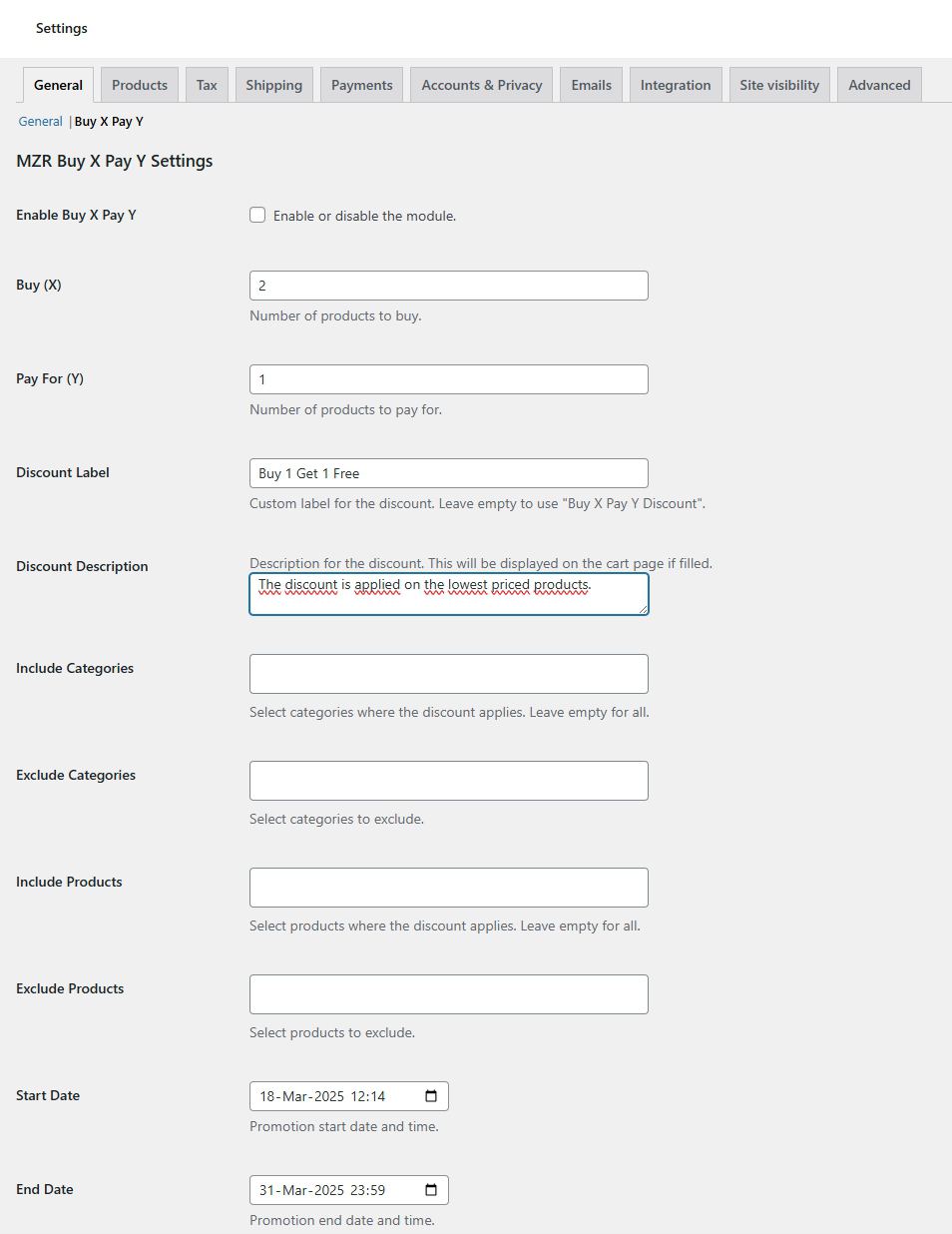
Buy X Pay Y settings tab in WooCommerce General Settings.
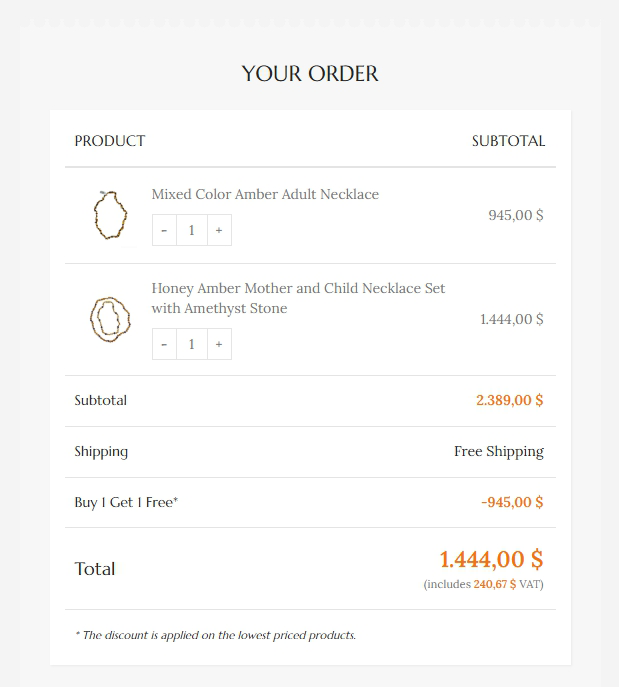
Discount applied automatically in the cart totals.
Changelog
1.0.1
- The problem of the discount description appearing even if the module is inactive has been fixed.
1.0.0
- Initial stable release.
- Flexible Buy X Pay Y discount rules.
- Include/exclude categories and products.
- Promotion period settings.
- Custom discount labels and descriptions.