
Plugin info
Maintenance & Compatibility
Maintenance score
Possibly abandoned • Last updated 2971 days ago • 4 reviews
Is NeonCRM Events Widget abandoned?
Possibly abandoned (last update 2971 days ago).
Compatibility
Similar & Alternatives
Explore plugins with similar tags, and compare key metrics like downloads, ratings, updates, support, and WP/PHP compatibility.
Description
Display a list of upcoming events in a widget, retrieved from your NeonCRM system. Limit your list of events to a specific campaign
or category.
Requires PHP 5.2.
Installation
- Obtain a NeonCRM account. Learn about NeonCRM
- Ensure the API is enabled for your NeonCRM system. This guide can help you determine whether the API is enabled for your system:
API Keys - Generate an API key to be used with this plugin. The guide in the previous step demonstrates this.
- Extract all files in the ‘neon-events’ plugin to the ‘/wp-content/plugins/’ directory,
- Activate the plugin through the ‘Plugins’ menu in WordPress.
- Navigate to the Widgets configuration to add the NeonCRM Events Widget.
- Enter a valid API key and organization ID into the widget configuration.
Frequently Asked Questions
Installation Instructions
- Obtain a NeonCRM account. Learn about NeonCRM
- Ensure the API is enabled for your NeonCRM system. This guide can help you determine whether the API is enabled for your system:
API Keys - Generate an API key to be used with this plugin. The guide in the previous step demonstrates this.
- Extract all files in the ‘neon-events’ plugin to the ‘/wp-content/plugins/’ directory,
- Activate the plugin through the ‘Plugins’ menu in WordPress.
- Navigate to the Widgets configuration to add the NeonCRM Events Widget.
- Enter a valid API key and organization ID into the widget configuration.
What is NeonCRM?
NeonCRM is a web-based fundraising and membership system that provides nonprofit organizations with all the tools
required to increase donations and memberships while automating common processes and streamlining staff’s day-to-day tasks.
Where do I get an API Key/ Org ID?
This guide explains how to generate an API key: API Keys
Review feed
Screenshots
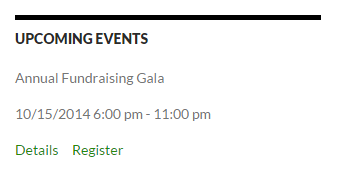
Display a list of upcoming events in a widget

Configure each widget's settings
Changelog
0.1
- Original release
0.11
- Fixed an issue that caused multiple cached widget instances to overwrite each other.
0.12
- Fixed an issue that prevented the cache from being cleared when a widget is updated.
0.13
- Updated the references to NeonCRM’s field names. This maintains compatibility after NeonCRM’s API upgrade on 1/17/2015. The plugin may not work properly without this update.
- Added two new filter options to hide events that are not web-published or have web registration disabled.
- Refactored the logic for the number of events to display, due to the new filters
0.14
- Fixed an issue that prevented Category filtering from working
0.15
- Removed PHP4-style class constructors
0.16
- Fixed an issue where dates used the server’s time zone instead of WordPress’s user-defined time zone.
- Added a check to see if the class Neon already exists to prevent conflicts with other plugins using the Neon PHP library.
- Added a check to the Neon PHP library to see if a session has already been started.
0.17
- Refactored API calls to use wp_remote_post instead of cURL.
- Fixed a bug with Campaign searching so that it now works.
0.18
- Refactored session checker to be compatible with PHP 5.2
- Refactored output code to improve security
0.19
- Events with Registration disabled no longer display a registration link
- Events that are displayed in the widget but not Published in NeonCRM will no longer display a details link
0.20
- Fixed a bug related to using PHP Sessions that caused the plugin to fail health checks.