

Popup Maker Addon for Newsletter
Adds support to Popup Maker for Newsletter subscription forms
Plugin info
Maintenance & Compatibility
Maintenance score
Possibly abandoned • Last updated 1675 days ago
Is Popup Maker Addon for Newsletter abandoned?
Possibly abandoned (last update 1675 days ago).
Compatibility
Similar & Alternatives
Explore plugins with similar tags, and compare key metrics like downloads, ratings, updates, support, and WP/PHP compatibility.
Description
This simple and little plugin integrates the Popup Maker plugin with forms
of Newsletter plugin, usually generated via
shortcodes. It follows the Popup Maker standard integration methods.
Note: this plugin should be considered as developed indipendently from Newsletter and Popup Maker. For support, contribution and so on
use the support area provided by wordpress.org. Much appreciated.
Other Newsletter plugin integrations
Installation
Frequently Asked Questions
Please see the screenshots for steps explained below.
Step 1. Just create a popup and in the page content add the shortcode [newsletter_form]. This shortcode just shows a subscription form
(you can customized it using the many attributes available – like labels, button color and so on).
Read more about shortcode attributes.
Step 2. Setup the popup rules to not reopen after a subscription has been submitted.
As far as I know, every kind of shortcodes work. All details about shortcodes and subscription forms creation
should be found here.
Actually yes, there is no way to block the popup if an “old” subscriber is revisiting the site. Maybe I can find a solution
(I’m open for ideas and/or code to integrate!)
Review feed
Screenshots
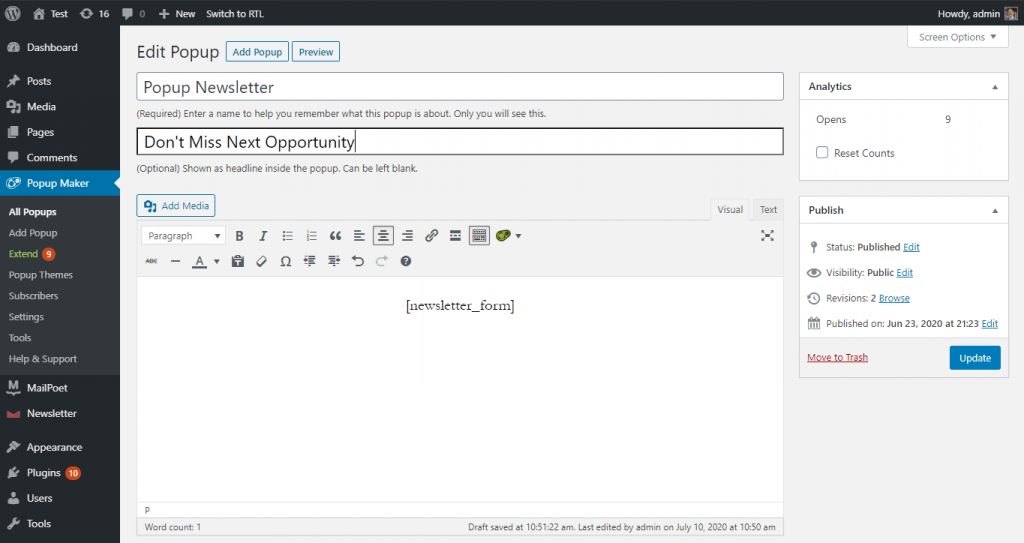
Create a popup using Popup Maker and add the Newsletter shortcode to display a subscription form

Configure the rules to block the popup reopening after the subscription
Changelog
1.0.3
- WP 5.8 compatibility
1.0.2
- Fixed links in the plugin header
1.0.1
- Fixed PopupMaker detection on activation