

Night Mode for WordPress
This plugin help to activate night mode and increase or decrease brightness of your website.You can easily add night mode filter to whole website and …
Plugin info
Maintenance & Compatibility
Maintenance score
Possibly abandoned • Last updated 1884 days ago • 2 reviews
Is Night Mode for WordPress abandoned?
Possibly abandoned (last update 1884 days ago).
Compatibility
Languages
Similar & Alternatives
Explore plugins with similar tags, and compare key metrics like downloads, ratings, updates, support, and WP/PHP compatibility.
Description
This plugin help to activate night mode and increase or decrease brightness of your website.You can easily add night mode filter to whole website and adjust it to improve the readability of text, images and other elements, Protect eyes from hurting when the screen is too bright by dimming the light.
Features of Night Mode for WordPress
- Custom Menu Select Option
- Elegent Night Mode Kit
- Custom CSS option
- Easy To Customize all Settings
- Import/Export Settings
- Night Mode Options
- Text Color
- Background Color
- Link Color
- Link Hover Color
- Border Color
- Image filter (Opacity)
Font Size kit options
- Control website font sizes for Large
- Control website font sizes for Extra Large
- Medium is your default font size
NIGHT MODE FOR WORDPRESS IS COMPATIBLE WITH ALL MAJOR MODERN BROWSERS:
- Firefox
- Chrome
- Safari
- Opera
- Edge
Need Support?
If you need any technical support, please send us a message at [email protected] and we will get back to you as soon as possible.
Why Night Mode for WordPress?
- Help Visitor Reduce Eye Strain
- Reduce Dry Eye of your Visitors
- Prevent Retinal Damage
- Reduce Risk of Depression, Diabetes, and Cardiovascular Issues while reading your blog
- Improve Battery Life of your Visitors
- Keep Visitor?s Device Cooler
- Boost Their Mood and Spand More Time To your website
- Increase/Decrease Font Size
- Zero Delay activation
Installation
Please follow the below steps to install and activate the plugin:
STEP 01:
Please download the installable file or install it from wordpress.org
STEP 02:
Go to your wordpress Dashboard > Plugins > Add New then click Upload Plugin
After that upload the installable plugin file and click Install Now
STEP 03:
Activate The Plugin
Frequently Asked Questions
Please follow the below steps to install and activate the plugin:
STEP 01:
Please download the installable file or extract installable file
you will find instable file inside the full package
STEP 02:
Go to your wordpress Dashboard > Plugins > Add New then click Upload Plugin
After that upload the installable plugin file and click Install Now
STEP 03:
Activate The Plugin
To configure this plugin, click on the Night Mode and Font Size on left side of your wordpress dashboard. You will see the below options:
All the options are self-explanatory. If you still have confusions in understanding any of the option, you can get in touch through support forum
Please go to optional Panel of Night Mode and Font Size
You will see all of your menu area. just select a menu where you want to show the kit. That’s it.
Screenshoot: http://prntscr.com/lznojq
Please go to optional Panel of Night Mode and Font Size
You will see all of the options of colors. Change the color from specific option
Screenshoot: http://prntscr.com/lznqwp
Review feed
Screenshots

Night Mode Activated demo

Normal Mode Demo

Dark Mode & Font size Activation panel

Night Mode Settings Panel

Font size kit Settings Panel

Custom CSS Settings Panel
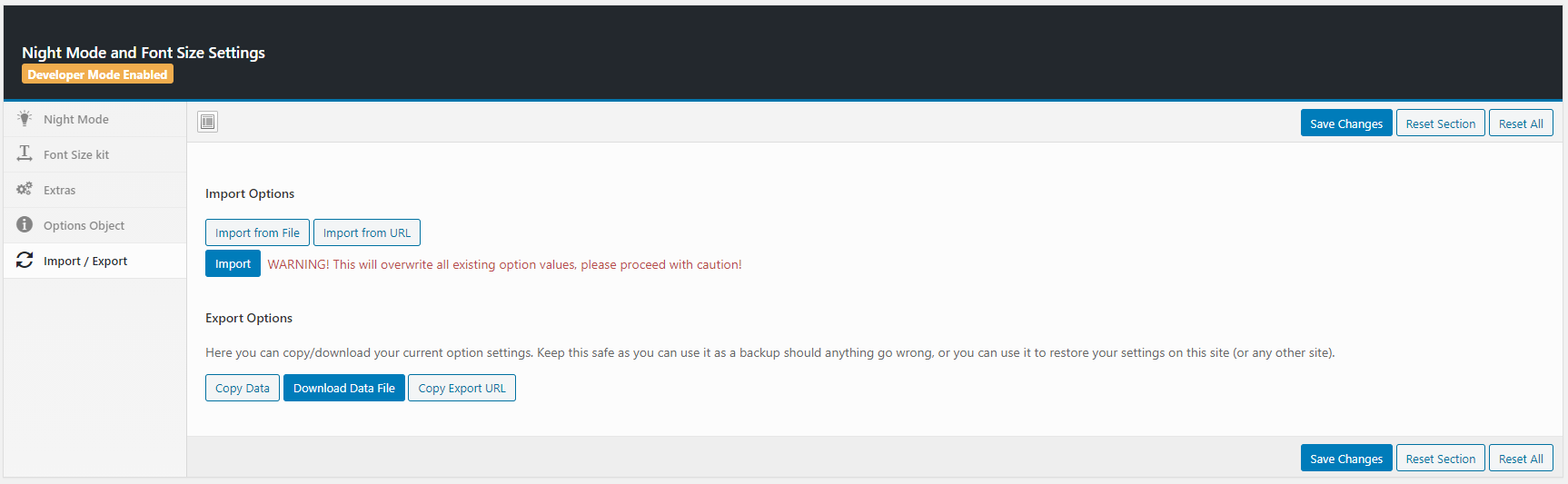
Import/Export Settings Panel
Changelog
2.4.0
( Feb 3, 2021 )
– Code Improvement
– Fixed: Font size kit
– Performance upgrade
2.3.0
( Jan 31, 2021 )
– Code Improvement
– Fixed: Incorrect behaviour