

No Function Language Widget
With this you can bridge the gap between multiple translation plugins. It is a no function language widget with multiple options.
Plugin info
Maintenance & Compatibility
Maintenance score
Possibly abandoned • Last updated 3441 days ago • 1 reviews
Is No Function Language Widget abandoned?
Possibly abandoned (last update 3441 days ago).
Compatibility
Similar & Alternatives
Explore plugins with similar tags, and compare key metrics like downloads, ratings, updates, support, and WP/PHP compatibility.
Description
Did you ever need to connect multiple language plugins? I know this is a niche, but from my long lasting experience I know that sometimes you need such a thing.
Maybe you don’t like the widgets your translation plugin provides. So you maybe need something else.
Try this if you are in need for a language widget which has no function except to be a widget.
Here is an example:
Imagine you have some people in your company providing their own translation but for some reason you also need machine translations of your content. In our specific case it was the plugin Global Translator and WPML. Of course all these plugins have their own widgets, but getting mad if you try to use them both because their widgets only work with the single plugin. So there was a need for a widget which has no function behind it to simply connect two plugins.
You need to configure the WPML part for the languages with your own translations and the Global Translator part for those without.
In the no function language widget you simply choose the language codes with a comma seperated list. It even works if you need other names for your languages. Just replace the flag to your name for example rename de.png to german.png and use /german as your language base.
Installation
- Upload ‘no-function-language-widget’ folder to the
/wp-content/plugins/directory. - Activate the plugin through the ‘Plugins’ menu in WordPress.
- Configure Widget in widget area
Frequently Asked Questions
Where can I get support?
Contact us at http://www.wp-plugin-dev.com/support-contact/
Where are the flags are coming from
It is now using https://cdnjs.com/libraries/flag-icon-css Flags
Review feed
Screenshots
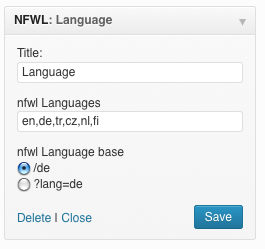
NFLW Widget Backend

NFLW Frontend
Changelog
1.5
changed flag images to cloud flare can
1.01
flag names to lowercase
1.0
Initial release