

Nav Menu Manager
Simplifies nav menu maintenance and functionality providing more control over nav menus with less coding.
Maintenance 52/100159d since update
Active installs
900
Downloads
36,013
Reviews
5
Age
9.7y
Plugin info
Total downloads: 36,013
Active installs: 900
Total reviews: 5
Average rating: 5
Support threads opened: 0
Support threads resolved: 0 (0%)
Available in: 1 language(s)
Contributors: 1
Last updated: 10/25/2025 (159 days ago)
Added to WordPress: 7/14/2016 (9 years old)
Minimum WordPress version: 5.0
Tested up to WordPress version: 6.8.3
Minimum PHP version: f
Maintenance & Compatibility
Maintenance score
Maintained • Last updated 159 days ago • 5 reviews
52/100
Is Nav Menu Manager abandoned?
Likely maintained (last update 159 days ago).
Compatibility
Requires WordPress: 5.0
Tested up to: 6.8.3
Requires PHP: f
Similar & Alternatives
Explore plugins with similar tags, and compare key metrics like downloads, ratings, updates, support, and WP/PHP compatibility.
Oneaccount WP
Rating 0.0/5 (0 reviews) • Active installs 0
Description
Simplifies nav menu maintenance and functionality providing more control over nav menus with less coding.
Nav Menus
- Easily register nav menus via the WordPress admin
- Fail-safe code helps add a layer of protection to the theme
- Disable already registered nav menus that won’t be used on the site
- wp_nav_menu and shortcode generator for quick theme and content implementation
- Improved nav menu sidebar widget for better widgetized menus
Nav Menu Items
- Add a global active class for all active nav menu items
- Exclude default ID attributes from all nav menu items
- Custom fields on nav menu items for ID, query string and/or hash
- For collapse/expand functionality, install Nav Menu Collapse
Installation
From Your WordPress Dashboard
- Log into the WordPress admin
- Go to Plugins > Add New
- Search for Nav Menu Manager
- Click Install Now for the “Nav Menu Manager” plugin
- Click Activate
From WordPress.org
- Download the plugin
- Log into the WordPress admin
- Go to Plugins > Add New
- Click Upload Plugin
- Click Browse and select the downloaded ZIP file
- Click Install Now
- Click Activate Plugin
Via File Transfer
- Download the plugin
- Extract the ZIP file
- Upload the contents of the ZIP file to wp-content/plugins/
- Log into the WordPress admin
- Go to Plugins
- Click Activate under “Nav Menu Manager”
What’s Next?
Once the plugin is active, simply visit Settings > Nav Menu Manager and enable the settings appropriate for this site.
Frequently Asked Questions
No FAQ available
Review feed
No reviews available
Screenshots
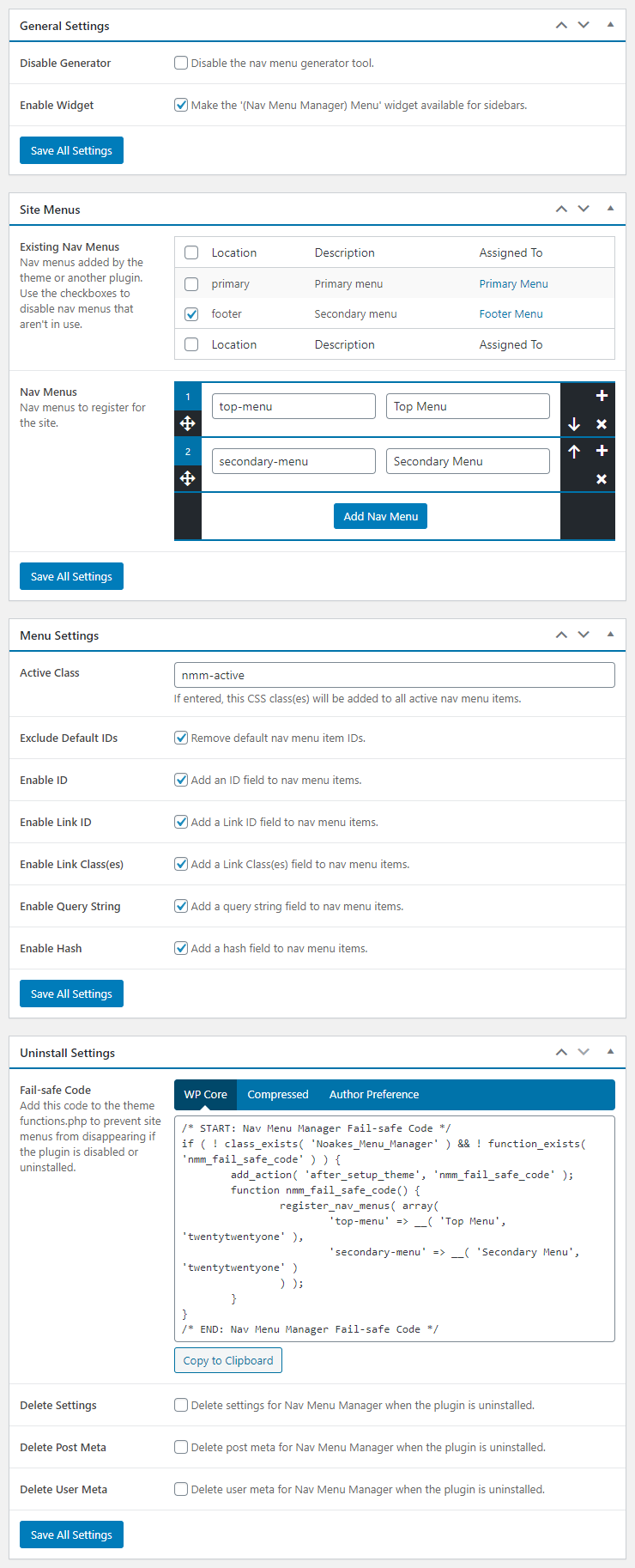
Plugin settings
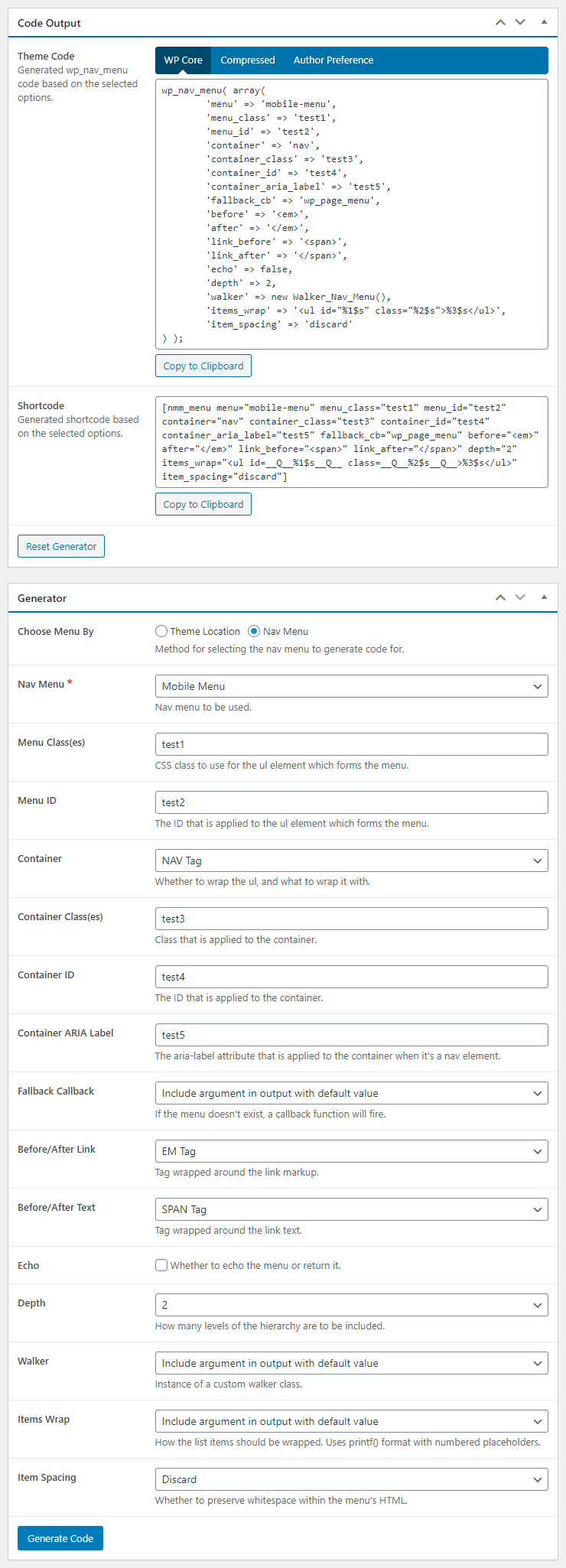
Code generator
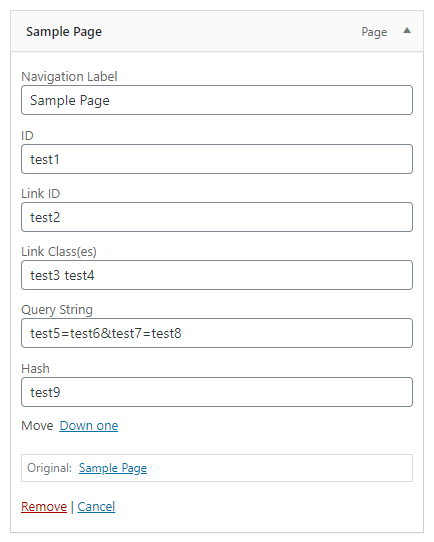
Nav menu item custom fields

Improved nav menu widget
Changelog
3.2.7.1
- Maintenance release
3.2.7
- Fixed: Repeatable nav menus issue
3.2.6
- Fixed: Plugin vulnderability
- Improved: Plugin security
- Verified: Functionality for WordPress 6.8
3.2.5
- Verified: Functionality for WordPress 6.7
3.2.4
- Verified: Functionality for WordPress 6.5
3.2.3
- Verified: Functionality for WordPress 6.2
3.2.2
- Updated: Third-party scripts
- Fixed: Repeatable field indexing issue
- Improved: Query arguments
- Improved: jQuery selectors
- Removed: PHP_INT_MAX fallback
3.2.1
- Improved: Asset generation
3.2.0
- Added: Form data validation
3.1.0
- Added: ID & CSS class(es) fields for nav menu item links
- Added: Support back to WordPress 5.0.*
- Improved: AJAX handling
3.0.3
- Added: AJAX capability checks
- Improved: AJAX buttons
- Improved: Knowledge base
- Improved: Option storage and retrieval
- Removed: Unneeded secondary tab functionality
- Removed: Deprecated jQuery functionality
3.0.2
- Added: Filter hook for active classes
- Added: Help tabs and knowledge base
- Improved: Admin URLs throughout
3.0.1
- Fixed: Missing nav menu widget args
3.0.0
- Improved: Complete plugin overhaul
Check changelog.txt for changes to earlier versions of the plugin.