

Notifications Telegram for WooCommerce
Get instant Telegram notifications for WooCommerce orders. Real-time alerts with complete order details sent directly to your Telegram messenger.
Plugin info
Maintenance & Compatibility
Maintenance score
Stale • Last updated 251 days ago • 2 reviews
Is Notifications Telegram for WooCommerce abandoned?
Likely maintained (last update 251 days ago).
Compatibility
Similar & Alternatives
Explore plugins with similar tags, and compare key metrics like downloads, ratings, updates, support, and WP/PHP compatibility.
Description
Notifications Telegram for WooCommerce sends real-time order notifications directly to your Telegram messenger. Stay connected with your online store 24/7 and never miss an order again.
This plugin provides instant notifications for WooCommerce orders, helping you respond to customers faster, process orders efficiently, and manage your business on the go.
Key Features
- Instant Notifications – Receive order alerts in real-time on Telegram
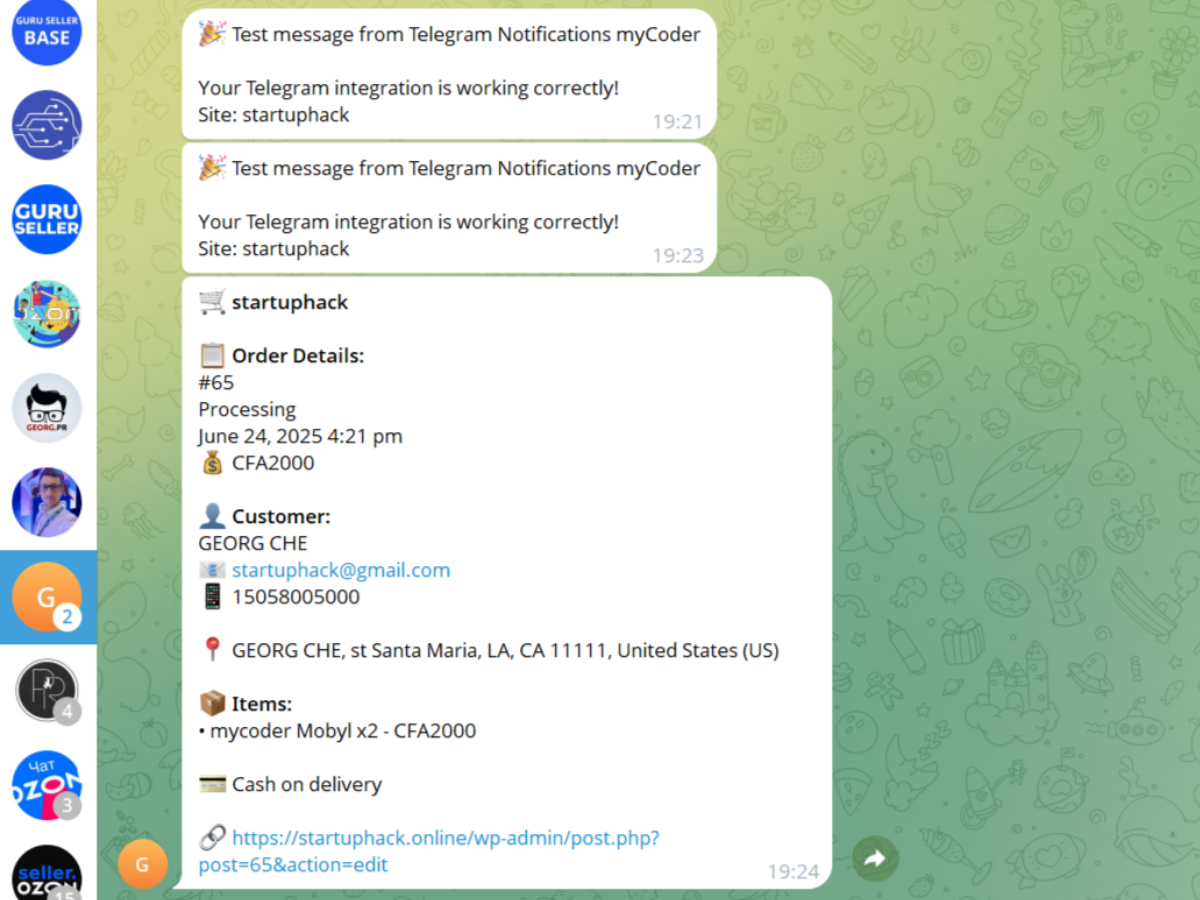
- Complete Order Details – Get all order information in one message
- Customizable Templates – Format messages exactly how you want
- Multiple Recipients – Send notifications to personal chats or groups
- Status Selection – Choose which order statuses trigger notifications
- Product Images – Optionally include product images in notifications
- Easy Setup – Simple configuration with built-in connection testing
- Secure – Direct Telegram API integration without third-party services
- Multilingual – Available in English, Russian, Spanish, and French
Perfect For
- Store owners who want real-time order alerts
- Teams that need to share order information instantly
- Dropshippers requiring immediate order processing
- Multi-store operators managing several shops
- Anyone who wants to stay connected with their business
Message Customization
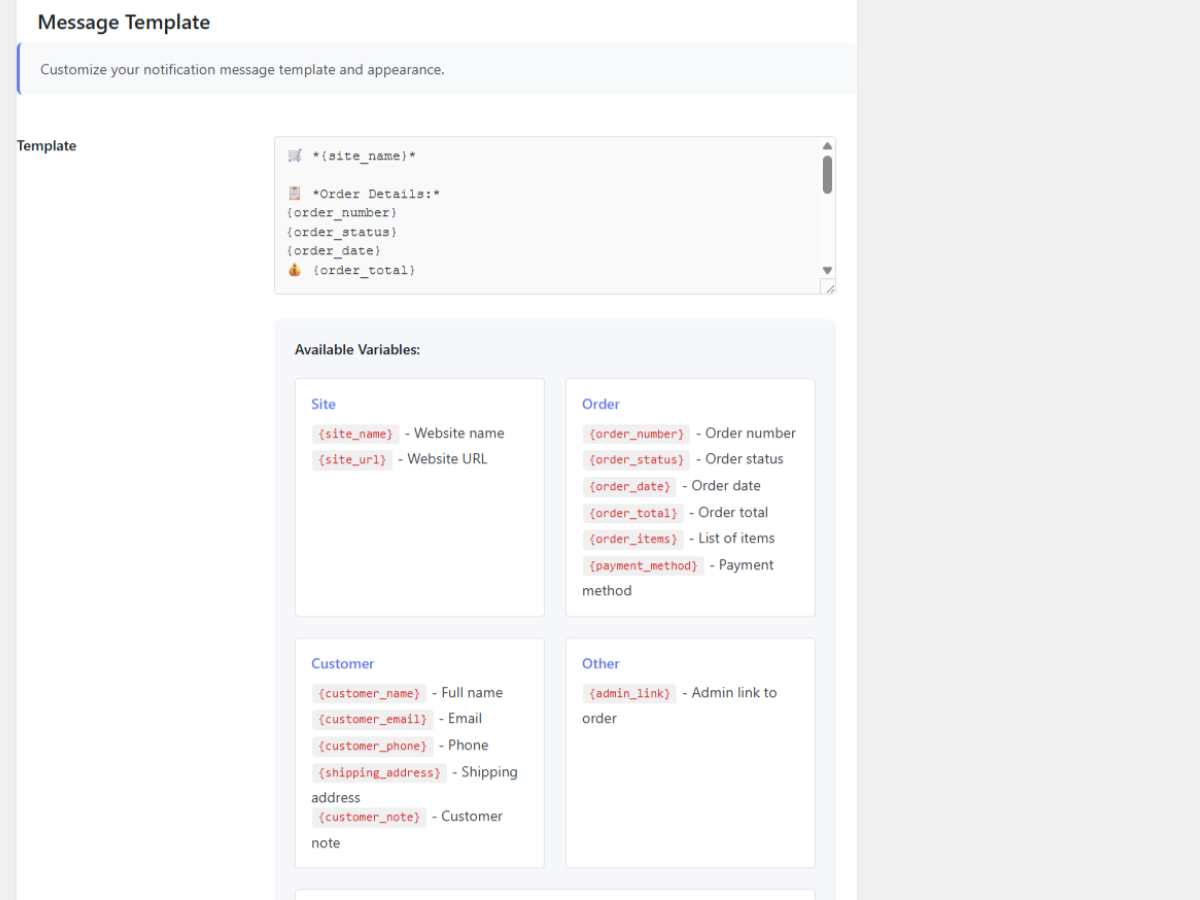
Customize your notification messages with these variables:
* Order details (number, status, date, total)
* Customer information (name, email, phone, address)
* Product list with quantities and prices
* Payment method
* Customer notes
* Direct admin links to orders
Translations
This plugin is available in the following languages:
* 🇬🇧 English (default)
* 🇷🇺 Russian (Русский)
* 🇪🇸 Spanish (Español)
* 🇫🇷 French (Français)
Want to translate this plugin to your language? Visit translate.wordpress.org or contact us!
Privacy & Security
- No data collection or tracking
- Direct connection to Telegram API
- All data stays between your site and Telegram
- GDPR compliant
Third Party Service
This plugin uses the Telegram Bot API to send notifications. When you enable notifications, order data is sent to Telegram’s servers for message delivery.
- Service: Telegram Bot API
- Purpose: Send order notifications to your Telegram account
- Data sent: Order details, customer information (as configured in templates)
- Privacy Policy: https://telegram.org/privacy
- Terms of Service: https://telegram.org/tos
Installation
- Upload the plugin files to
/wp-content/plugins/notifications-telegram-for-woocommerce/ - Activate the plugin through the ‘Plugins’ screen in WordPress
- Create a Telegram bot using @BotFather
- Configure the plugin at Telegram Orders menu with your bot token
- Get your Chat ID and test the connection
- Customize your message template and save
Quick Setup Guide
- Open Telegram and search for @BotFather
- Send
/newbotcommand and follow instructions - Copy the bot token
- Find your Chat ID using @getmyid_bot
- Enter credentials in plugin settings
- Test connection and start receiving notifications!
Frequently Asked Questions
Yes, this plugin is specifically designed for WooCommerce and requires it to function. The plugin will check for WooCommerce on activation.
Open Telegram, search for @BotFather, send the /newbot command, and follow the instructions. You’ll receive a bot token to use in the plugin settings.
The easiest way is to message @getmyid_bot on Telegram. It will reply with your Chat ID. You can also use the “Get My Chat ID” button in the plugin settings after configuring your bot token.
Yes! Add your bot to a Telegram group, then use @getmyid_bot in that group to get the Group Chat ID. Enter this ID in the plugin settings.
Absolutely! The plugin includes a template editor where you can customize the message format using variables for order details, customer info, and more.
You can select any combination of WooCommerce order statuses. Common choices are Processing (new orders), Completed, Cancelled, and Refunded.
Yes, this plugin is completely free with no premium version or hidden costs.
The plugin includes translations for Russian, Spanish, and French. To see the plugin in your language:
1. Go to Settings General in your WordPress admin
2. Change “Site Language” to your preferred language
3. Save changes
If translations still don’t appear, try clearing your browser cache and deactivating/reactivating the plugin.
Review feed
Screenshots
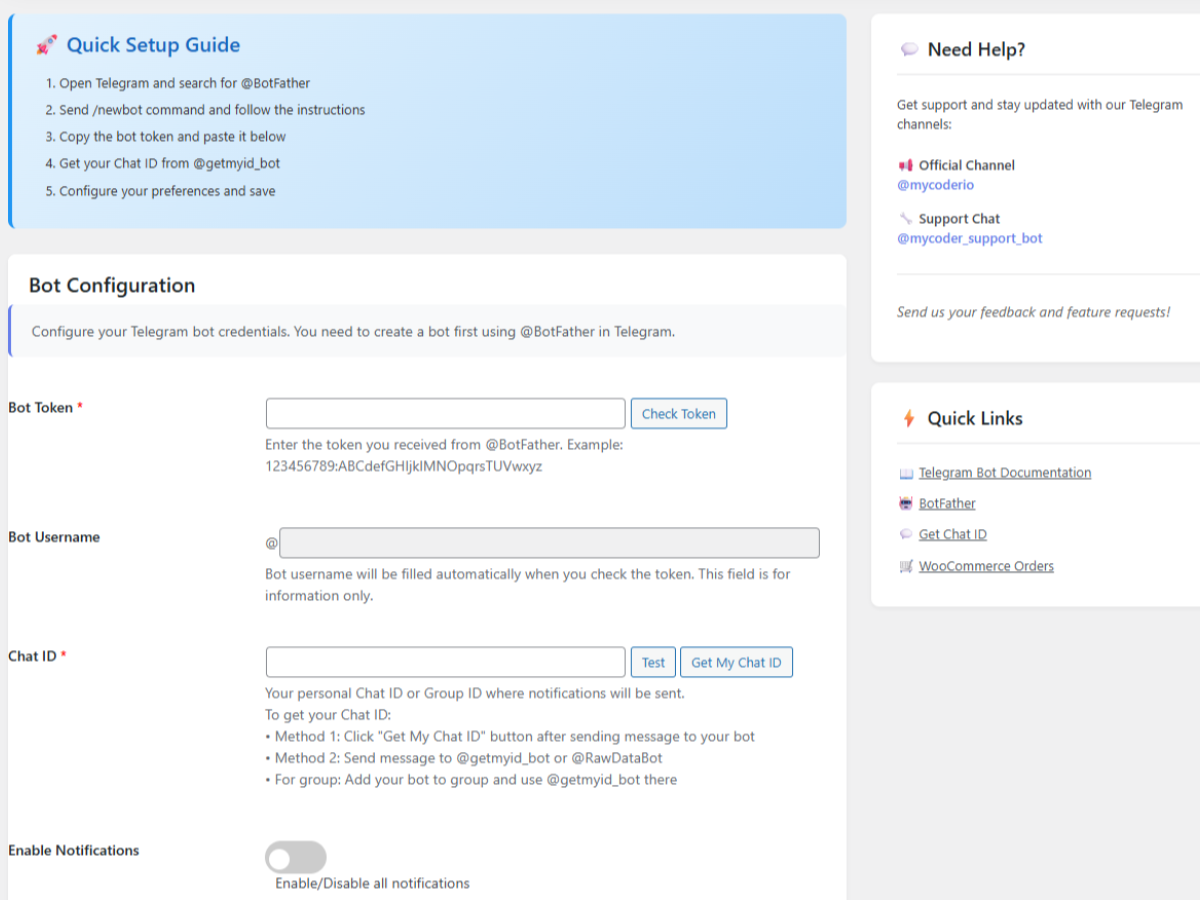
Main settings page with bot configuration
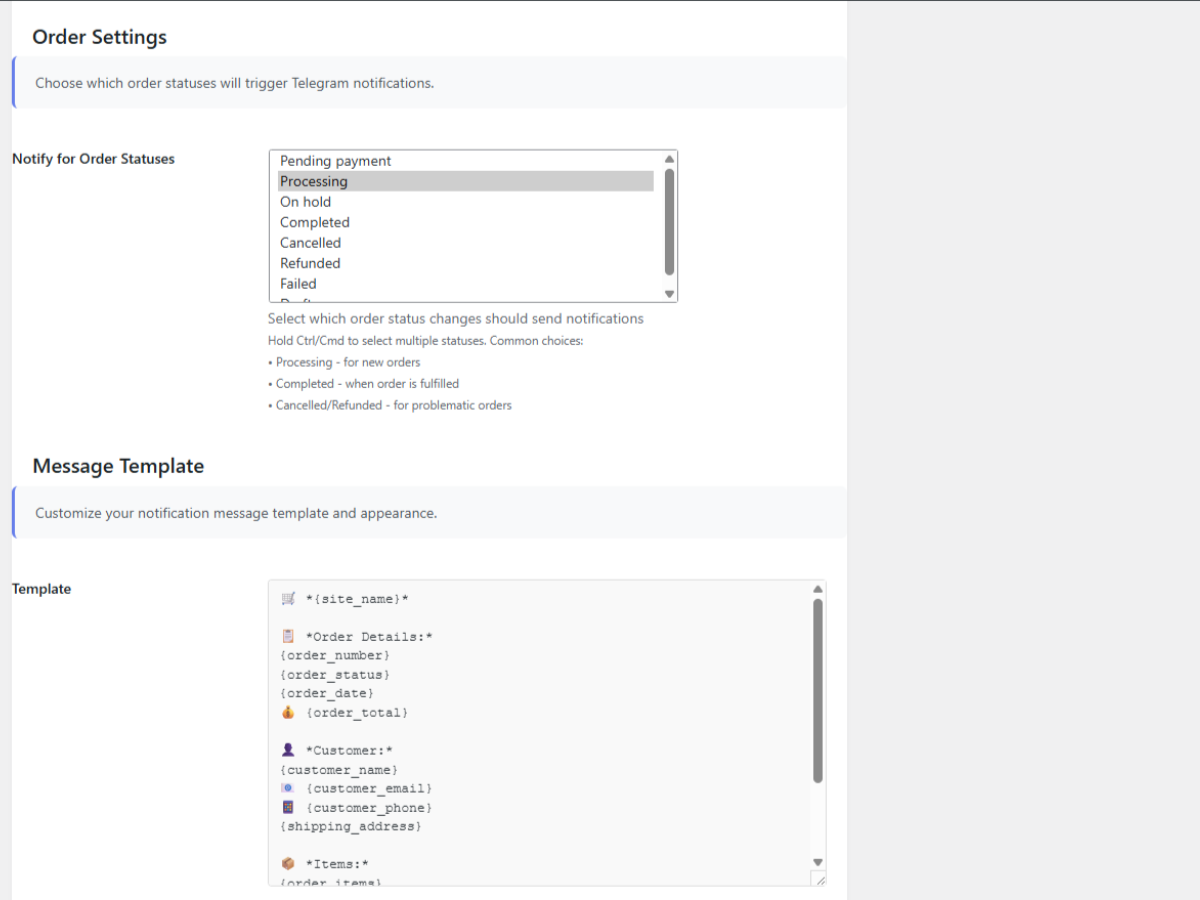
Message template customization
Example notification in Telegram
Quick setup guide
Changelog
1.0.2
- Added plugin icon (128×128) and banner (772×250) for WordPress.org repository
- Improved visual design and user interface
- Fixed display issues in settings page
- Enhanced code documentation
1.0.1
- Added multilingual support with complete translations
- Added translations: Russian (Русский), Spanish (Español), French (Français)
- Improved code structure for better maintainability
- Fixed minor display issues in settings page
- Added language information to readme
- Updated plugin description with translation details
1.0.0
- Initial release
- Core notification functionality
- Customizable message templates
- Multi-status support
- Product image support
- Connection testing tools