

NP Forex Commodity Widget
Adds commodity prices, exchange rates and fuel rates widget.
Plugin info
Maintenance & Compatibility
Maintenance score
Possibly abandoned • Last updated 2023 days ago
Is NP Forex Commodity Widget abandoned?
Possibly abandoned (last update 2023 days ago).
Compatibility
Languages
Similar & Alternatives
Explore plugins with similar tags, and compare key metrics like downloads, ratings, updates, support, and WP/PHP compatibility.
Description
NP Forex Commodity Widget is a simple and light weight plugin to that to add up a widget that shows current commodity prices, exchange rates and fuel rates
Usage
- Just install, activate and use the widgets.
External Services used in plugin are given below
- JSON data of daily commodity price – https://mahesh-maharjan.com.np/npfc/public/api/commodity that is returned from fenegosida.org
- JSON data of daily exchange rates – https://mahesh-maharjan.com.np/npfc/public/api/forex that is returned from nrb.org.np
- JSON data of fuel rates – https://mahesh-maharjan.com.np/npfc/public/api/fuel that is returned from nepaloil.com.np
- JSON data service provider – Terms of use https://mahesh-maharjan.com.np/npfc/public/terms-of-use
Disclaimer
NP Forex Commodity Widget will not accept any liability for loss or damage as a result of reliance on the information provided by this plugin including prices, rates and any information.
Installation
The easy way (via Dashboard) :
- Go to Plugins > Add New
- Type in the NP Forex Commodity Widget in Search Plugins box
- Click Install Now to install the plugin
- After Installation click activate to start using the NP Forex Commodity Widget
- Go to widgets page from Dashboard menu and you’ll see the widgets being populated in the list
Not so easy way (via FTP) :
- Download the NP Forex Commodity Widget
- Unarchive NP Forex Commodity Widget plugin
- Copy folder with np-forex-commodity-widget.zip
- Open the ftp \wp-content\plugins\
- Paste the plug-ins folder in the folder
- Go to admin panel => open item “Plugins => activate” NP Forex Commodity Widget
- Go to widgets page from Dashboard menu and you’ll see the widgets being populated in the list
Frequently Asked Questions
Review feed
Screenshots

NFCW Commodity Price Widget

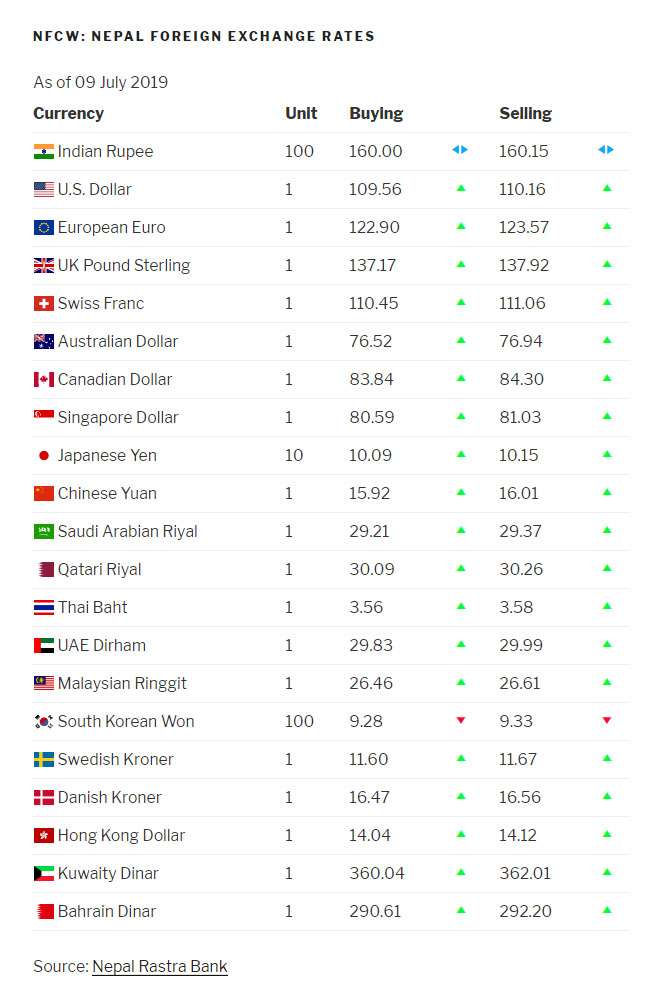
NFCW Exchange Rates Widget

NFCW Fuel Price Widget

Changelog
1.6 (Released: July 22, 2020)
- Compatibility check with WordPress 5.4
- Bug Fixed: No data error
1.5 (Released: February 25, 2020)
- Updated: API
- Code Optimization and enhancement
- Bug Fixes
1.4 (Released: July 28, 2019)
- Added: Increase or Decrease in value and notation
- Updated: Enhanced Design
- Updated: API URL
1.3 (Released: May 28, 2019)
- Update: Forex Database
1.2 (Released: January 2, 2019)
- Added: Oil Price Widget
= 1.1.1 (Released: May 18, 2018)
* Bug Fixed: CSS and JS missing
= 1.1 (Released: May 16, 2018)
* Updated Widget design
* Changed API url
= 1.0
* Initial Public Release