

O3World Members-Only Categories
Designate categories as "members-only" via 'Privacy Settings.' Assign them to users via 'Profile.'
Plugin info
Maintenance & Compatibility
Maintenance score
Possibly abandoned • Last updated 5201 days ago • 1 reviews
Is O3World Members-Only Categories abandoned?
Possibly abandoned (last update 5201 days ago).
Compatibility
Similar & Alternatives
Explore plugins with similar tags, and compare key metrics like downloads, ratings, updates, support, and WP/PHP compatibility.
Description
If you’d like to make the content on your site visible only to certain users using categories, look no further!
Designate certain categories as “members-only” via Privacy Settings.
An administrator may then assign a user to them via Profile.
Only content belonging to “public” categories (any top-level category you do not designate as “members-only”), and categories assigned to the logged-in user, and all subcategories of either, will be visible.
I would like to thank the action hook pre_get_posts, without which this plugin would not have been possible.
O3World
This plugin was created by [email protected]
We’re an online marketing strategy / custom web and mobile development agency in Philadelphia.
Among other things, we love WordPress.
Installation
- Upload
o3world-members-only-categories.phpto the/wp-content/plugins/directory - Activate the plugin through the Plugins menu in WordPress
- Within Settings -> Privacy you’ll see a new section titled Members-Only Categories. This is a listing of all your top-level categories. Tick the checkbox next to those you would consider “private.”
- To grant a user access to one or more of those categories, tick the checkboxes at the bottom of their Profile in a new section also titled Members-Only Categories. Only a user who can edit users (administrator) may do this.
- Log out of WordPress, and log in as that user. The content on your site should now be filtered by “public” and “members-only” categories.
Frequently Asked Questions
If “User Access Manager” exists, why must this plugin also exist?
While User Access Manager is a fine plugin, it may be cumbersome to grant access to one or more user groups upon editing each and every post.
By contrast, with this plugin, you need only consider a category as “members-only,” and any content created within it will automaticaly be viewable only to those users assigned to it.
If you’d like to redirect a user to a different page upon logging in, instead of Profile, you might try WordPress Login Redirect or something similar.
Review feed
Screenshots
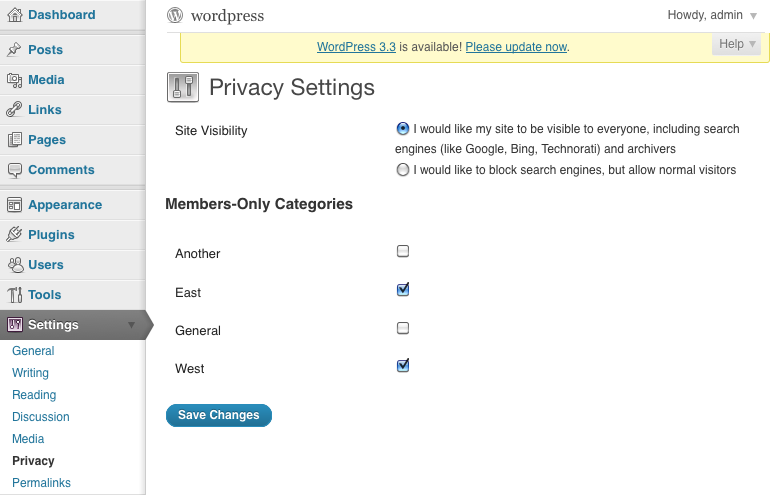
Within Settings -> Privacy, Any top-level category may be designated "members-only" .

Edit a user's Profile to grant access to view content present in any "members-only" category.
Changelog
1.03
Specify hide_empty argument (set to false) in call to get_categories, so that ALL top-level categories are shown.
1.02
Added logic to pre_get_posts hook to return $query as-is when $query->query_vars[ ‘suppress_filters’ ] is set and true.
1.01
- Add empty callback function ‘o3_moc_edit_categories’, referenced in add_settings_section( ).
1.0
- Initial release.