

Plugin info
Maintenance & Compatibility
Maintenance score
Possibly abandoned • Last updated 4913 days ago
Is Ody Events abandoned?
Possibly abandoned (last update 4913 days ago).
Compatibility
Similar & Alternatives
Explore plugins with similar tags, and compare key metrics like downloads, ratings, updates, support, and WP/PHP compatibility.
Description
You can easily turn any post or page to an event! Set which dates are associated with this event and browse the events through the calendar widget.
Simply click the event date and then the appropriate post links will be loaded automatically.
Ody Events does the following:
1. Creates a custom field for posts or/and pages that helps you inserting dates easily. The feature is available for saved posts, and the data are stored in a new database table.
2. Creates a new group named “Ody Events” in the admin menu of your WordPress installation.
3. Creates a sidebar widget. You can drag this widget to any of your sidebars. This widget is a 270 pixels wide calendar, similar to the iphone’s one.
Feedback
If you have any questions, comments, ideas, feedback, I would love to hear from you, so please feel free to reach me at [[korinthorama at gmail dot com]]
Installation
This section describes how to install the plugin and get it working.
- Upload
ody_eventsfolder to the/wp-content/plugins/directory - Activate the plugin through the ‘Plugins’ menu in WordPress
- Set the plugin’s options
- Go to Appearance -> Widgets and you will see the
Ody Calendarwidget. Add this widget to your sidebar.
Frequently Asked Questions
Can I change the colors or the size of the widget?
For the moment this feature is available only in pro version.
Can I use the events functionality only in pages?
Yes, just select the post type you want in admin panel settings page.
Review feed
Screenshots
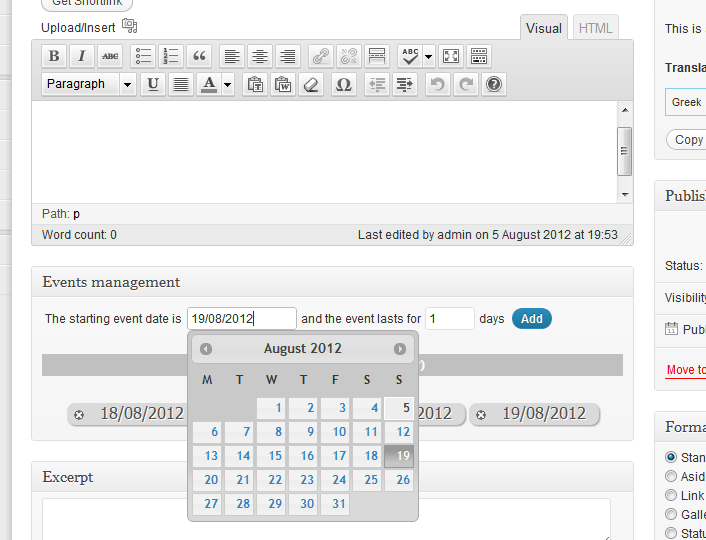
Add Events Page

Calendar widget

Admin options
Changelog
0.1
- First version