

Leadbolt WordPress Unlocker
Plugin to allow Leadbolt.com's unlockers to be easily added to your WordPress site or blog.
Plugin info
Maintenance & Compatibility
Maintenance score
Possibly abandoned • Last updated 5650 days ago
Is Leadbolt WordPress Unlocker abandoned?
Possibly abandoned (last update 5650 days ago).
Compatibility
Similar & Alternatives
Explore plugins with similar tags, and compare key metrics like downloads, ratings, updates, support, and WP/PHP compatibility.
Description
Plugin to allow Leadbolt.com’s unlockers to be easily added to your WordPress site or blog.
Installation
- Upload the ‘official-leadboltcom-wordpress-plugin/’ directory to the ‘/wp-content/plugins/’ directory.
- Activate it through the ‘Plugins’ menu in WordPress. You will then see a new menu item appear under Settings.
- Click Settings => Leadbolt Unlocker Options link.
- Use the given form to enter your unlocker code & select the pages and/or posts you wish to add the unlocker to.
Frequently Asked Questions
How does this plugin work ?
This plugin makes it easy to add Leadbolt.com’s unlocker to your wordpress site or blog without editting the theme files. It does this by providing a Leadbolt unlocker setting page where you can enter the HTML code for each unlocker set up in Leadbolt.com’s portal. The plugin will insert your codes using the wp_print_scripts action.
Can I have more than one Leadbolt unlocker on my wordpress site or blog ?
Yes, just add each unlocker code into the settings pages and select the pages and post for it to appear. Please ensure if using mulitple unlockers to only have 1 unlocker defined for each page or post. This plugin will take and display the first active unlocker found.
Review feed
Screenshots
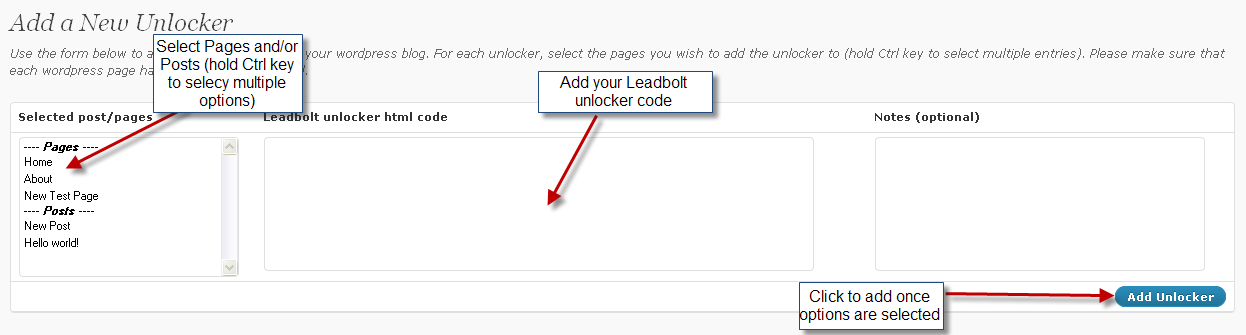
Adding a Leadbolt unlocker to your wordpress site or blog.
Changelog
1.0
- Initial release – 26th July 2010
1.1
- Updated default limit of 5 when displaying Posts in the “Selected Post/Page” drop-down list – 13th Oct 2010