

StatCounter – Free Real Time Visitor Stats
StatCounter.com powered real-time detailed stats about the visitors to your blog.
Plugin info
Maintenance & Compatibility
Maintenance score
Maintained • Last updated 121 days ago • Support resolved 100% • 47 reviews
Is StatCounter – Free Real Time Visitor Stats abandoned?
Likely maintained (last update 121 days ago).
Compatibility
Similar & Alternatives
Explore plugins with similar tags, and compare key metrics like downloads, ratings, updates, support, and WP/PHP compatibility.
Description
The Official StatCounter WordPress Plugin brings you all the powerful StatCounter features to your wordpress blog.
Including but not limited to the following:
- Invisible Counter Option
- Configurable Counter
- Configurable Summary Stats
- Magnify User
- Drill Down
- Popular Pages
- Entry Pages
- Exit Pages
- Came From
- Keyword Analysis
- Recent Keyword Activity
- Search Engine Wars
- Visitor Paths
- Visit Length
- Returning Visits
- Recent Pageload Activity
- Recent Visitor Activity
- Country/State/City Stats
- Recent Visitor Google Map
- ISP Stats
- Browser Stats
- O.S. Stats
- Resolution Stats
- JavaScript Stats
- Email Reports
- Multiple Site Management
- User Access Management
- Public Stats
- Blocking Cookie
Installation
StatCounter is a free web traffic analysis service, which provides summary stats on all your traffic and a detailed analysis of your last 500 page views. This limit can be increased by subscribing to their paid service.
To activate the StatCounter service for your WordPress site:
- Sign Up with StatCounter or add a new project to your existing account
- The installation process will detect your WordPress installation and provide you with your Project ID and Security Code
- The installation instructions are also available at http://statcounter.com/wordpress.org/
Frequently Asked Questions
Review feed
Screenshots
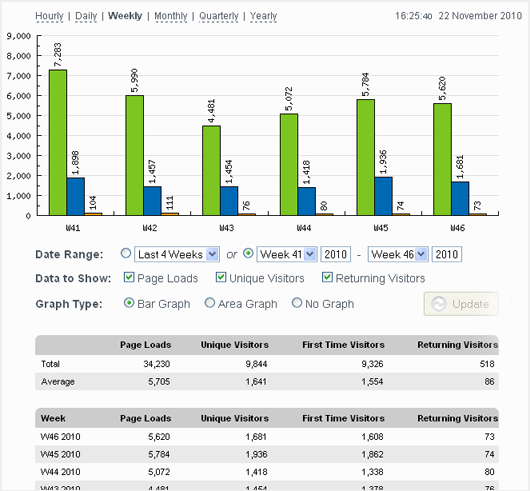
Example StatCounter.com Summary Stats
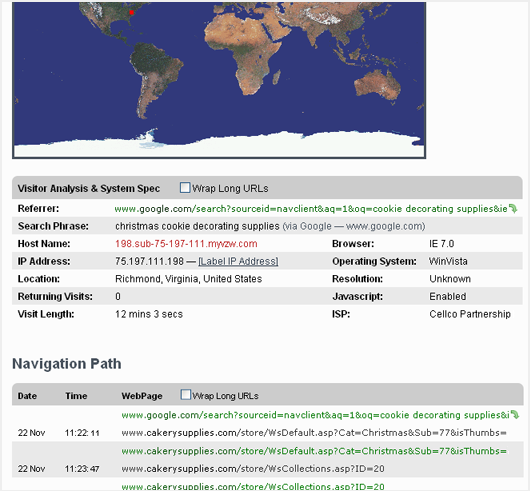
Using the magnify tool, you can "zoom in" on individual visitors and get a detailed report on where they are from, their system settings, and most importantly, what link reffered them to your site and their navigation path through your site.
Changelog
2.0.9
Updated security checks
2.0.8
Added additional security checks
2.0.7
Added additional sanitation to prevent XSS attacks
2.0.6
Readme fix
2.0.5
Bug fix for async JS support
2.0.4
Async JS support
2.0.2
Compatibility enhancements
2.0.1
Security enhancements
2.0
StatCounter Tags supported.
1.7.1
Removed unnecessary type attribute from script element
1.7
Updated constant definitions to be case sensitive
1.6.9
Fixed small bug with form
1.6.8
Addd StatCounter https compatible code
1.6.7
Support https/http for wordpress admin section when viewing StatCounter stats
1.6.6
Removed deprecated function calls
1.6.5
Modified url used for dashboard to not include project id when it has not been set.
1.6.4
Improved UI to give error message in dashboard when no project id has been set
1.6.3
- Bug fix to prevent user entry of whitespace characters for Project ID and Security Code
1.6.2
- Bug fix for Upgrade with PayPal link.
1.6.1
- Correct incorrect spelling of ‘invisibility’
1.6
- Removed the ‘Logging Enabled/Disabled’ option (you can deactivate the plugin instead). Updated installation instructions.
1.5
- Removed option to set partition – no longer required.
1.4
- Added noscript to StatCounter code – allowing non-javascript enabled visitors to be tracked.
1.3
- Added counter position option. Allows you to specify the position of the counter in the header or footer.
- Added ‘forced invisibility’ option. Allows you to enable an invisible counter without logging into your StatCounter account.
1.2
- Fixed critical bug.
1.1
- Added ability to view StatCounter Stats from within the WordPress Admin.