

ONet Regenerate Thumbnails
Fix missing thumbnails in no time with few easy clicks. The plugin does the hard work.
Plugin info
Maintenance & Compatibility
Maintenance score
Possibly abandoned • Last updated 3048 days ago • 11 reviews
Is ONet Regenerate Thumbnails abandoned?
Possibly abandoned (last update 3048 days ago).
Compatibility
Similar & Alternatives
Explore plugins with similar tags, and compare key metrics like downloads, ratings, updates, support, and WP/PHP compatibility.
Description
This plugin helps you to fix any missing thumbnail issue in a fairly short time. The only thing you need to do is just few simple click and the plugin does the rest. It can be really helpful if you have thousands of images in your database.
You can regenerate thumbnails for each single image in your database or you can simply select those you really want to update. If you choose a post or page the plugin will regenerate thumbnails for each related images. You can choose from the following methods:
- Regenerate thumbnails for all images in the database.
- Bulk action in post liste: You can choose which one to update by checking the checkboxes.
- Media library items: Move your mouse over the chosen image(s) and click on “Regenerate thumbnails” link.
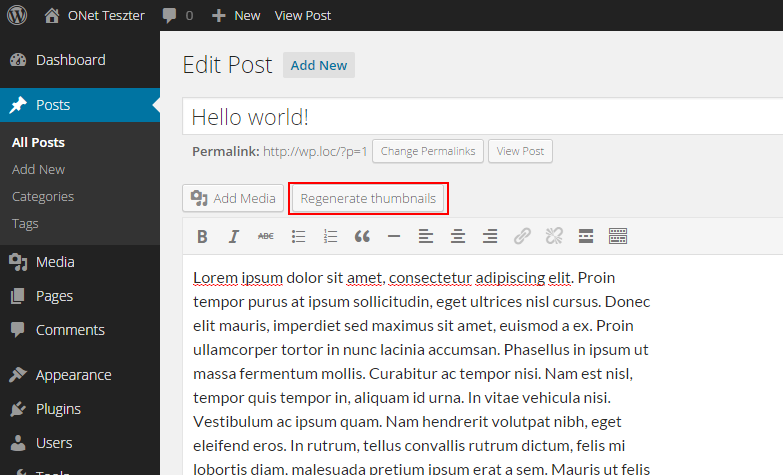
- Post editor: click on “Regenerate thumbnails” button which is next to “Add media” button. (Off by default)
Furthermore you can add your own thumbnails sizes, change default JPG compression rate and mass regenerate thumbnails. The best thing about this plugin is that you can use it with custom post types as well.
Installation
- Install ONet Regenerate Thumbnails either via the WordPress.org plugin directory, or by uploading the files to your server
- Activate the plugin through the ‘Plugins’ menu in WordPress
- Chose a method listed in description.
Frequently Asked Questions
Installation Instructions
- Install ONet Regenerate Thumbnails either via the WordPress.org plugin directory, or by uploading the files to your server
- Activate the plugin through the ‘Plugins’ menu in WordPress
- Chose a method listed in description.
I can’t see any changes on the site. Why this plugin does nothing?
This plugin adds and replaces missing image files if the original file is valid and exists. If you want to add thumbnails next to your posts this is not the plugin you are looking for.
“Regenerate thumbnails” is missing from post editor. Where I can turn it on?
Go to Tools > Regen. Thumbnails and you can change the settings on the right.
I’m on Regen. thumbnails dashboard but nothing happens. How can i start the process?
You can find a big blue button under the statics, click on that button.
Review feed
Doesnt have 4.4.1 support completely
Screenshots
/assets/screenshot-1.png

/assets/screenshot-2.png

/assets/screenshot-3.png
Changelog
1.6
- Updated for WordPress 4.5.2.
- Special thanks to Harry Milatz for testing the plugin.
1.5
- Updated for WordPress 4.0
1.4
- Fixes for developers in debug mode
1.35
- Updated to WordPress 3.8
- Estimated time update
1.3
- Various text updates
- Estimated time fix
- Server side task storage
- Lost custom thumbnails fix
- Ability to change default WordPress JPG compression rate.
- Mass thumbnail regeneration
1.2
- Custom thumbnail creator in admin.
1.1
- Settings link added in plugin admin.
- Some language issue fixed.
- Uploads.php link replaced with upload.php
1.0.1
- Minor changes (package size reduction)
1.0
- Initial release