

Optimized Dropdown Menus
Create "spiderable" drop-down menus that every search engine will scan!
Plugin info
Maintenance & Compatibility
Maintenance score
Possibly abandoned • Last updated 4365 days ago • 1 reviews
Is Optimized Dropdown Menus abandoned?
Possibly abandoned (last update 4365 days ago).
Compatibility
Similar & Alternatives
Explore plugins with similar tags, and compare key metrics like downloads, ratings, updates, support, and WP/PHP compatibility.
Description
By using Optimized Dropdown Menus Widget, you’ll be able to create dropdown menus that are searchable or “spiderable” by search engine bots.
So how does it work?
Basically, it works like this:
The menu’s markup code is being printed as an ordinary nested menu. e.g.
Since most browsers support JavaScript, using the widget, the markup would be translated into something like this
The tricky part here is, that search engines do not usually interpret JavaScript, all they will be able to scan is the nested menu. That way they will reach out for those pages, and most probably will crawl those pages as well.
ODM also supports a range of per-widget settings:
- Control whether links will be open in new window or in the same window
- Choose to use HTML5/XHTML markup for the menu
Features set for the next versions
Soon there will be an option for developers to use the same functionality via the code. e.g.
Translations
Currently, these translations are available:
- Spanish (es_ES) – in courtesy of Ognjen Djuraskovic
- Serbian (sr_RS) – in courtesy of Ognjen Djuraskovic
Installation
Install Optimized Dropdown Menus in 3 easy steps
- Upload the plugin folder to the
/wp-content/plugins/directory - Activate the plugin through the ‘Plugins’ menu in WordPress
- Go to Appearance > Widgets and drag the widget (“Optimized Dropdown Menu”) to any sidebar you wish
Frequently Asked Questions
How do I add a menu?
First you should set up a menu before you attempt to use the widget. In order to do that, go to Appearance > Menus and create a new menu. When you’re finished creating and saving the new menu, go back to Appearance > Widgets and select the appropriate menu.
Review feed
Screenshots
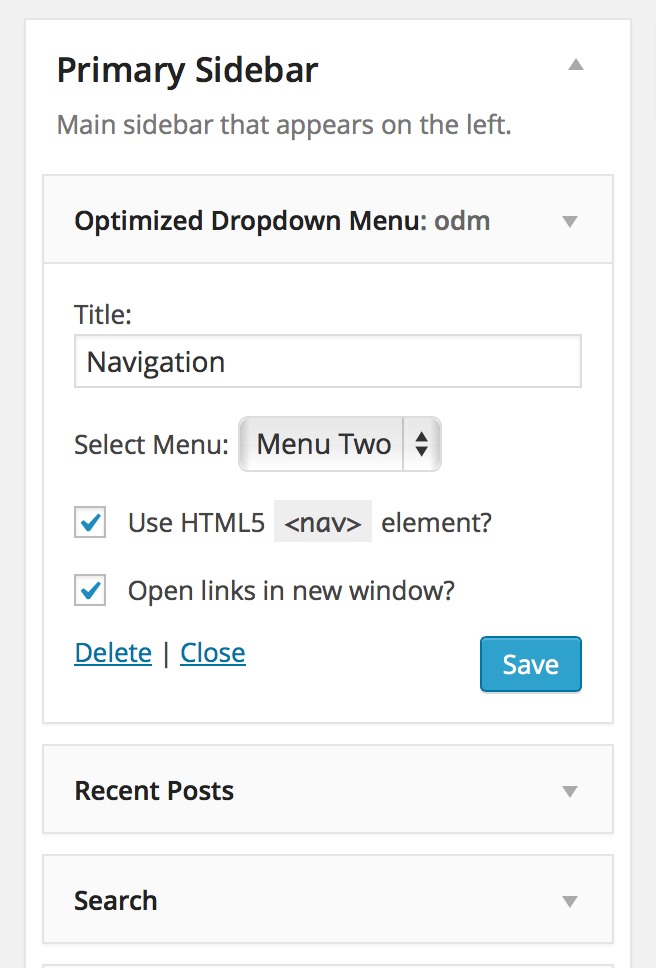
Widget Settings

How it looks on the front-end
Changelog
1.2.2
- New! Added support for opening links in new window. Proposed by Kari S.
1.2.1
- Added new es_ES, sr_RS translations. Thank you, Ognjen Djuraskovic!
1.2
- Optimized Dropdown Menus is now translation-ready
1.1
- Fixed bug where the menu was rendered, but the “Go” button was not responding. props Graham W.
- Codebase improved, now wrapped in a class
1.0
- Initial release.