

Optional Content
This plugin makes it easy to conditionally display content. No more if statements in your template files!
Plugin info
Maintenance & Compatibility
Maintenance score
Possibly abandoned • Last updated 5370 days ago • 2 reviews
Is Optional Content abandoned?
Possibly abandoned (last update 5370 days ago).
Compatibility
Similar & Alternatives
Explore plugins with similar tags, and compare key metrics like downloads, ratings, updates, support, and WP/PHP compatibility.
Description
This plugin allows you to show or hide content on a page or post based on a simple shortcode. You don’t need PHP knowledge, or a PHP enabling plugin. Simply use a button on the WYSIWYG editor to select under what condition you would like the content displayed. Fast, simple, and safe. Keep your template files clean by removing your PHP logic. Now allows shortcodes inside of the conditional content.
Display content based on the following conditions:
- Manual on/off setting
- Before, after, or between specific times (repeated daily)
- Before, after or between specific dates
- Based on if the visitor is logged in
- Based on a specific user (by user id) or multiple users (by user id)
- Based on GET variables (variables passed on the URL in the form of http://www.example.com/about/?test=value where the variable is ‘test’)
- Based on POST variables (variables sent via forms)
- Based on REQUEST variables (either GET or POST variables)
Installation
- Upload the folder
optional-contentto the/wp-content/plugins/directory - Activate the plugin through the ‘Plugins’ menu in WordPress
- Use the ‘[if]’ button now on the tinyMCE WYSIWYG editor.
Frequently Asked Questions
I don’t see a new button on the editor?
Try clicking the ‘show/hide kitchen sink’ button. This will display additional buttons, and may reveal the ‘[if]’ button. If not, clear your browser cache and try again.
Can I do a date AND a time?
Yes, this plugin uses the PHP function strtotime(), so you can do date and time like ‘2010-12-31 23:59:59’ in the ‘date’ field for 12:59:59PM on Dec. 31 2010. See the PHP documentation for strtotime() for more examples of what you can use.
Review feed
Screenshots
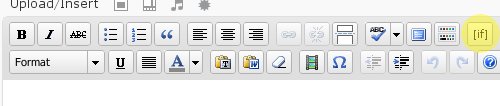
The editor button

The window to insert the optional content
Changelog
1.1
Fixed issues with selecting a user
Added the ability for multiple users
Now allows for shortcodes inside shortcodes
1.0.0
- Plugin functional and tested by a small group of volunteers