

Orange Confort+ accessibility toolbar for WordPress
Add the Orange Confort+ accessibility toolbar to your WordPress site.
Plugin info
Maintenance & Compatibility
Maintenance score
Stale • Last updated 195 days ago
Is Orange Confort+ accessibility toolbar for WordPress abandoned?
Likely maintained (last update 195 days ago).
Compatibility
Languages
Similar & Alternatives
Explore plugins with similar tags, and compare key metrics like downloads, ratings, updates, support, and WP/PHP compatibility.
Description
This plugin adds the Orange Confort+ accessibility toolbar, version 4.3.5, to your WordPress website.
Orange Confort+ aims to enhance user experience on your website. It works best when your website is fully accessible because it does not fix website accessibility issues: blocking points stay blocking points, with or without Orange Confort+.
The Orange Confort+ service was created by Orange. It provides significant assistance to users with motor, visual or cognitive disabilities (such as dyslexia), and improves the user experience for all.
Toolbar features
- Typography: font size, word-spacing, letter-spacing, line-height, font-face (Arial, Luciole, Open Sans, Open Dyslexic and Accessible DfA).
- Layout: cancel layout, force left-aligned text, number list items, customize links appearance, display a reading mask.
- Colors: modify foreground and background colors.
- Behavior: direct access to main content on page load, automatic selection of page clickable elements with a user defined delay, page scrolling on simple user on hover.
- Toolbar available in French, English, Polish and Spanish, defaulting to the site language.
Plugin features
- Toolbar and button position can be set on Settings > Reading.
- Custom button position with a shortcode.
- Compatible with many Cookie Consent plugins via WP Consent API.
- WordPress Multisite compatible.
Privacy / GDPR
Neither this plugin nor the Orange Confort+ accessibility toolbar collect any user or visitor data. The Orange Confort+ accessibility toolbar uses two functional browser cookies, used for storing user selected accessibility options.
- UCI42 – Stores user toolbar settings; set at page load; domain specific; expires after 1 year.
- uci-bl – Stores toolbar on/off toggle; set when toolbar toggle is used; domain specific; session only.
Please update your site’s GDPR/Cookie Consent documentation to reflect this information.
This plugin is compatible with any Cookie Consent plugin that supports the WP Consent API. At this time, the WP Consent API proposal has not been merged into core yet, so you’ll need to install and acivate the WP Consent API plugin.
Installation
Frequently Asked Questions
Toolbar and button position can be set on Settings > Reading.
A shortcode ocplus_button is available to allow giving the Orange Confort+ button a custom location. The shortcode will generate a Button block with one button “Confort +”.
Add the following shortcode in an Shortcode block where you wish the button to appear in any template part or widget zone.
[ocplus_button style="outline" color="black" bgcolor="" /]
If you wish to add the button to a custom, classic (non-FSE) theme PHP template file, you can use this:
echo do_shortcode( '[ocplus_button style="outline" color="black" bgcolor="" /]' );
These parameters are available to make it match your site theme more closely:
- style for the button style; can be fill or outline (default: not set). Note: styles may not work as expected, depending on your theme.
- color set the text color and outline color (default: white). Note: the + sign will always remain orange.
- bgcolor sets the button background color (default: not set).
Please note: there can be only one button on a web page and not all toolbar positions may work well in combination with a custom button position.
Review feed
Screenshots

The Orange Confort+ accessibility toolbar.

Enlarging characters, changing the fonts and the spacing in the text: useful for dyslexic users, users with vision problems, or simply subject to visual fatigue.

Changing the layout, displaying a reading rule: mainly useful for visually impaired and cognitively impaired users who have difficulty identifying the information on the page, as well as motor disabled users who can’t use the mouse or those using keyboard navigation only.

Choosing a custom palette for the text color and page background.
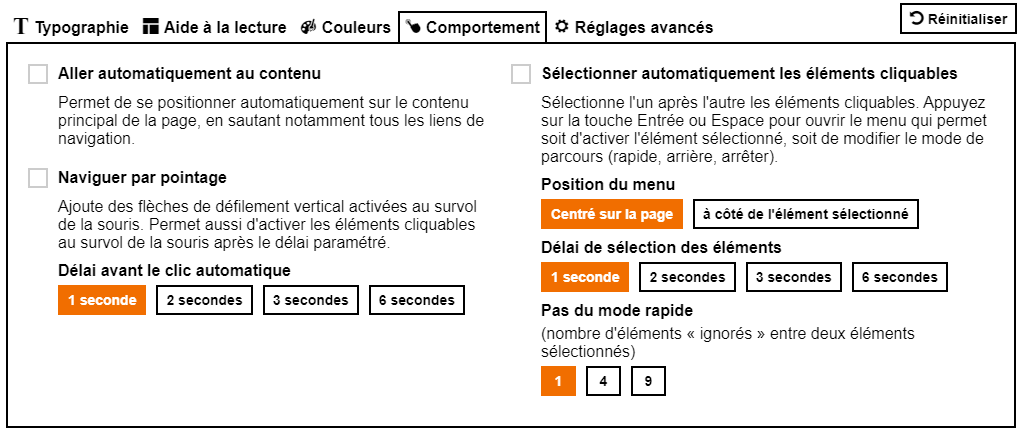
Advanced behavior tools and options.

Toolbar admin options on Settings > Reading.
Changelog
0.7
20250922
* Orange Confort+ script version 4.3.6
* Consent API wrapper script cache invalidation
* Plugin action/meta links
0.6
20240702
* Classes + autoload for modular file inclusion.
* Orange Confort+ script version 4.3.5
0.5
20240629
* New toolbar position: Window top
* Shortcode with parameters style, color, bgcolor for custom button position.
0.4
20240609
* Toolbar Positions: Top/bottom, left/right
0.3
20240607
* WP Consent API compatibility
0.2
20240607
* Button position: bottom screen (fixed)
0.1
20240605
* Initial implementation, Orange Confort+ script version 4.3.3