

Plugin info
Maintenance & Compatibility
Maintenance score
Possibly abandoned • Last updated 539 days ago • Support resolved 0% • 13 reviews
Is Order Attachments for WooCommerce abandoned?
Possibly abandoned (last update 539 days ago).
Compatibility
Similar & Alternatives
Explore plugins with similar tags, and compare key metrics like downloads, ratings, updates, support, and WP/PHP compatibility.
Description
Do you want to add attachments to orders in your store? Or maybe you sell virtual products, but only after paying for the order do you want to send the customer a file? This plugin allows you to add a file to orders in your store! An option appears in the administration menu of the order, thanks to which you can attach any file to it. The customer is informed about the attachment in an e-mail notification informing about the change of the order status or can preview the attachment in the Orders menu in the My Account tab.
Features
- Order Attachments for WooCommerce allows you to add an attachment to an order from the administration menu.
- When the attachment is added, the customer will be informed about it in an email notification informing about the change of order status.
- The customer can view the attachment in the Orders menu in the My Account tab.
Compatibility
- WordPress 6.4+
- WooCommerce 8.4+
Feedback
Thank you for installing this plugin. Hope it’s perfect for your purposes. If you think the plugin is helpful, please rate us 5/5 stars and comment or suggest what else you want about this plugin. If you notice that a plugin is not working properly, please give us the reason and we will try to fix the error or fix the problem quickly.
Installation
- Upload your plugin folder to the ‘/wp-content/plugins’ directory.
- Activate the plugin through the ‘Plugins’ menu in WordPress.
- All done. From now on, you can add attachments to orders from the order admin menu.
Frequently Asked Questions
Yes, this plugin is compatible with all latest version of WooCommerce themes.
Review feed
Just what i needed
Screenshots
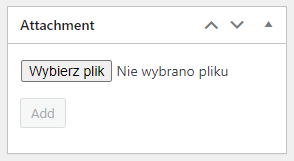
Editing order - before adding an attachment.

Editing order - after adding an attachment.

An example email sent after adding an attachment.

'Attachments' tab - preview of all attachments.
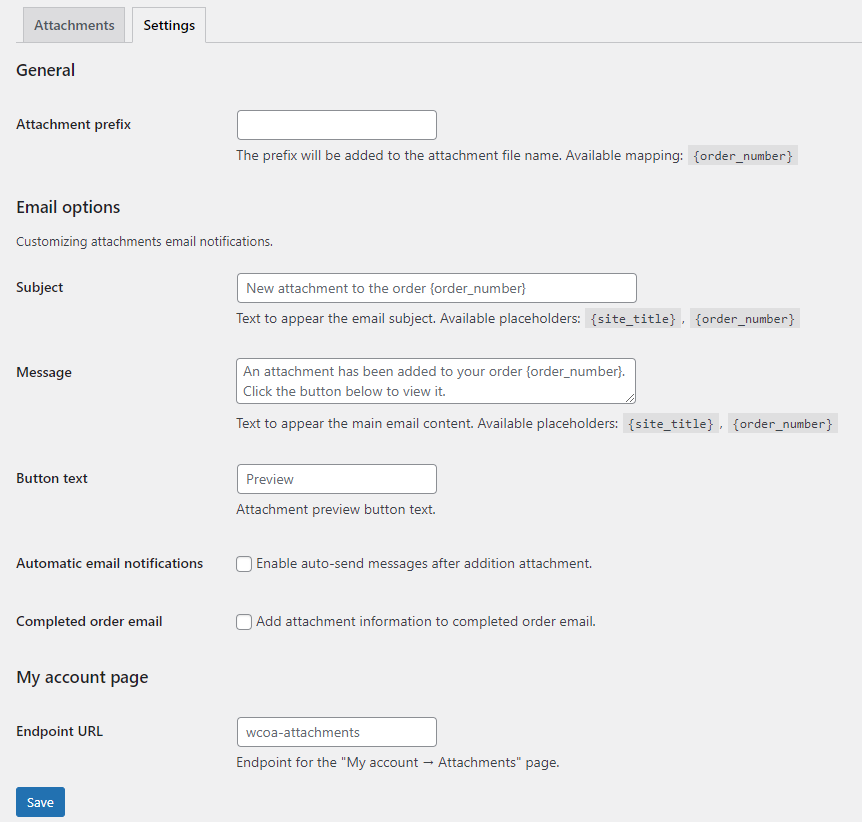
'Attachments' tab - settings.

Changelog
2.5.1
- Fixed – Versioning of styles and scripts.
2.5.0
- Added – Check whether the attachment’s extension is within the range returned by the get_allowed_mime_types() function.
- Added – Check whether the user has the permission to edit the order to which the attachment is being added, using the current_user_can() function and the ‘edit_post’ capability.
- Added – Verification of the attachment request to ensure it does not originate from outside the website using the check_ajax_referer() function.
- Added – Shortcode [wcoa_display_all_attachments], which allows displaying all orders for the current user.
2.4.1
- Fixed – Missing attachment link in the email message when HPOS mode is enabled.
- Added – More logging throughout the application for improved event tracking.
- Tested with WordPress 6.6.2
- Tested with WooCommerce 9.3.3
2.4.0
- Added – Composer support for dependency management.
- Added – PSR-4 autoloading standard for improved class loading and organization.
- Added – Logging functionality to track plugin events and errors.
- Added – Option to display attachment name on the ‘My Account Attachments’ page.
- Added – Option to copy the attachment URL to the clipboard in the order edit screen.
- Tested with WooCommerce 9.2.2
2.3.2
- Fixed – Fatal error on deleting attachment.
2.3.1
- Fixed – Fatal error on activation plugin.
2.3.0
- Added – Minimum required PHP version 8.0.
- Fixed – Support for High-Performance Order Storage (HPOS).
- Fixed – SQL queries.
- Fixed – Display of the attachment list.
- Bug fixes.
- Tested with WordPress 6.6.1
- Tested with WooCommerce 9.1.4
2.2.2
- Fixed – translations
- Fixed – SQL queries
2.2.1
- Bug fixes.
2.2.0
- Added – Support for High-Performance Order Storage (HPOS)
- Added – Ability to set a custom URL for the My Account Attachments endpoint.
- Added – Ability to set a prefix for the attachment file name.
- Fixed – Permissions handling.
- Fixed translations.
- Bug fixes.
- Tested with WordPress 6.4.2
- Tested with WooCommerce 8.4.0
2.1.1
- Fixed – View of attachments in the My Account tab.
- Fixed translations.
- Bug fixes.
- Tested with WooCommerce 7.6.0
2.1
- Added – Ability to send information about attachments in completed order email.
2.0.1
- Bug fixes.
2.0
- Added – Ability to add more than one attachment per order.
- Added – The email is sent automatically after adding an attachment.
- Added – The ‘Attachments’ tab in the administration menu.
- ‘Attachments’ tab – Preview of all orders, the ability to resend an email, deleting an attachment.
- ‘Attachments’ tab, Settings – Possibility to change the subject, content and preview button in the email template.
- ‘Attachments’ tab, Settings – Possibility to disable/enable automatic emails after adding an attachment.
- Added – The ‘Attachments’ tab in the My Account menu.
- Plugin rebuild.
- Compatibility with the attachment from previous versions of the plugin.
- Tested with WordPress 6.2
- Tested with WooCommerce 7.5.1
1.1
- Bug fixes.
- Added – Option to delete an attachment while editing an order.
- Tested with WordPress 5.9.3
- Tested with WooCommerce 6.3.1
1.0
- Initial release.