

Origami For Contact Form 7 – Visual Form Progress
Tired of boring forms? Enhance your Contact Form 7 with interactive origami animations, making form-filling fun and engaging!
Plugin info
Maintenance & Compatibility
Maintenance score
Possibly abandoned • Last updated 454 days ago
Is Origami For Contact Form 7 – Visual Form Progress abandoned?
Possibly abandoned (last update 454 days ago).
Compatibility
Languages
Similar & Alternatives
Explore plugins with similar tags, and compare key metrics like downloads, ratings, updates, support, and WP/PHP compatibility.
Description
Origami For Contact Form 7 transforms standard forms into interactive, visually engaging experiences. Each form field reveals a step of an origami animation—birds, boats, trees, and more—making your forms unique and enjoyable.
Key Features:
- Interactive Origami Animations – Animated origami figures that respond to form fields being filled out.
- Compatible with Contact Form 7 – Works seamlessly with all your Contact Form 7 forms. Just add a shortcode, and you’re ready to go.
- Customizable Origami Styles – Choose from several themed animations (birds, boats, camels, trees), or upload your own custom origami images for a personal touch.
- Increased User Engagement – Fun, interactive form animations that make filling out forms enjoyable for users.
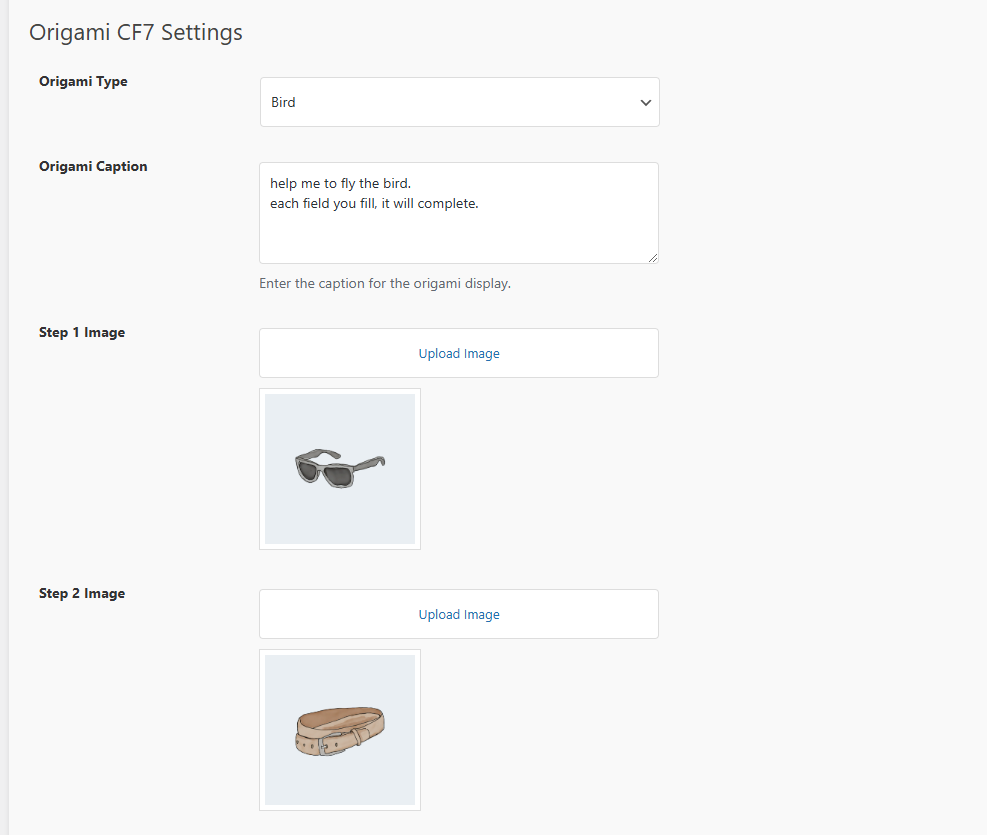
- Custom Settings – Adjust origami captions, images, and themes directly from the plugin settings page.
Perfect for any website that uses Contact Form 7! Whether you run a business, blog, or eCommerce site, you can easily integrate these animations to make form submissions more appealing and engaging for users.
Benefits of Using Origami for Contact Form 7
- Increased Form Completions – Fun visuals keep users engaged, improving form completion rates.
- Easy Customization – Customize the origami steps and animation types to match your brand or website theme.
- Enhanced User Experience – Create memorable user interactions and avoid boring form designs.
Don’t let your forms be dull—give them life with Origami For Contact Form 7!
How It Works
- Install the Plugin – Upload the plugin to your
/wp-content/plugins/directory or install it directly from the WordPress plugins screen. - Activate the Plugin – Activate it via the WordPress ‘Plugins’ screen.
- Customize Your Form Animations – Choose your preferred origami theme and upload custom images from the plugin settings.
- Use the Shortcode – Add the shortcode
[origami_cf7 id="YOUR_FORM_ID"]to display the origami animation alongside any Contact Form 7 form (replaceYOUR_FORM_IDwith your actual Contact Form 7 form ID).
Video
Plugin Homepage
For more details and updates, visit the Origami For Contact Form 7 Plugin Homepage.
Installation
- Upload the plugin files to
/wp-content/plugins/, or install via the WordPress plugin screen. - Activate through the ‘Plugins’ screen.
- Go to the settings page, select or upload origami images.
- Use
[origami_cf7 id="YOUR_FORM_ID"]shortcode in your pages or posts.
Frequently Asked Questions
Visit the plugin settings page to select or upload your own origami images.
Yes! Just use the shortcode [origami_cf7 id="YOUR_FORM_ID"] with any Contact Form 7 form.
Absolutely! You can upload custom images for each origami step directly from the settings page.
Review feed
Screenshots

Origami animations displayed with form fields.

Customizable plugin settings page for image selection.
Changelog
1.1
- Initial release with interactive origami animations.
- Customizable image settings.