

ORQADESIGN Bluesky Feed
Easily display and cache the latest posts from a Bluesky user using a shortcode.
Plugin info
Maintenance & Compatibility
Maintenance score
Stale • Last updated 238 days ago • Support resolved 0%
Is ORQADESIGN Bluesky Feed abandoned?
Likely maintained (last update 238 days ago).
Compatibility
Similar & Alternatives
Explore plugins with similar tags, and compare key metrics like downloads, ratings, updates, support, and WP/PHP compatibility.
Description
Bluesky Feed lets you embed a user’s latest posts from the Bluesky network onto your WordPress site. Just add a shortcode to any post, page, or widget. The feed is cached for performance and customizable via plugin settings.
- Display latest posts from any Bluesky handle
- Lightweight and styled with CSS
- Caches results for performance
- Works with shortcodes:
[orqablfe_feed handle="@yourhandle" limit="5"]
Arbitrary section
This plugin was built to help developers and creators showcase their Bluesky content on WordPress.
External services
This plugin connects to Bluesky services to retrieve and display public posts from a specified Bluesky user. It makes external HTTP requests to the following domains:
-
https://bsky.social – This is Bluesky’s API endpoint, used to:
- Authenticate using the admin’s Bluesky App Password and email address (
/xrpc/com.atproto.server.createSession) - Fetch public post data from the user’s feed (
/xrpc/app.bsky.feed.getAuthorFeed)
- Authenticate using the admin’s Bluesky App Password and email address (
-
https://cdn.bsky.app – This is used to fetch thumbnail images for posts.
The plugin sends the following data:
– The Bluesky handle specified in the settings
– The email and app password provided by the site admin (used only to obtain a temporary session token)
– Authenticated API requests to retrieve feed content
– Public media URLs for thumbnails
No personal data from site visitors is sent. All API calls are made on behalf of the site admin and cached locally to reduce load and limit requests.
This service is provided by Bluesky PBLLC. For more information, see:
– Bluesky Terms of Service: https://blueskyweb.xyz/blog/3-terms-of-service
– Bluesky Privacy Policy: https://blueskyweb.xyz/blog/2-privacy-policy
Installation
- Upload the plugin files to the
/wp-content/plugins/bluesky-feeddirectory, or install it through the WordPress plugins screen directly. - Activate the plugin through the ‘Plugins’ screen in WordPress.
- Add your Bluesky credentials in the plugin settings page.
- Use the
[bluesky_feed handle="@example"]shortcode in posts or pages.
Frequently Asked Questions
You’ll need to create a Bluesky App Password in your Bluesky account settings.
Yes, the plugin includes a style.css file you can customize or override in your theme.
Review feed
Screenshots
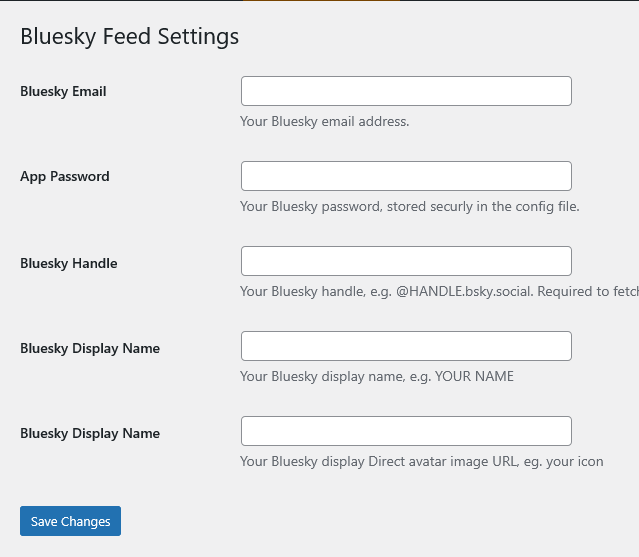
Example frontend output of the feed
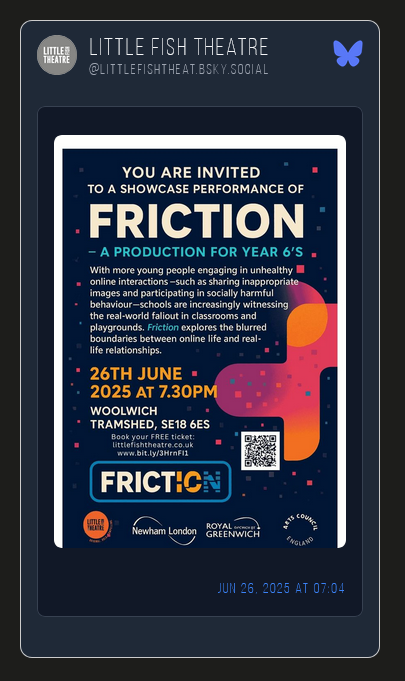
Settings screen to add your Bluesky credentials

Changelog
1.0
- Initial release