

Outgrow
Outgrow | Embed quizzes, calculators, polls and much more in your WordPress sites
Plugin info
Maintenance & Compatibility
Maintenance score
Possibly abandoned • Last updated 534 days ago • 4 reviews
Is Outgrow abandoned?
Possibly abandoned (last update 534 days ago).
Compatibility
Similar & Alternatives
Explore plugins with similar tags, and compare key metrics like downloads, ratings, updates, support, and WP/PHP compatibility.
Description
Boost your marketing with highly interactive content. Outgrow lets you collect leads with the help of quizzes, calculators, polls, chatbots, etc. What makes Outgrow better than the rest? You can create your first content piece in less than 5 minutes and start collecting leads for your business.
Important: This plugin is for embedding content pieces created on outgrow.co. (You can’t edit them or see responses inside WordPress, sorry.) If you haven’t used Outgrow before, you can try it out by signing up for a free account on our website!
A brief Markdown Example
- Create Interactive content without code
- Customize the design to match your style
- See metrics at a glance and learn more about your visitors
- Integrate with your favorite tools and platforms
Find out more information at outgrow.co (https://outgrow.co)
Installation
- Upload the plugin files to the
/wp-content/plugins/Outgrow Quizzesdirectory, or install the plugin through the WordPress plugins screen directly. - Activate the plugin through the ‘Plugins’ screen in WordPress
- Use the Settings->Plugin Name screen to configure the plugin
- (Make your instructions match the desired user flow for activating and installing your plugin. Include any steps that might be needed for explanatory purposes)
Note: To prevent critical issues on the site, existing users must reinstall or update the plugin.
Frequently Asked Questions
- Upload the plugin folder to the /wp-content/plugins/ directory
- Activate the plugin through the ‘Plugins’ menu in WordPress
- Paste your API Key taken from your Outgrow account.
- List of calculators, quizzes, and polls will be reflect there.
- Copy the code to embed code on your post, pages and custom sidebars.
Login to your Outgrow account on outgrow.co. Click on your Avatar/Name. Go under Billing & Setting, and click on the API Key to copy it.
In your WordPress dashboard:
1. Open the Outgrow tab
2. Select the content piece you’d like to embed by clicking Get Code
3. Select the type of embed
4. Copy the code
5. Paste it in WP Page, Posts or Custom Sidebar
Review feed
Screenshots

When user enter api key and correspondinng results are shown.

When user click on any of the card to get shortcode

Click to copy the code
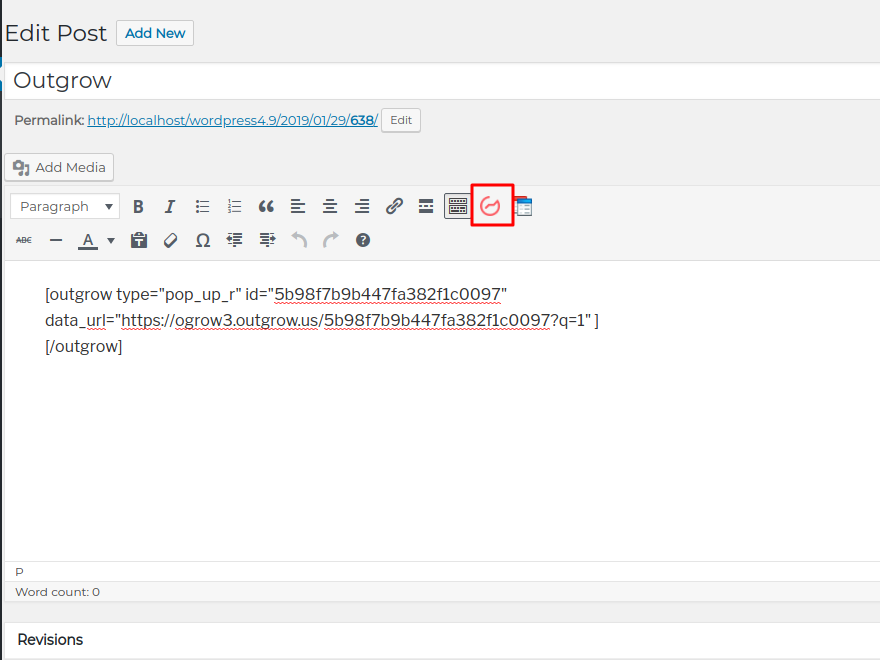
Paste it to the post to show calculator in the posts.


Changelog
1.0
- A new plugin for embeding quizzes, calculators and polls in the posts or in sidebars
- New plugin and first version for outgrow clients