

Page Navigator Widget
This plugin is a replacement for the standard Page widget, that works how you want it to do.
Plugin info
Maintenance & Compatibility
Maintenance score
Stale • Last updated 327 days ago
Is Page Navigator Widget abandoned?
Likely maintained (last update 327 days ago).
Compatibility
Developers
Similar & Alternatives
Explore plugins with similar tags, and compare key metrics like downloads, ratings, updates, support, and WP/PHP compatibility.
Description
This plugin works like the standard Page widget, however this one works how you want it to do.
The menu unfolds sub-items as required
This plugin displays initially the pages menu top-level pages only.
While on a page, the child pages that belong to the page are also listed.
While on a child-page, the subsequent grand-child pages are listed also.
Etc. as deeply as reuired.
Extra features
Additionally a Home-link can be added that will display conditionally.
You can select from: Always, On a page only, Never.
When On a page only is selected, the Home link will display ony when you are on a page, so when you might need it.
The advantage of this plugin is that a huge amount of pages can be in a menu, without the user getting lost as long as you provide a proper tree-structure to them.
Also included
The standard configurability of Widget title, Excluded pages, Sort order.
About and Credits
- Page Navigator Widget is written and maintained by J.N. Breetvelt, ( http://www.opajaap.nl/ ) a.k.a. OpaJaap
Licence
WP Photo Album is released under the GNU GPL licence. ( http://www.gnu.org/copyleft/gpl.html )
Installation
- Unzip and upload the wppa plugin folder to wp-content/plugins/
- Activate the plugin in WP Admin -> Plugins.
- Add and configure the widget in WP Admin -> Appearance -> Widgets
Frequently Asked Questions
Review feed
Screenshots

The display of the standard WP Pages widget

The display of the plugin when not on a page
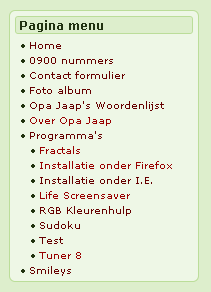
The display of the plugin when on a page
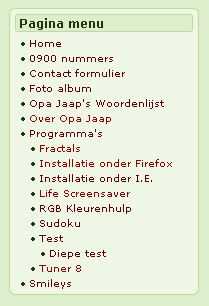
The display of the plugin when on a sub-page
Changelog
1.9
- Maintanance release
1.8
- Compatible with PHP 7.2
1.7
- Can now properly be translated according to the new rules
1.6
- Fixed a layout bug.
1.5
- Hierarchical display did not work when permlink seting was not default. Fixed.
- Changed text domain name to meet the current wp standards.
- Improved sort order mechanism.
1.4
- Made class definition compat to php5.
1.3
- Page titles in multi-language based on qTranslate rules are now displayed in the currect language.
1.2
- Tested on WP 3.8
1.1
- Fixed a warning message while in debug mode and permalinks were non-standard
1.0
- Initial coding