

Paid Memberships Pro – Content Restriction, User Registration, & Paid Subscriptions
Build a membership site that grows with you: user registration, member profiles, 28 protected content types, free or paid subscriptions.
Plugin info
Maintenance & Compatibility
Maintenance score
Possibly abandoned • Last updated 537 days ago • Support resolved 94% • 647 reviews
Is Paid Memberships Pro – Content Restriction, User Registration, & Paid Subscriptions abandoned?
Possibly abandoned (last update 537 days ago).
Compatibility
Languages
Similar & Alternatives
Explore plugins with similar tags, and compare key metrics like downloads, ratings, updates, support, and WP/PHP compatibility.
Description
The most trusted way to build a membership site on WordPress.
Paid Memberships Pro is a complete solution to secure your content and create a seamless membership experience on WordPress.
With over 28 ways to protect content, advanced membership management, and built-in recurring payment gateways, we provide you with everything you need to create an efficient and user-friendly membership site.
Read about all of the plugin’s features at Paid Memberships Pro or launch a personal demo site now to test drive the full plugin and premium Add Ons for free.
Built For Your Unique Type of Membership Site
PMPro supports any kind of member-focused business or organization. With over 12 years of experience working with creators like you, this plugin delivers on what you need today and in the future. Select a use case to learn more about how we specialize in supporting your unique business:
- Associations & NPOs
- Blog & News
- Communities
- Courses & Coaching
- Directory & Listings
- Paid Newsletters
- Podcasting
- Private Video
You can also browse Case Studies for successful membership sites that are using PMPro to get paid for their content and reach their personal or business goals with 100% open source software.
“PMPro is very user-friendly, affordable and scalable. It has all the features you would need to run a fully-functioning membership site.”
Katie Prescott, Founder, Abridge Academy
28 Types of Content Restrictions
- Restrict Default Content: Show sneak peaks or completely hide restricted content
- Restrict Other Content: Secure content like courses, videos, forums, products, events, podcasts, and more
- Limit or “Meter” Access: Limit access to a specific number of views before hitting the paywall
- Content Dripping: Drip feed access based on membership start dates
- Personalized Content: Unique pages and navigation menus for each membership level
- Directories & Profiles: Browse public or members-only directories for a robust community
- WordPress Multisite: Secure content across your network with a single login
Membership Management Features
- Unlimited Levels: Create distinct pricing and content access for each level
- Multiple Memberships Per User: Increase LTV by selling multiple membership types, allowing members to hold more than one active subscription simultaneously (now built into core PMPro v3.0+).
- Group Memberships: Offer child accounts linked to a paying parent account for umbrella or corporate memberships
- User Fields by Level: Capture custom profile info by membership level
- Email Communications: Customize content and design of every message
- Sync Roles and Levels: Define custom capabilities based on your membership features
Built-in Ecommerce & Recurring Payments Features
All of our payment gateways are included in the plugin. Choose from Stripe, PayPal, Authorize.net, or Braintree. You can offer multiple gateway options at checkout including PayPal Express or manual and offline payments, like Bank Transfer, Check, and Venmo.
- Flexible Pricing: Configure free, one-time payment, or recurring subscription levels
- Multiple Gateways: Integrate with Stripe, PayPal, and more
- Multiple Payment Methods From credit card, Apple Pay, bank transfer, and “buy now pay later”
- Customizable Trials: Offer different trial periods from your recurring billing
- Proration and Pausing: Offer custom proration rules and pausing options
- Discount & Gift Codes: Offer discounts, run sitewide sales, and track success
Seamless Member Experience Features
- Front-end user profiles and editing
- Front-end user registration
- Front-end user login and password recovery
- Custom form fields
- Conditional logic for form fields
- Membership account dashboard
- Membership orders and billing information pages
- Custom member emails
- Restrict WP dashboard access
- Hide the WP toolbar
- Conditional nav menus
Admin Tools and Reports
Add members manually, import/export members, require membership approval, and manage membership roles.
Track sales & revenue, signups, member activity, and more in detailed reports.
Install a web app on your mobile device or table for real-time updates on membership site reporting.
Site Enhancements
Extend functionality with affiliates, page builders, themes, and landing pages.
- Page Builder Compatibility: Gutenberg Block Editor, Full Site Editing, Elementor, Divi, Beaver Builder, Oxygen Builder, SiteOrigin
- Integrate With Popular Platforms: WooCommerce, BuddyPress/BuddyBoss, Mailchimp, Zapier
- Use With Your Favorite LMS: LifterLMS, LearnDash, Sensei LMS, and Tutor LMS
“Recommended to anyone from beginner to experienced coders. I tried MemberMouse and MemberPress and they both lacked critical features that I wanted for my member site. PMPro has all the features I need (Social Login, ability to gift, multiple membership levels, works with BuddyPress) and more. I can easily customize to make it look great too. If I have questions, which is often since I am a beginner in WordPress and know nothing about coding, they are quick to respond and always find a way for me to do exactly what I want. Super happy. Would recommend to anyone from beginner to experienced coders!”
@efsluys via WordPress.org 5-star Review
Documentation, Support, Localization
Access free support here on WordPress.org or reach out on our contact form. Refer to our information on premium support if you would like more help.
Our website has extensive documentation to assist you in building your membership site.
We also offer unique content hubs, which explore the 8 most popular membership site use cases and how to build a successful membership site on WordPress.
Developer Friendly
Open source, REST API support, extensive hooks, and tools for easy customization.
Our website offers over 340 examples on how to use our action and filter hooks to customize your membership site.
Free WordPress Theme
Our official theme, Memberlite, is built specifically for membership sites. Memberlite has deep integration with Paid Memberships Pro to offer advanced features for logged-in/out users and works alongside your favorite page builders, like the Block Editor and Elementor.
Popular Add Ons
Extend the features of your membership site or integrate with third-party services through our library of over 65 Add Ons. Some of the most popular features include:
- Integrate memberships with email marketing platforms including Mailchimp
- Manage Affiliates with Add Ons or use a popular third-party systems like AffiliateWP
- Let members log in or join with their social media profiles
- Design your site using popular Page Builders like Elementor, Page Builder by SiteOrigin, Beaver Builder, and Divi. We offer 15 core membership blocks for the WordPress Block Editor (Gutenberg)
- Optional WooCommerce Integration to offer members-only discounts in your shop or sell membership as a product (WooCommerce is not required. Recurring payments and gateway integration is built into PMPro)
- Create a sales landing page with banners to run a sitewide or flash sale
- Offer members-only events with Events Manager, The Events Calendar, and Sugar Calendar
Paid Memberships Pro is a free membership plugin for WordPress
Our plugin is 100% GPL and available from the WordPress repository or on our site at www.paidmembershipspro.com. The full version of the plugin is offered with no restrictions or additional licenses required. Developers should get involved at our GitHub page.
Compare PMPro to Other Membership Plugins and Platforms
Are you comparing Paid Memberships Pro with another membership plugin or third-party platform? We have a series of product comparison guides that will help you see the distinct features of PMPro as compared to other options, including:
…and more. You can read all of these comparison guides here.
Installation
Download, Install and Activate!
- Go to Plugins > Add New to find and install Paid Memberships Pro.
- Or, download the latest version of the plugin, then go to Plugins > Add New and click the “Upload Plugin” button to upload your .zip file.
- Activate the plugin.
Use the Setup Wizard to Complete Initial Setup
After activation, you will be taken through a brief setup wizard to configure the plugin.
Refer to our Initial Setup Tutorial guide for additional help getting started.
More Installation and Setup Documentation
Frequently Asked Questions
No, Paid Memberships Pro does not require any coding knowledge. The plugin is designed to meet all levels of WordPress experience. At the same time, our plugin is very developer-friendly and extendible.
Yes. PMPro will work with any properly coded theme. However, some themes may cause conflicts with the plugin. If you find a styling issue with your theme please create a post in the community forum.
Absolutely. We have a complete guide on using a caching plugin or your host’s caching methods with Paid Memberships Pro on our website if you want to explore this topic more.
PMPro does not restrict access to the wp-login.php page when active. This allows your administrator users to leverage advanced security plugins, like Two-Factor and more, so that you can keep your membership site secure. We do include a frontend login page for your members to use for logging in and resetting their password.
“Supporting multisite” means different things to different people. This guide covers the three primary ways you can use Paid Memberships Pro in a network.
Out of the box PMPro will basically act as a stand alone plugin for each site. Each site has its own list of membership levels, members, payment settings, etc.
Our Member Network Sites Add On allows members to choose a site name and title at checkout and will set up a network site at checkout.
Our Multisite Membership Add On allows you to manage memberships at the ‘Main’ Network site and provide or restrict access on other Network Subsites.
If you would like more help using PMPro on a network install, reach our via our contact page.
Please visit our support site for more documentation and our support forums.
Please post it in the WordPress support forum and we’ll fix it right away. Thanks for helping.
Not sure? You can find out by doing a bit a research.
Review feed
Good support
Awesome Plugin 👍
Screenshots
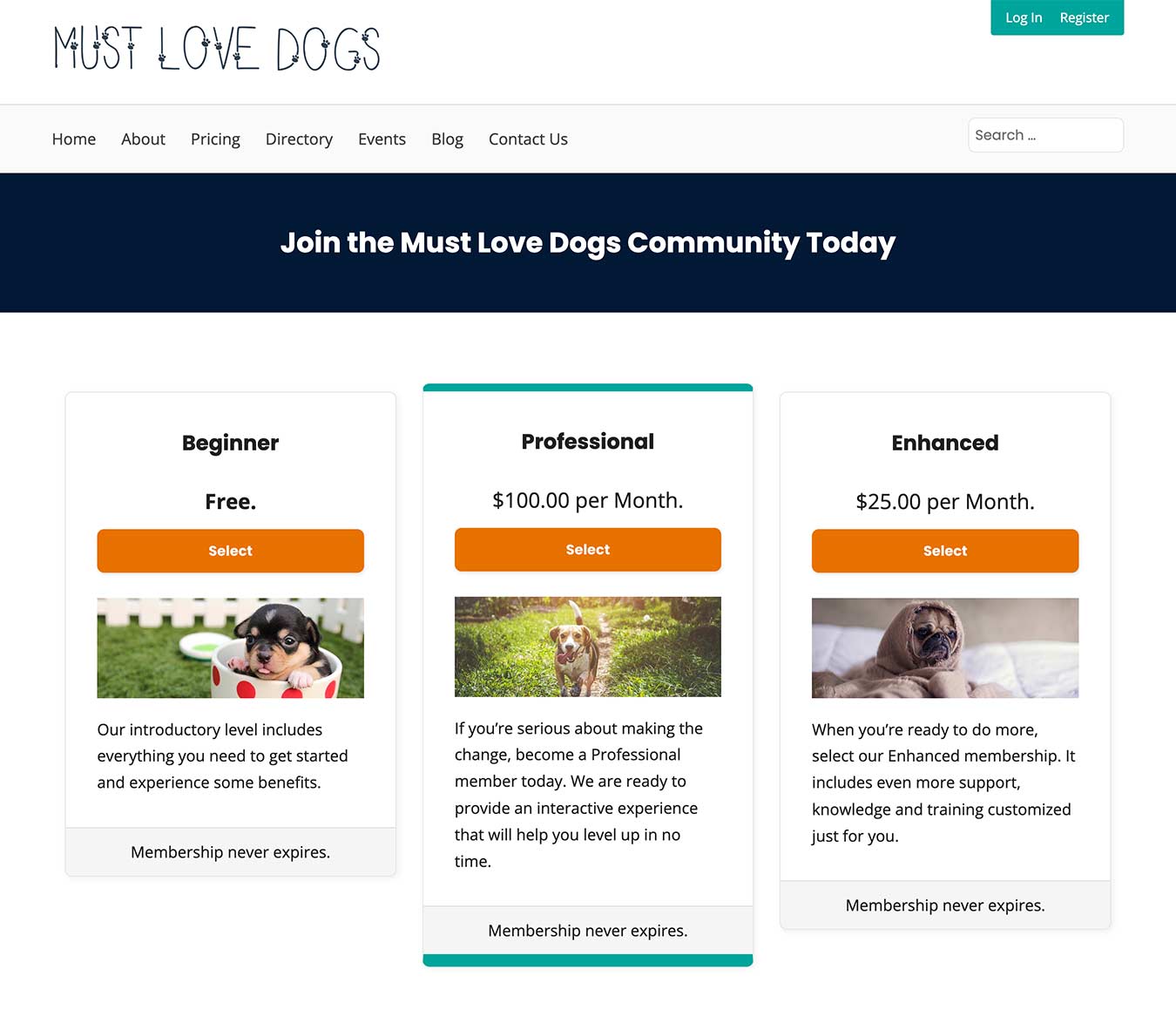
Membership levels or Pricing page to showcase your subscription plans.

Set up the membership levels that best fit your business, whether they are Free, Paid, or Subscriptions (Annual, Monthly, Weekly, Daily). Offer Custom Trial Periods (Free Trial, Custom-length Trial, 'Introductory' Pricing)
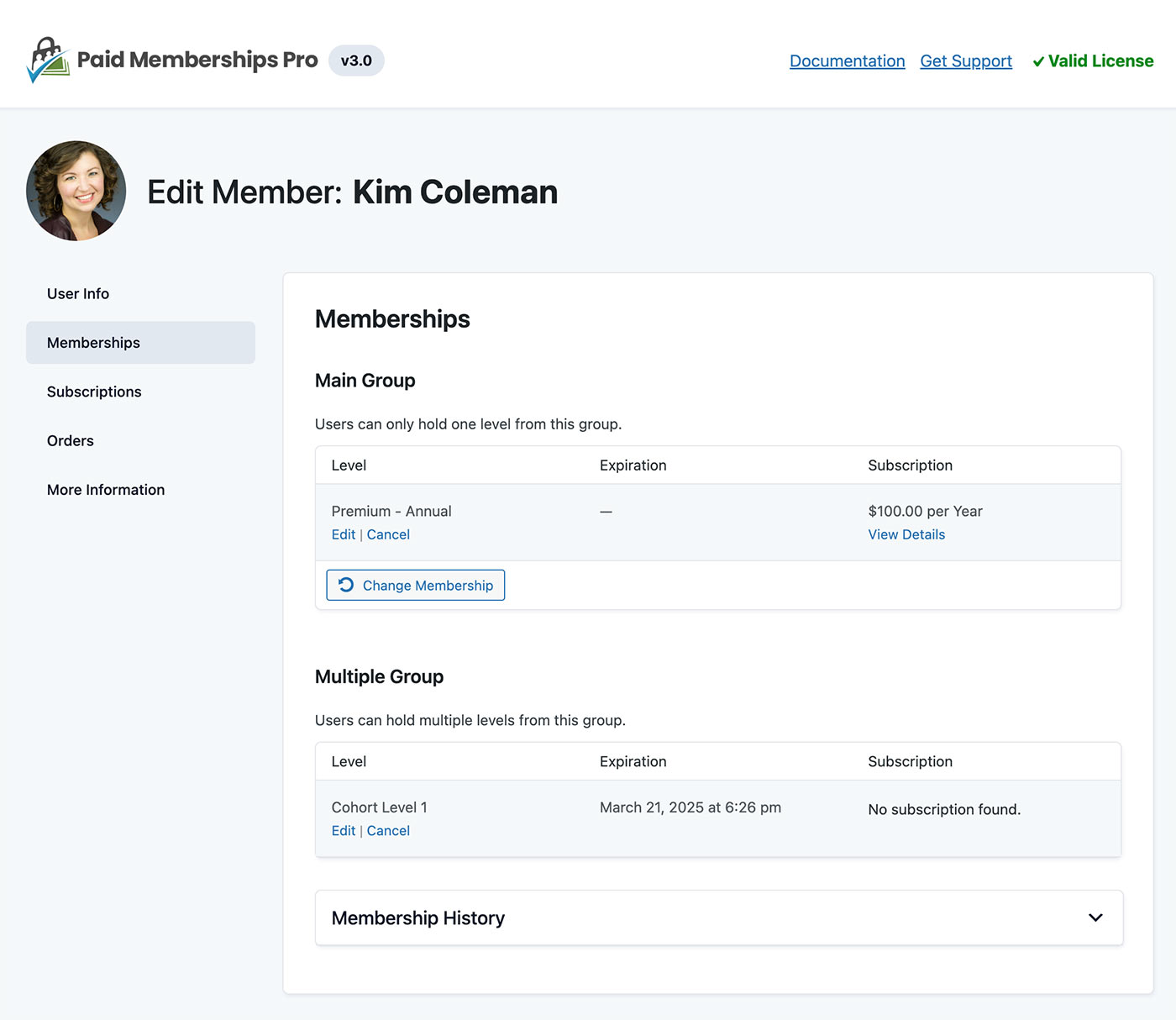
Use the CRM-like Edit Member dashboard to give admins a deeper view of a single member's profile information, memberships, subscriptions, orders, and more.

Membership Account page, display all sections or show specific sections using shortcode attributes.

Optimized Membership Checkout page that blends seamlessly into your WordPress site. Fields captured at checkout can be modified with other Add Ons.

Easy to use Membership Access Settings by Page, Post, or Category. Use block settings or shortcodes to display restricted content inline. Developer-friendly hooks to restrict access any way you need.
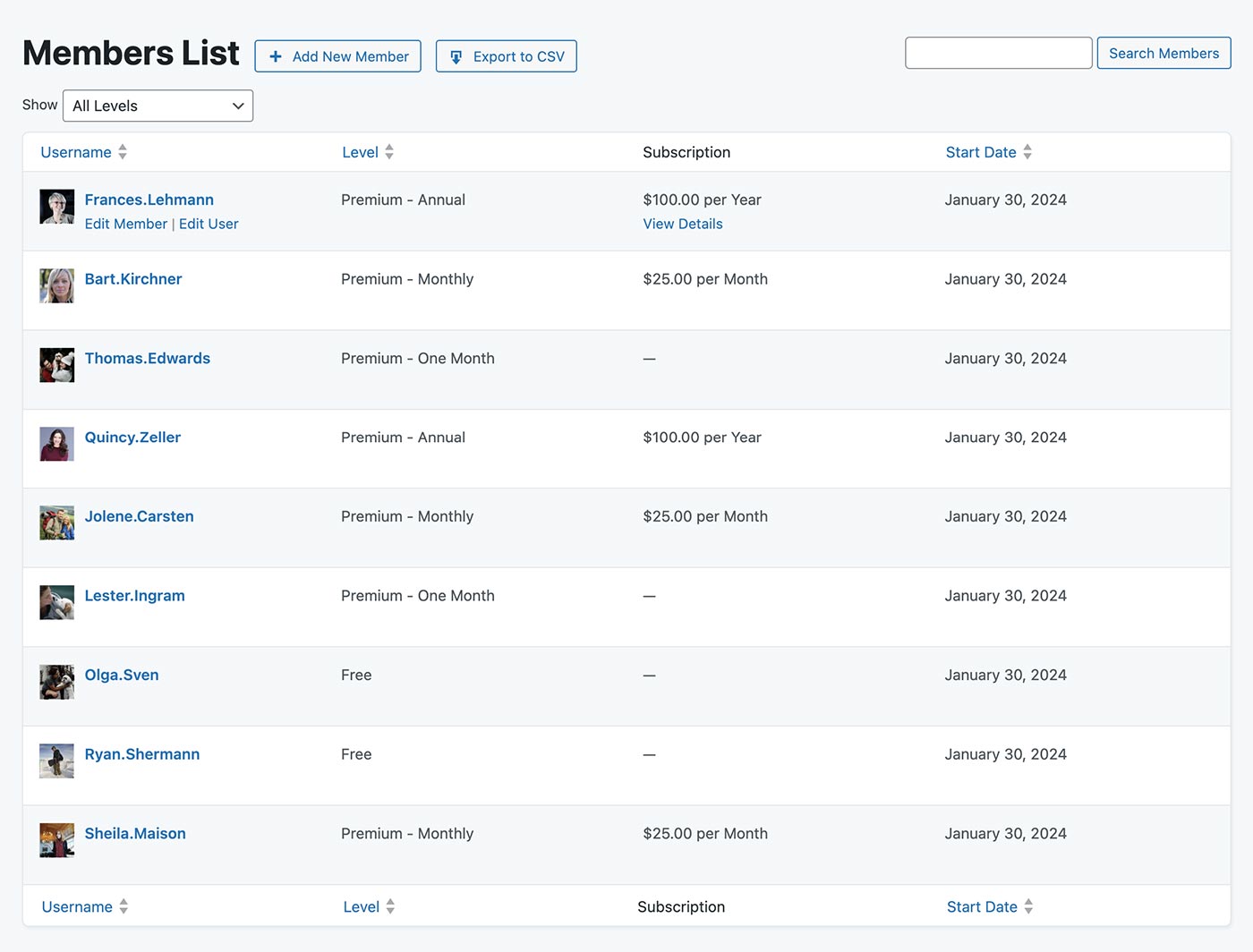
Members are WordPress Users. PMPro provides a unique interface to view a single member's history, filter and search all Members or export your Members List.

Offer Membership Discounts with specific price rules (restricted by level, unique pricing for each level, # of uses, expiration date.)
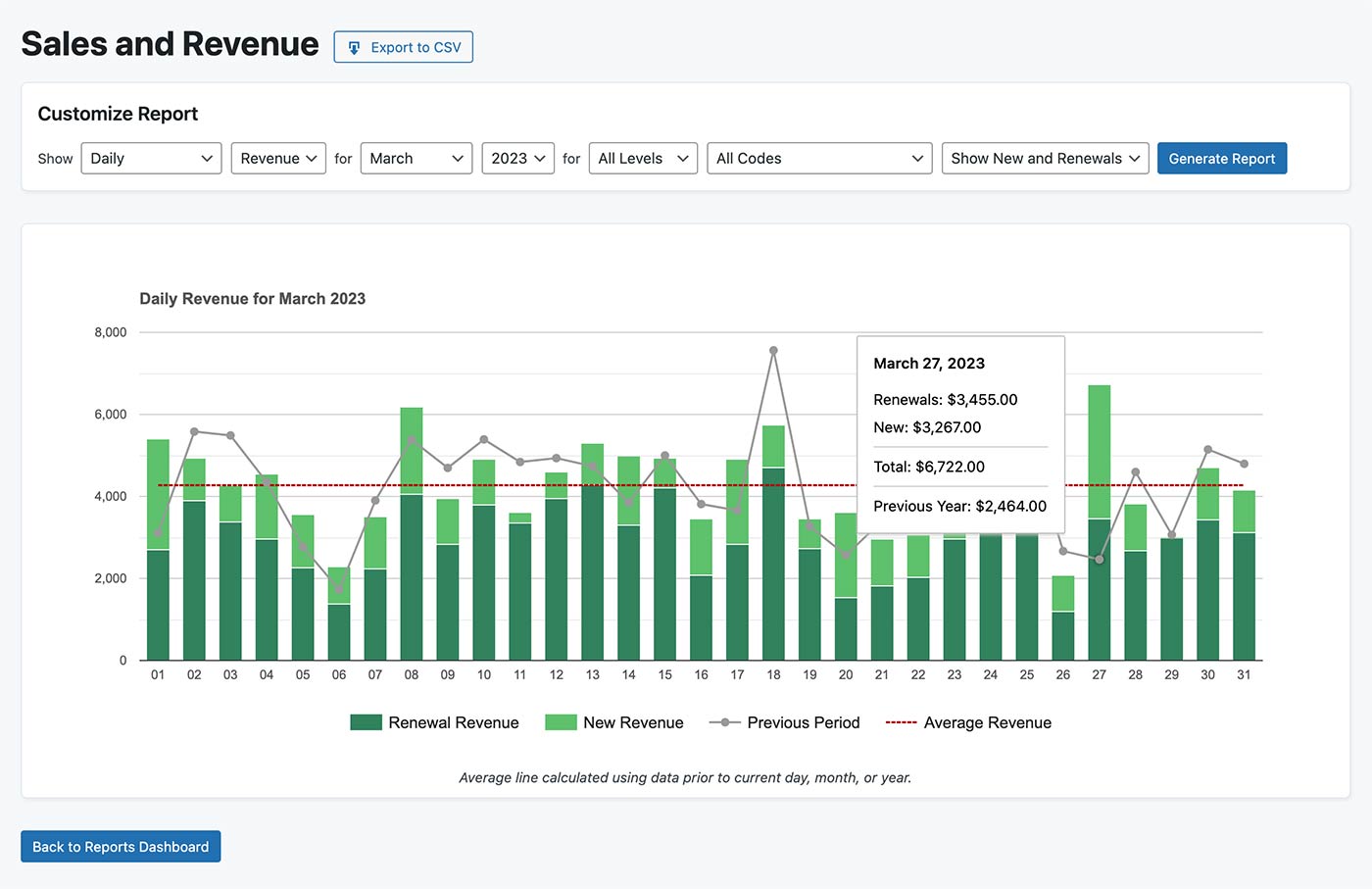
Filterable Sales Revenue Reports (reports also included for Visits, Views, Logins, Signups, Cancellations, and other Membership Stats).

Advanced settings for updating non-member messages, optionally show excerpts or filter content, use reCAPTCHA, and a Terms of Service checkbox.
Changelog
3.2.2 – 2024-10-12
- ENHANCEMENT: Added screen reader text to identify an empty header row on levels table output. #3161 (@kimcoleman)
- BUG FIX: Fixed issue where some third party gateways were no longer cancelling subscriptions at the gateway when cancelled locally in WP/PMPro. If you were using a gateway that is not included with the core PMPro plugin, please double check all recent cancellations to make sure they were sync’d to your gateway. If not, you will have to cancel those subscriptions at the gateway manually. #3164 (@ideadude)
3.2.1 – 2024-10-08
- ENHANCEMENT: Improved the print styles for frontend pages. #3158 (@kimcoleman)
- BUG FIX: Fixed an issue where payments would not complete when Stripe 3DS was triggered. #3157 (@dparker1005)
- BUG FIX: Fixed an issue where “file” user fields would not allow uploads if the file restrictions setting was empty. #3156 (@andrewlimaza)
- BUG FIX: Fixed a deprecation warning when using Stripe Checkout. #3160 (@dparker1005)
- BUG FIX: Fixed an issue where the “street2” billing address field may not be saved for Stripe payments. (@dparker1005)
3.2 – 2024-10-02
- FEATURE: Users will now receive a notification email when they have an upcoming subscription payment. #3109 (@dparker1005)
- FEATURE: Added integration with Cloudflare Turnstile. #3123 (@andrewlimaza)
- ENHANCEMENT: The business address for the website can now be set on the Advanced Settings page and will be shown on invoices. #3134 (@MaximilianoRicoTabo)
- ENHANCEMENT: Added a table view on the Email Templates settings page. #3128 (@kimcoleman)
- ENHANCEMENT: Added the Checkbox Group user field type. #3126 (@andrewlimaza)
- ENHANCEMENT: A default value can now be set for user fields that do not allow multiselect or file uploads. #3132 (@andrewlimaza)
- ENHANCEMENT: Allowed file types and maximum file sizes can now be set for “File” user fields. #3133 (@andrewlimaza)
- ENHANCEMENT: Added three new filters at checkout to allow checks at different parts of the checkout process:
pmpro_checkout_checks,pmpro_checkout_user_creation_checks, andpmpro_checkout_order_creation_checks. #3137 (@dparker1005) - ENHANCEMENT: Now creating a user at checkout even when order creation checks fail. #3137 (@dparker1005)
- ENHANCEMENT: Memberships on the Membership Account page will now be shown in the order set on the Membership Levels settings page. #3112 (@kimcoleman)
- ENHANCEMENT: Updated the wording around “legacy keys” and “restricted keys” for the Stripe gateway. #3151 (@dparker1005)
- BUG FIX/ENHANCEMENT: Street2 billing address lines are now stored separately in the MemberOrder object. #3122 (@dparker1005)
- BUG FIX: Fixed an issue where payment fields on the update billing page might be wrapped in nested cards. #3143 (@kimcoleman)
- REFACTOR: Abstracted all “Terms of Service” logic into a single file. #3119 (@dparker1005)
- REFACTOR: Abstracted all reCAPTCHA logic into a single file. #3105 (@dparker1005)
- REFACTOR: Cleaned up the checkout preheader flow including deprecating the
pmpro_build_order_for_checkout()function in favor of inline logic. #3129 (@dparker1005) - REFACTOR: Updated the PayPal Express integration to run checkout logic in its
process()method instead of on actions that are being deprecated. #3116 (@dparker1005) - REFACTOR: Updated the Stripe integration to send users to Stripe Checkout in the
process()method instead of during thepmpro_checkout_before_change_membership_levelhook. #3104 (@dparker1005) - DEPRECATED: Marking the Authorize.net gateway integration as deprecated. Websites that are already using Authorize.net can continue using that gateway, but new sites will not be shown Authorize.net as a gateway option. #3150 (@dparker1005)
- DEPRECATED: PayPal Express will no longer automatically be enabled as a second payment option when using the deprecated Website Payments Pro gateway. This functionality can be restored by using the Add PayPal Express Add On. #3114 (@dparker1005)
- DEPRECATED: Marked the following filters at checkout as deprecated:
pmpro_checkout_oldemail,pmpro_new_user,pmpro_require_billing, andpmpro_checkout_confirmed. #3137 (@dparker1005) - DEPRECATED: Now throwing deprecation warnings for dynamic order properties that were previously used at by gateways at checkout. #3122 (@dparker1005)
- DEPRECATED: Marked the
getGatewaySubscriptionStatus(),getGatewayTransactionStatus(), andconfirm()MemberOrder methods as deprecated. #3129, #3116 (@dparker1005) - DEPRECATED: Removed sample code from methods in the
PMProGatewayclass and marked sample helper methods as deprecated. #3129 (@dparker1005)
3.1.4 – 2024-09-18
- ENHANCEMENT: Improved the wording of the Stripe webhook checker message that displayed when there are event types that have not yet been triggered in Stripe. #3115 (@dparker1005)
- BUG FIX/ENHANCEMENT: Improved the validation of IP addresses before they are returned by the
pmpro_get_ip()function. #3113 (@andrewlimaza) - BUG FIX/ENHANCEMENT:
pmpro_set_curent_user()is now only called in thepmpro_clear_level_cache_for_user()function if we are clearing the cache for the current user. #3127 (@mircobabini) - BUG FIX/ENHANCEMENT: Localized the billing periods for subscription cost text strings. #3140 (@kimcoleman)
- BUG FIX: Fixed an issue where an empty “Account Information” box might appear at checkout if using the
pmpro_skip_account_fieldsfilter to skip the account fields for new users. #3135 (@kimcoleman) - BUG FIX: Fixed the background color for input fields on the login form. #3124 (@kimcoleman)
- BUG FIX: Fixed an issue where the
code_idmay not reflect the discount code ID that was used at checkout. #3138 (@dparker1005) - BUG FIX: Fixed an issue where incorrect data may be returned when calling
getDiscountCode()on a blank MemberOrder object. #3120 (@dparker1005) - BUG FIX: Fixed PHP errors on the Visits, Views, and Logins report page when the usermeta values that are retrieved are not in the correct format. #3139 (@kimcoleman)
3.1.3 – 2024-08-06
- ENHANCEMENT: Improved the appearance of input fields on dark-background themes. #3111 (@kimcoleman)
- ENHANCEMENT: Improved the appearance of dropdown arrow icons. #3111 (@kimcoleman)
- ENHANCEMENT: Added an icon for the upcoming Localized Pricing Add On. #3110 (@kimcoleman)
- BUG FIX: Fixed an issue where new subscriptions might be immediately cancelled after checkout when re-purchasing a level that the user already had. #3107 (@dparker1005)
- BUG FIX: Fixed an issue where Braintree billing updates would fail due to the
CardTypeJavaScript not being present in the update billing form. #3108 (@dparker1005)
3.1.2 – 2024-08-02
- ENHANCEMENT: Added an admin notice on PMPro settings pages when using Stripe without a webhook set up. #3103 (@dparker1005)
- ENHANCEMENT: Added a new filter
pmpro_stripe_card_element_styleto allow developers to customize the Stripe card element style. #3099 (@kimcoleman) - ENHANCEMENT: Improved the styling of bulleted lists. #3095 (@kimcoleman)
- BUG FIX: Fixed an issue where Braintree checkouts would fail due to the
CardTypefield not being present in the payment form. #3102 (@JarrydLong) - BUG FIX: Fixed an issue where billing updates could fail for some gateways. #3102, #3106 (@JarrydLong, @dparker1005)
- BUG FIX: Fixed PHP errors when showing a “no access” message and there is not a levels page or checkout page set. #3096 (@kimcoleman)
- BUG FIX: Fixed an issue where checkouts would fail when using the Stripe payment request button and reCAPTCHA v3. #3094 (@dparker1005)
- REFACTOR: Updated doc block for the
pmpro_set_expiration_date()function to allownullas a valid value for the$enddateparameter. #3098 (@ZebulanStanphill)
3.1.1 – 2024-07-29
- ENHANCEMENT: Added autocomplete functionality for name and billing fields on the checkout page. #3081 (@andrewlimaza)
- ENHANCEMENT: Improved the field structure and styling for checkbox and radio user fields. #3077 (@kimcoleman)
- ENHANCEMENT: Added a new hook
pmpro_lost_password_before_submit_button. #3090 (@dioliviers, @dparker1005) - BUG FIX/ENHANCEMENT: The current panel on the Member Edit page is now included in the form action instead of as a hidden input. #3092 (@mircobabini)
- BUG FIX/ENHANCEMENT: Improved the LifterLMS streamline option to prevent LifterLMS from modifying the login form links on the PMPro login page. #3089 (@kimcoleman)
- BUG FIX: Fixed an issue where fields may overlap on the checkout page when viewing on a mobile device. #3078 (@kimcoleman)
- BUG FIX: Fixed an issue where pages could not be saved when they contain the “Confirmation Page” block. #3085 (@dparker1005)
- BUG FIX: Fixed an issue where the billing address fields were always shown on the Update Billing page, even when disabled. #3082 (@dparker1005)
- BUG FIX: Fixed an issue where some required fields did not display a “required” asterisk or the
aria-requiredattribute. #3076 (@kimcoleman) - BUG FIX: Fixed the styling for fields with errors after submitting the checkout form. #3076 (@kimcoleman)
- BUG FIX: Fixed an issue where the default expiration date when adding a new membership level via the Edit Member page would be calculated based on the current UTC time. #3093 (@mircobabini)
- BUG FIX: Fixed an issue where free orders would not process correctly when the default gateway was set to PayPal Standard or 2Checkout. #3091 (@dparker1005)
- BUG FIX: Fixed an issue where some HTML elements were missing class names. #3080 (@mircobabini)
- BUG FIX: Fixed the alignment of the action links on the “lost password” form. #3084 (@kimcoleman)
- BUG FIX: Fixed an issue where content added to the login form via hooks might be given flex alignment. #3083 (@kimcoleman)
- BUG FIX: Fixed an issue where requesting a subscription date as a timestamp would always return in the UTC timezone regardless of if
$local_timewas set totrue. #3069 (@mircobabini) - BUG FIX: Fixed a typo of “Akismet” on the PMPro Security settings page. #3081 (@andrewlimaza)
- BUG FIX: Fixed the alignment of the “search” field on the Add Ons dashboard page. #3079 (@kimcoleman)
3.1 – 2024-07-17
- FEATURE: Added a new “Design” tab to the Memberships > Settings page with multiple frontend style variations to choose from. #3003 (@kimcoleman)
- FEATURE: Added a new “Security” tab to the Memberships > Settings page. #2999 (@MaximilianoRicoTabo)
- ENHANCEMENT: Updated the styling of frontend pages. #3003 (@kimcoleman)
- ENHANCEMENT: Improved the logic around how “no access” messages are generated and added filters to customize these messages. #3003 (@kimcoleman)
- ENHANCEMENT: Standardized CSS selectors to make theming a PMPro site more straightforward. #3003 (@kimcoleman)
- ENHANCEMENT: Added an “Edit Customer in Stripe” button to the “View Subscription” page for Stripe subscriptions. #2987 (@dparker1005)
- ENHANCEMENT: Set Stripe Checkout to be the default Stripe payment flow on new websites. #3006 (@dparker1005)
- ENHANCEMENT: Updated the “Check out with PayPal” button so that it is more accessible and can be translated. #3026 (@kimcoleman)
- ENHANCEMENT: Updated the billing failure email to link directly to the “update billing information” page for the corresponding subscription. #3032 (@MaximilianoRicoTabo)
- ENHANCEMENT: Updated the term “Invoice” to “Order” in most places throughout the plugin. #2982 (@kimcoleman)
- ENHANCEMENT: Added filters for updating how the total, subtotal, and tax are displayed for an order. #3009 (@dparker1005)
- ENHANCEMENT: Added a new filter
pmpro_subscription_cost_textfor updating how the subscription cost is displayed. #3021 (@dparker1005) - ENHANCEMENT: Added new filter
pmpro_dashboard_meta_boxesto allow developers to hide dashboard widgets and add their very own widgets to the PMPro dashboard area. #3019 (@andrewlimaza) - ENHANCEMENT: Now detecting Add Ons with incorrect folder names in site health. #2069 (@mircobabini)
- BUG FIX/ENHANCEMENT: Email headers and footers are now added after email body filters are run. #2000 (@mircobabini)
- BUG FIX/ENHANCEMENT: Added an error message on the Edit Member page when an order refund fails. #3015 (@dparker1005)
- BUG FIX/ENHANCEMENT: Moved the “Edit Customer in Stripe” button on the Edit Member page to the “User Info” tab. #2987 (@MaximilianoRicoTabo)
- BUG FIX/ENHANCEMENT: Added a fallback to get the site URL from the database should the SERVER_NAME parameter not be available in certain cases like using WP-CLI and some other instances. #2996 (@andrewlimaza)
- BUG FIX/ENHANCEMENT: Now including email template variables for the expired level ID and level name on the membership expired email template. #2954 (@MaximilianoRicoTabo)
- BUG FIX/ENHANCEMENT: When using PMPro Lifter Streamline mode, now making sure that Lifter does not reserve the
/membership/slug. #2927 (@MaximilianoRicoTabo) - BUG FIX/ENHANCEMENT: Enabled localization for certain strings throughout the plugin. #3005 (@DAnn2012)
- BUG FIX/ENHANCEMENT: Updated the “Login Name” setting for Authorize.net to “API Login ID” to match the Authorize.net documentation. #3058 (@dparker1005)
- BUG FIX: Fixed an issue where the payment transaction ID would not be saved for an order while purchasing a subscription via Stripe Checkout. #3025 (@dparker1005)
- BUG FIX: Fixed an issue on some hosting setups where subscriptions would not be successfully inserted into the database. #3002 (@dparker1005)
- BUG FIX: Fixed an issue where the “Content Visibility” block editor settings could break some core WordPress blocks. #3014 (@MaximilianoRicoTabo)
- BUG FIX: Fixed an issue where a user’s membership might not be removed when a PayPal Express subscription is suspended due to payment failure. #3016 (@dparker1005)
- BUG FIX: Fixed a broken link to the PMPro Approvals documentation page when creating a new membership level. #3001 (@dparker1005)
- BUG FIX: Fixed an issue where testing the “cancel on next payment date” email template might fail. #2984 (@MaximilianoRicoTabo)
- BUG FIX: Fixed an issue where a PHP warning might be shown when dynamically adding the membership level body CSS class. #3013 (@andrewlimaza)
- BUG FIX: Fixed an issue where the “From Name” email setting could add slashes before escaped characters when saved. #3050 (@andrewlimaza)
- BUG FIX: Fixed an issue where the “View With” admin bar dropdown might not work correctly when using Firefox. #2953 (@MaximilianoRicoTabo)
- BUG FIX: Fixed an issue where there might not be a space between class names when creating a user field. #3046 (@kimcoleman)
- BUG FIX: Fixed issues where user IDs over 4294967295 would not be correctly linked to their subscription. #3065 (@dparker1005)
- BUG FIX: Fixed over-escaped HTML in the admin activity email. #2985 (@MaximilianoRicoTabo)
- BUG FIX: Fixed some typos in the plugin. #3062 (@szepeviktor)
- REFACTOR: Updated the checkout preheader to use the abstracted
pmpro_complete_checkout()function. #2937 (@dparker1005) - REFACTOR: Removed duplicate code from PayPal gateway classes. #2932 (@dparker1005)
- DEPRECATED: Removed the ability to customize no access messages for the RSS feed and the secondary option for logged out members. Filters should be used to customize these messages. #3003 (@kimcoleman)
- DEPRECATED: Removed the “Update Billing Flow” option from the Stripe gateway settings. Billing information will now be updated on-site if using the on-site payment flow and off-site if payments are taken via Stripe Checkout. #3006 (@dparker1005)
- DEPRECATED: Removed the
print.cssfile from the plugin. These styles are now infrontend.css. #2940 (@dparker1005) - DEPRECATED: Deprecated the
pmpro_longform_addressfilter. Address fields will always be shown in longform format. #2990 (@kimcoleman) - DEPRECATED: Removed setting and display of SSL Seal Code option from database and frontend pages. #2991 (@kimcoleman)
- DEPRECATED: No longer storing an option for accepted card types or allowing a card type select field in payment forms. #2989 (@kimcoleman)
- DEPRECATED: Deprecated the billable invoice, credit card expiring, checkout express, checkout trial, and checkout free trial email templates along with their admin counterparts. #3032 (@MaximilianoRicoTabo)
- DEPRECATED: Removed the setup.sql file from the plugin. #3068 (@dparker1005)