

Password for WP
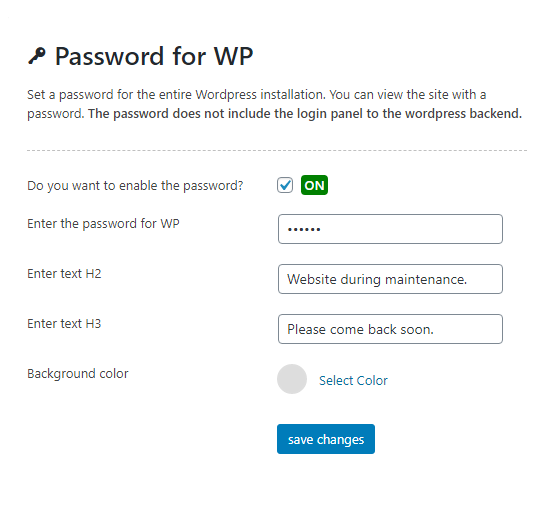
Add a password for the entire WordPress website. Edit the background and message. Free and simple to use.
Maintenance 26/100456d since update
Active installs
300
Downloads
3,589
Reviews
0
Age
6.1y
Plugin info
Total downloads: 3,589
Active installs: 300
Total reviews: 0
Average rating: 0
Support threads opened: 0
Support threads resolved: 0 (0%)
Available in: 5 language(s)
Contributors: 1
Last updated: 1/3/2025 (456 days ago)
Added to WordPress: 2/21/2020 (6 years old)
Minimum WordPress version: 4.9
Tested up to WordPress version: 6.7.4
Minimum PHP version: 5.6
Maintenance & Compatibility
Maintenance score
Possibly abandoned • Last updated 456 days ago
26/100
Is Password for WP abandoned?
Possibly abandoned (last update 456 days ago).
Compatibility
Requires WordPress: 4.9
Tested up to: 6.7.4
Requires PHP: 5.6
Developers
Similar & Alternatives
Explore plugins with similar tags, and compare key metrics like downloads, ratings, updates, support, and WP/PHP compatibility.
No similar plugins found yet.
Description
Add a password for the entire WordPress website in a simple and quick way. You can edit the background and add a message to the user. The plugin is completely free.
Upgrading
For manual upgrades via FTP, deactivate and reactivate the plugin to ensure it works correctly.
Translations
Plugin translations will be added in future versions.
Installation
- Upload or install the plugin through your WordPress admin.
- Activate the plugin via the ‘Plugins’ admin menu.
- Configure the plugin in the Password for WP settings.
Frequently Asked Questions
No FAQ available
Review feed
No reviews available
Screenshots

Changelog
1.6.1
- Added Changelog.
- Improved CSS for colorpicker.
1.6
- Added CSRF protection.
- Tested on WordPress 6.7.
1.5
- Improved translations.
- Tested on WordPress 6.x.
1.4
- Added support for WordPress 6+.
1.3
- Plugin tested on WordPress 6.0 and above.
1.2
- Plugin tested on WordPress 5.7.
1.1
- Plugin tested on WordPress 5.5.
1.0
- Initial release to the WordPress repository.