

Plugin info
Maintenance & Compatibility
Maintenance score
Possibly abandoned • Last updated 5489 days ago
Is Paypal Target Meter abandoned?
Possibly abandoned (last update 5489 days ago).
Compatibility
Similar & Alternatives
Explore plugins with similar tags, and compare key metrics like downloads, ratings, updates, support, and WP/PHP compatibility.
Description
Paypal target meter uses the Paypal NVP API (which means you must have a premium or better account) to display a progress meter of donations towards a monthly or yearly goal. Setup is a breeze, requiring only your Paypal API credentials, and it supports filtering received payments by the email address they were sent to.
You can see a demo of the plugin on the BrainSilo web page at http://brainsilo.org/
Installation
- Upload the
paypal-target-meterfolder to the/wp-content/plugins/directory - Activate the plugin through the ‘Plugins’ menu in WordPress
- Add the Widget to your sidebar (or where ever else you want) through the ‘Widgets’ menu in WordPress
- Configure your instance of the Widget through the ‘Widgets’ menu in WordPress
Frequently Asked Questions
Where do I get my Paypal API Credentials?
To use the Paypal API, you must have a business or premier level Paypal account.
- Log into PayPal, then click Profile under My Account.
- Click API Access.
- Click Request API Credentials.
- Check Request API signature and click Agree and Submit.
- Click Done to complete the process.
Review feed
Screenshots
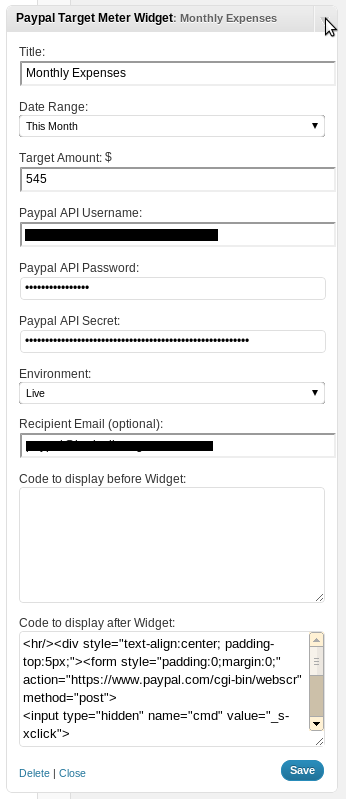
Admin Configuration

On site, with post-test filled with custom text (the paypal button and disclaimer)
Changelog
1.2.4
fixed a limit of 10 transactions – now it is 100 (per the paypal api spec)
fixed a bug with the display bar and more then 100% funding.
improved the API transaction search to return less (uneccissary) transactions
1.2.3
added admin debug page under the Tools menu.
1.2
trying to fix versions
1.1
it doesn’t seem to like versions less then 1
0.9
- Initial creation and tag