

Peak Uploader to S3 for WPDM
This plugin extends Wordpress Download Manager plugin with Amazon S3 and Cloudfront integration
Plugin info
Maintenance & Compatibility
Maintenance score
Possibly abandoned • Last updated 3091 days ago
Is Peak Uploader to S3 for WPDM abandoned?
Possibly abandoned (last update 3091 days ago).
Compatibility
Similar & Alternatives
Explore plugins with similar tags, and compare key metrics like downloads, ratings, updates, support, and WP/PHP compatibility.
Description
S3 Uploader extends WordPress Download Manager plugin, helps you upload files to Amazon S3, create buckets and Cloudfront distributions.
Features
- Create Amazon S3 buckets
- Upload all Downloads files to particular bucket
- Create Cloudfront distributions
- Accelerate S3 buckets
- Choose default bucket or distribution for new Downloads files
- Add files from S3 using widget on Downloads file edit page
Select the checkbox option CloudFront or Transfer Acceleration to enable them for the plugin.
After that, buttons will be available that will allow you to work remotely with Amazon Cloudfront and S3 services:
Accelerate/Decelerate buttons – enable or disable the Transfer Acceleration for the bucket.
Create distribution – when you click, a distribution with default settings will be created for the bucket (also, you can edit or create distributions through the Amazon website with the settings you need).
Distribute/Not distribute – enable or disable distribution for the bucket
If both buttons (Distribute and Accelerate) were enabled for the bucket, then the link to the bucket will be generated using the CloudFront service, not Transfer Acceleration.
In this case, if you want to use Transfer Acceleration, click Not distribute for this bucket or turn off CloudFront option.
Installation
- Go to Plugins > Add New.
- Search for “S3 Uploader”.
- Click “Install Now”.
OR
- Download the zip file.
- Upload the zip file via Plugins > Add New > Upload.
- Install and activate WordPress Download Manager plugin
Activate the plugin. Look for “Downloads > Settings > Cloud Storage tab” in the admin menu.
Set Amazon Access and Secret keys
Go to plugin page “Downloads > S3-Uploader”
Frequently Asked Questions
Installation Instructions
- Go to Plugins > Add New.
- Search for “S3 Uploader”.
- Click “Install Now”.
OR
- Download the zip file.
- Upload the zip file via Plugins > Add New > Upload.
- Install and activate WordPress Download Manager plugin
Activate the plugin. Look for “Downloads > Settings > Cloud Storage tab” in the admin menu.
Set Amazon Access and Secret keys
Go to plugin page “Downloads > S3-Uploader”
Review feed
Screenshots
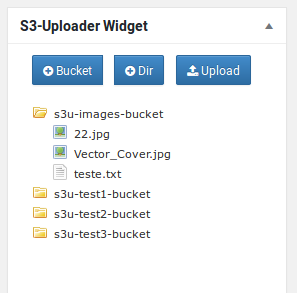
Peak Uploader Widget

Peak Uploader settings page
Changelog
1.0
Initial commit.