
Per Product Shipping for WooCommerce
The easiest way to add shipping costs for each product.
Maintenance 28/100490d since update
Active installs
100
Downloads
2,195
Reviews
3
Age
4.0y
Plugin info
Total downloads: 2,195
Active installs: 100
Total reviews: 3
Average rating: 2.3
Support threads opened: 0
Support threads resolved: 0 (0%)
Available in: 1 language(s)
Contributors: 4
Last updated: 11/28/2024 (490 days ago)
Added to WordPress: 3/30/2022 (4 years old)
Minimum WordPress version: 4.0.0
Tested up to WordPress version: 6.7.4
Minimum PHP version: 7.1
Maintenance & Compatibility
Maintenance score
Possibly abandoned • Last updated 490 days ago • 3 reviews
28/100
Is Per Product Shipping for WooCommerce abandoned?
Possibly abandoned (last update 490 days ago).
Compatibility
Requires WordPress: 4.0.0
Tested up to: 6.7.4
Requires PHP: 7.1
Languages
Similar & Alternatives
Explore plugins with similar tags, and compare key metrics like downloads, ratings, updates, support, and WP/PHP compatibility.
AffiliateWP – Affiliate Product Rates
Rating 3.0/5 (2 reviews) • Active installs 2,000
Simple MinMax
Rating 5.0/5 (1 reviews) • Active installs 10
Easy Options Empty Cart per product for WooCommerce
Rating 0.0/5 (0 reviews) • Active installs 0
Description
Per Product Shipping for WooCommerce is the most regularly-updated, and well-supported extension for adding shipping costs per product for WooCommerce.
Installation
Using The WordPress Dashboard
- Navigate to the ‘Add New’ in the plugins dashboard
- Search for ‘Shipping Per Product for WooCommerce’
- Click ‘Install Now’
- Activate the plugin on the Plugin dashboard
Uploading in WordPress Dashboard
- Navigate to the ‘Add New’ in the plugins dashboard
- Navigate to the ‘Upload’ area
- Select
shipping-per-product-for-woocommerce.zipfrom your computer - Click ‘Install Now’
- Activate the plugin in the Plugin dashboard
Using FTP
- Download
shipping-per-product-for-woocommerce.zip - Extract the
shipping-per-product-for-woocommercedirectory to your computer - Upload the
shipping-per-product-for-woocommercedirectory to the/wp-content/plugins/directory - Activate the plugin in the Plugin dashboard
Frequently Asked Questions
- Go to WooCommerce -> Settings -> Shipping -> Per Product Shipping.
- Click on the ‘Add a new product shipping rule’ button.
- Select the product you want to add shipping costs for.
- Enter the shipping costs.
- Click on the ‘Add’ button.
Review feed
No reviews available
Screenshots

Settings Page.
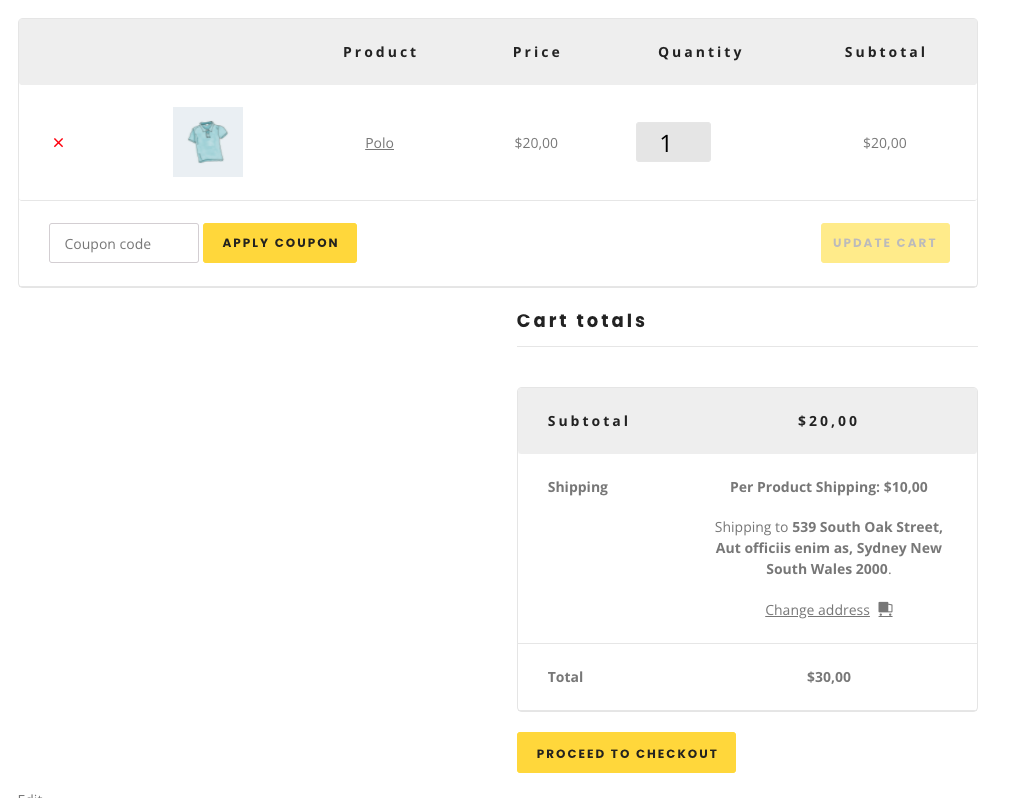
Checkout Page.
Changelog
1.0.2
- Added: WordPress 6.7 compatibility.
1.0.1
- Added: A notice to add the shipping method to the WooCommerce shipping zones.
1.0.0
- Initial release.