

Phone Validator with Flags for WooCommerce
Adds a country flag and phone validation to the checkout phone field.
Plugin info
Maintenance & Compatibility
Maintenance score
Stale • Last updated 225 days ago • Support resolved 0% • 6 reviews
Is Phone Validator with Flags for WooCommerce abandoned?
Likely maintained (last update 225 days ago).
Compatibility
Similar & Alternatives
Explore plugins with similar tags, and compare key metrics like downloads, ratings, updates, support, and WP/PHP compatibility.
Description
Phone Validator with Flags for WooCommerce enhances the billing phone field on the checkout page by:
- Displaying a dropdown with country flags and dial codes.
- Auto-detecting the default country or letting the customer choose.
- Validating the phone number format in real-time.
- Respecting WooCommerce’s “Selling Locations” settings to limit the list of countries.
Ideal for WooCommerce stores targeting international customers who want to ensure clean, valid phone numbers during checkout.
Features
- 🏳️ Add country flags and dial codes to the checkout phone field.
- ✅ Validate phone numbers in real-time before submission.
- 🌍 Supports only countries enabled in WooCommerce Selling Locations.
- 🔒 GDPR-safe and does not rely on any external APIs.
- ⚙️ Compatible with High-Performance Order Storage (HPOS).
- 📦 Lightweight and fully self-contained.
- 🌐 Translation-ready.
Libraries Used
This plugin includes the following third-party open source library:
- intl-tel-input – JavaScript international phone input utility.
Source: https://github.com/jackocnr/intl-tel-input
License: MIT
Installation
- Upload the plugin folder to the
/wp-content/plugins/directory. - Activate the plugin through the ‘Plugins’ menu in WordPress.
- Ensure that WooCommerce is active and “Selling Locations” are configured.
- The billing phone field on the checkout page will now display with country flag + validation.
Frequently Asked Questions
No. All assets and logic are fully self-hosted. No external scripts, APIs, or CDNs are used.
Currently, it only targets the default WooCommerce billing_phone field at checkout.
An alert will appear, and the order will not be submitted until a valid phone number is entered.
Yes. This plugin officially declares compatibility with WooCommerce High-Performance Order Storage.
Review feed
Screenshots
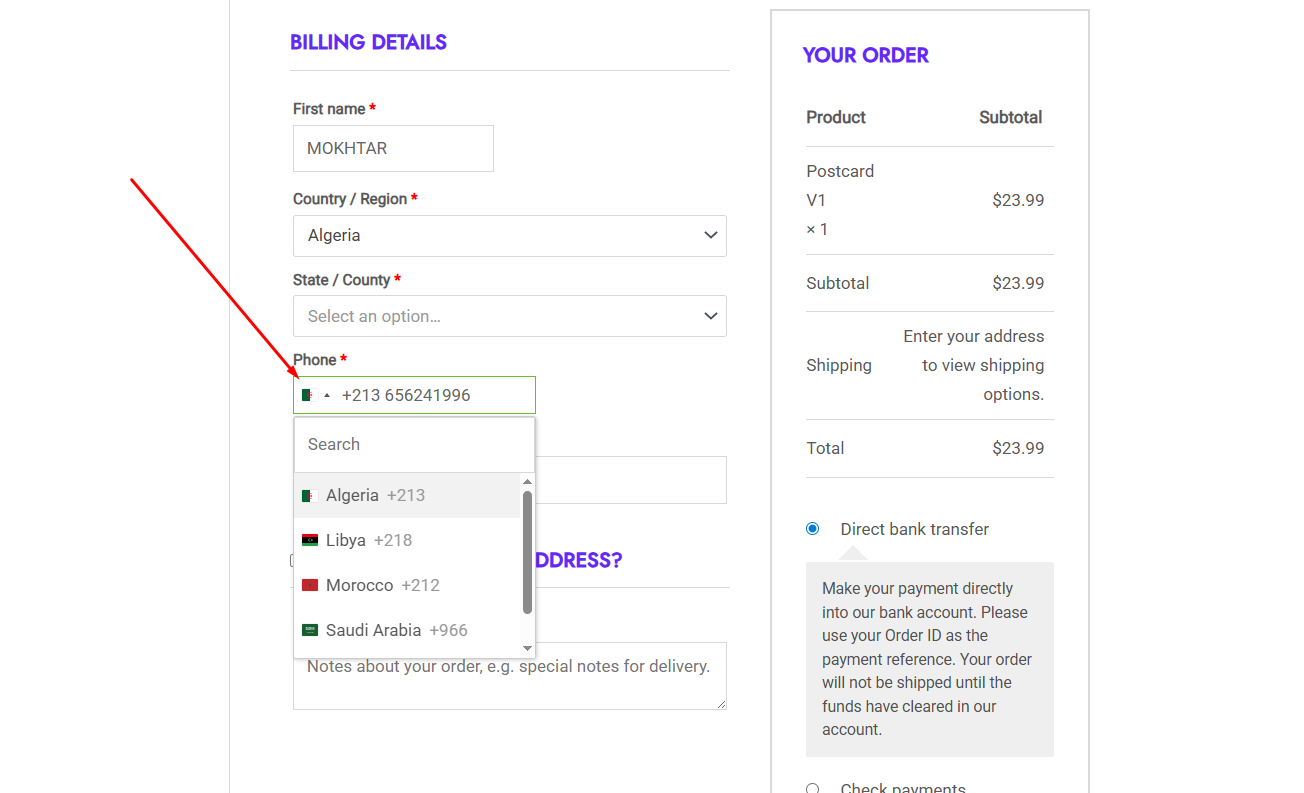
Enhanced checkout phone field with country flag.
Changelog
1.0.0
- Initial release with flag selector, validation, and WooCommerce integration.
1.1.0
- Fix some technical issues about the error alert
1.2.0
- Fix some technical issues