

Plugin info
Maintenance & Compatibility
Maintenance score
Possibly abandoned • Last updated 1021 days ago • Support resolved 100% • 1 reviews
Is Photo Box abandoned?
Possibly abandoned (last update 1021 days ago).
Compatibility
Similar & Alternatives
Explore plugins with similar tags, and compare key metrics like downloads, ratings, updates, support, and WP/PHP compatibility.
Description
The Photo Box will set popup for all images in galleries.
Auto popup in home page, slide show popup, responsive popup for gallery in posts, pages, …
You can use do_shortcode(‘[gallery type=”photobox” ids=”1,2″]’).
Support to block gallery – Gutenberg editor.
The plugin allows using
- Gallery
- Slide show
- Auto popup
- Popup
- Popup single
- Popup slider
- Block gallery – Gutenberg editor
Add-Ons
But wait: there’s more! We’ve got a whole stable of plugins available to help you be awesome at what you do. Check out a full list of the products below, and over on our website.
Our Free Plugins:
HELP TRANSLATE THE PLUGIN
You can help translate Photo Box plugin on translate.wordpress.org.
Installation
Thank you for your interest in Photo Box plugin.
Minimum requirements.
- WordPress 4.0+
- PHP 5.x
- MySQL 5.x.
This section describes how to install the plugin wordpress and get it working.
e.g.
- Upload folder ‘plugin-name’ to the
/wp-content/plugins/directory. - Activate the “Photo Box” plugin through the ‘Plugins‘ menu in the WordPress.
- Go to edit gallery in media popup and choose type is “Photo Box” and setting.
If any problem occurs, please read the documents WordPress.
Frequently Asked Questions
Review feed
Screenshots

Popup image - Photo Box.

Setting in gallery - Photo Box.
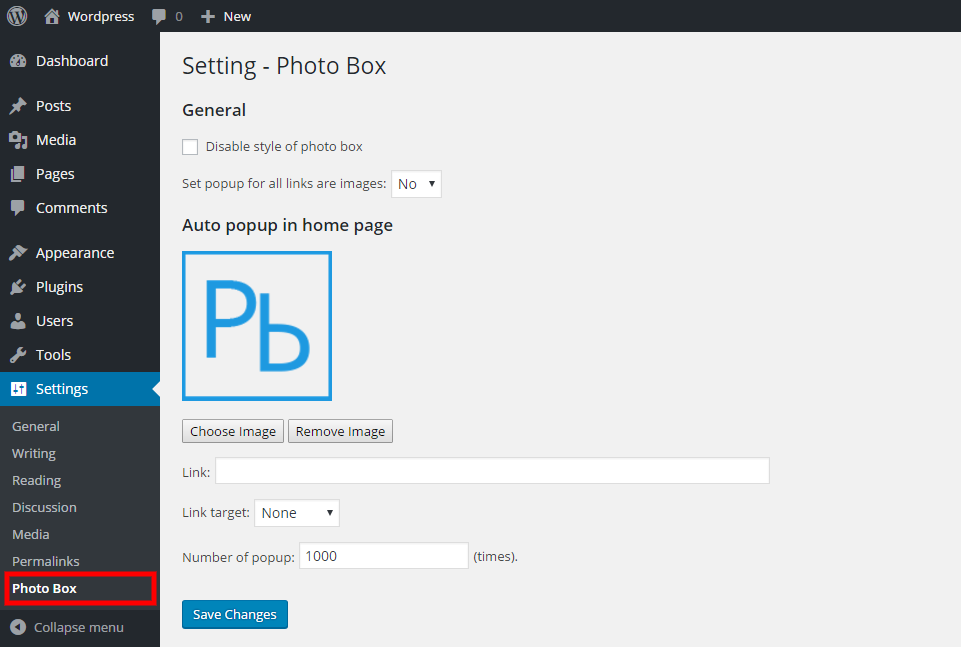
Setting all site - Photo Box.

Support to block editor - Photo Box.
Changelog
1.2.6
- Tested to WordPress 6.1.1
1.2.5
- Tested to WordPress 6.0
1.2.4
- Tested to WordPress 5.9.2
1.2.3
- Tested to WordPress 5.9
1.2.2
- Tested to WordPress 5.8.2
1.2.1
- Test name.
1.2
- Tested WP 5.8.1.
1.1.9
- Tested WP 5.8.
1.1.8
- Tested WP 5.7.2
1.1.7
- Tested WP 5.6.
1.1.6
- Tested WP 5.3.
1.1.5
- Added cloud wordpress js – Setting.
1.1.4
- Fix duplicate function.
1.1.3
- Support to block editor
- Tested for WordPress 5.2.
1.1.2
- Tested for WordPress 5.1.
1.1.1
- Tested for WordPress 5.0.2.
1.1.0
- Update final version.
- Tested for WordPress 4.9.8.
1.0.2.5
- Update setting.
- Tested for WordPress 4.9.7.
1.0.2.4
- Update setting.
- Tested for WordPress 4.9.6.
1.0.2.3
- Tested for WordPress 4.9.5.
1.0.2.2
- Update CSS.
1.0.2.1
- Update core.
1.0.2
- Tested for WordPress 4.9.4.
1.0.1
- Tested for WordPress 4.9.1.
1.0.0
- The first version.