

WP Image Gallery
Simple way to add image and display with image grid, image slider, image Album grid,…
Plugin info
Maintenance & Compatibility
Maintenance score
Possibly abandoned • Last updated 2000 days ago
Is WP Image Gallery abandoned?
Possibly abandoned (last update 2000 days ago).
Compatibility
Similar & Alternatives
Explore plugins with similar tags, and compare key metrics like downloads, ratings, updates, support, and WP/PHP compatibility.
Description
A very simple plugin to add Responsive photo gallery, Responsive image album in your WordPress Website, using custom post type section and display it on frontend of your website in a Grid, Slider Portfolio filter or carousel view with the help of shortcode.
This Plugin Enables to create several media such as image gallery, photo & image albums, portfolio filter and also simple picture to an image slider with popupbox or image lightbox and image carousel. also you can create multiple image Album with using category.
FEATURES OF THIS PLUGIN
- No Need Coding Skills.
- Online Free Help for Setup.
- 7+ Design Template available.
- No need of any settings.
- Create multiple photo Album using category.
- You can easily true/false and customize every field.
- Set your Photo Gallery withing 2 minutes.
- Fully Responsive and Mobile friendly.
- Easy Shortcode Generator.
- Create multiple Gallery using category.
- Beautiful, light-weight.
- Add unlimited image Gallery.
- Unique settings for each image gallery.
- Fully SEO Friendly.
Photo Grid, Photo slider Photo Album Grid, Photo Album Slider, image Portfolio Filter works with 7+ Design template
This plugin Working with five shortcode:-
[pgr_grid]: Displays Image in Grid view.[pgr_slider]: Displays image in Slider view.[pgr_album_grid]: Displays Image Album in Grid view.[pgr_album_slider]: Displays Image Album in Slider view.[pgr_portfolio]: Displays Image Portfolio Filter view.
Common shortcode paramaters for Photo Grid, Slider, Album Grid, Album Slider and Portfolio Filter view.
-
ID:
like: id=”185″ ( ie. Gallery id for which you want to display images. (for Image Grid, Image slider only.)) -
cell:
like: cell=”4″ ( ie. set image Grid(cell). for each row.) -
template:
like: template=”template-3″ (ie. there are 7+ Design template.) -
link_target:
like: link_target= “new-tab” (ie. Click on image open in new Tab. Note:- Must do popup=”false”). -
image_height:
like: image_height= “300” (ie. Set image height like 300px). -
show_title:
like: show_title= “false” (ie. Show image title. Value are true/ false). -
show_description:
like: show_description= “false” (ie. Show image Description. Value are true/ false). -
show_caption:
like: show_caption= “false” (ie. Show image Description. Value are true/ false). -
order:
like: order= “ASC” (ie. change order like ascending and descending value: ASC/DESC) (no need to use image grid and image slider). -
order_by:
like: order_by= “ID” (ie. change order by like ID, author, title, name, rand, date. value: ASC/DESC) (no need to use image grid and image slider). -
image_size:
like: image_size= “full” (ie. Set image size. Value are full, medium, large, thumbnail). -
popup:
like: popup= “false” (ie. For Click on image and open on popupbox).
other shortcode paramaters for Photo slider and Photo Album slider.
-
slidestoscroll:
like: slidestoscroll= “1” (Scroll number of images at a time). -
dots:
like: dots= “false” (ie. Show image Pagination Dots. Value are true/ false). -
arrows:
like: arrows= “false” (ie. Show image Pagination Dots. Value are true/ false). -
autoplay:
like: autoplay= “false” (ie. Move slider automatically.. Value are true/ false). -
autoplay_interval:
like: autoplay_interval= 2000″ (ie. Delay between two slides.). -
speed:
like: speed= 300″ (ie. Slider slides moving speed).
other shortcode paramaters for album grid and album slider.
-
album_cell:
like: album_cell=”4″ ( ie. Set album Grid(cell). for each row.) -
album_link_target:
like: album_link_target= “new-tab” (ie. Click on image open in new Tab. must be need popup=”false”). -
album_height:
like: album_height= “300” (ie. Set image height like 300px). -
album_title:
like: album_title= “false” (ie. Show album title. Value are true/ false). -
album_description:
like: album_description= “false” (ie. Show album description. Value are true/ false). -
album_full_content:
like: album_full_content= “false” (ie. Show album Full description. Value are true/ false). -
words_limit:
like: words_limit= “50” (ie. If no need to full content. so set word limit). -
content_tail:
like: content_tail= “…” (ie. Set content tail sign). -
limit:
like: limit= “5” (ie. Set how many recent album show. default all album show). -
category:
like: category= “7” (ie. If need multiple album you can use category id). -
total_photo:
like: total_photo= “8” (ie. Change total no of photo text).
Template code is
How to install & Setup Plugin :
Installation
- Upload the ‘Photo Gallery with Responsive’ folder to the ‘/wp-content/plugins/’ directory.
- Activate the “Photo Gallery with Responsive” list plugin through the ‘Plugins’ menu in WordPress.
- Add a new page and add desired short code in that.
Frequently Asked Questions
Review feed
Screenshots

How to Create photo Gallery

Display Multiple Album Grid and slider using category.
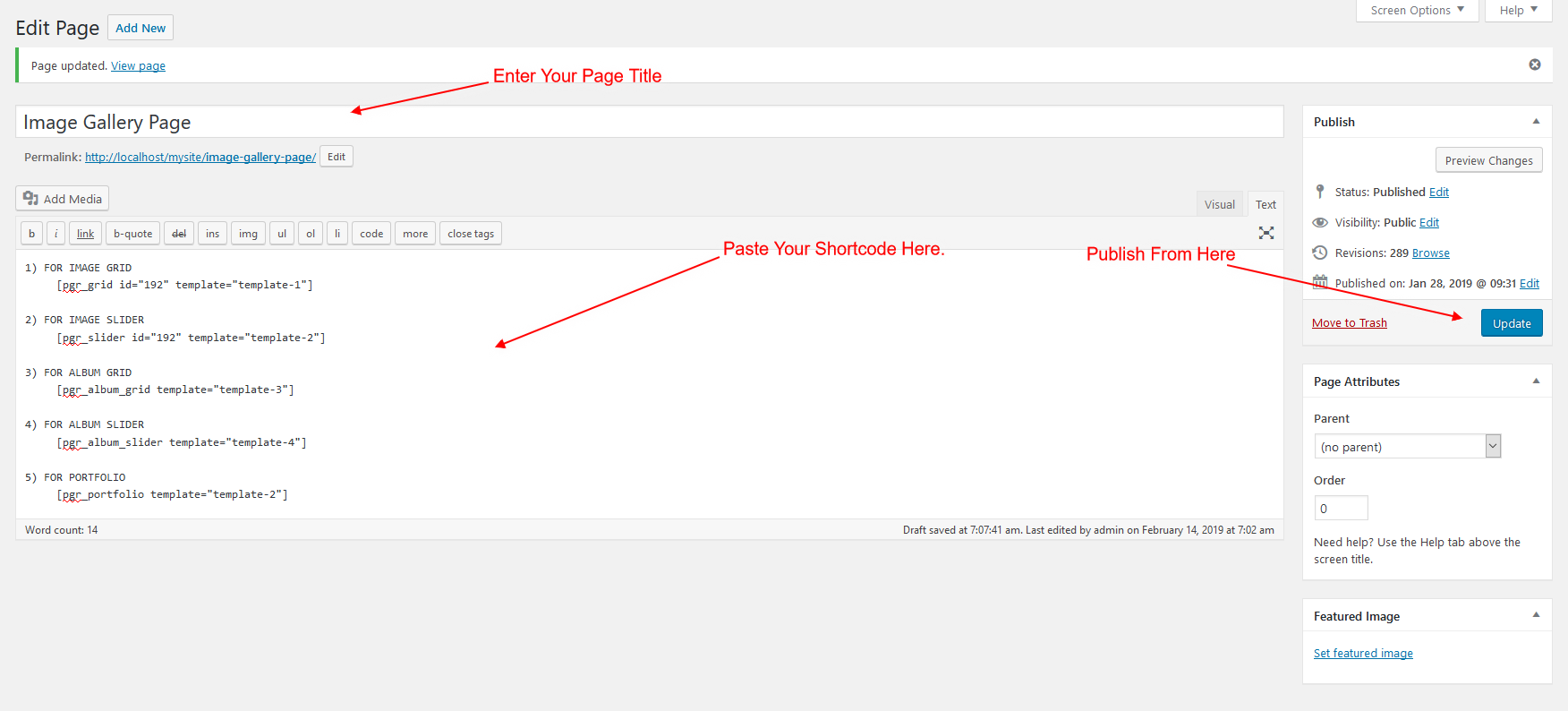
How to Add Shortcode in Page & post text editer.

How to Generate shortcode for grid, slider, portfolio.
Changelog
1.2
- change as per WordPress guideline.
1.1
- update screenshot.
- add update js
1.0
- Initial release.