

Pixelpost Importer
Import your PixelPost database in WordPress (categories, posts, comments, and ratings).
Plugin info
Maintenance & Compatibility
Maintenance score
Possibly abandoned • Last updated 3921 days ago • 4 reviews
Is Pixelpost Importer abandoned?
Possibly abandoned (last update 3921 days ago).
Compatibility
Similar & Alternatives
Explore plugins with similar tags, and compare key metrics like downloads, ratings, updates, support, and WP/PHP compatibility.
Description
Set up your PixelPost database info, and let it work for a while. It’ll import categories, posts and comments. It leaves a new table in the database, used by the provided index.php (see FAQ) to keep the old link alive, by redirecting them to the new uri.
Imported posts are imported as posts with an “image” format in wordpress, the image attached to the imported post. A “more” separator is inserted between the image and the post content.
Installation
- Upload
pixelpost-importerto the/wp-content/plugins/directory - Activate the plugin through the ‘Plugins’ menu in WordPress
Usage
- in WP admin interface, go to Tools>Importer
- Click on Pixelpost, then set up the PixelPost database settings (in pixelpost.php).
- Click on “import categories”, then click on “import posts”. Depending on the number of posts in your PixelPost set up, this may take long (around 30 to 40 min in my case, I had around 850 posts)
Frequently Asked Questions
Categories, Posts, and Comments. Tags are not supported in this version.
Here is a small hack-ish redirection script, to set where PixelPost’s index.php was. Note that this works only if PixelPost and WordPress are installed on the same host. Simply create index.php and copy/paste the following script:
<?php

define('WORDPRESS_LOAD', /* insert here the path to wordpress's wp-load.php */);

if( ! isset($wp_did_header) ) {
    $wp_did_header = true;
    require_once( WORDPRESS_LOAD );
    wp();
}


$link = home_url('/');

if( isset( $_GET['showimage']) && class_exists('PP_Importer') ) {
    $pp_post_id = intval( $_GET['showimage'] );
    $pp_importer = new PP_Importer();
    $wp_post_id = $pp_importer->get_pp2wp_wp_post_id($pp_post_id);
    $link = get_permalink( $wp_post_id );
} else if( isset( $_GET['x'] ) ) {
    switch($_GET['x']) {
        case 'rss':
            $link = get_bloginfo('rss2_url');
            break;
        case 'browse': // todo one dayœ
            break;
    }
}

header( "Status: 301 Moved Permanently", false, 301 );
header( "Location: " . $link );
exit();
Review feed
Screenshots
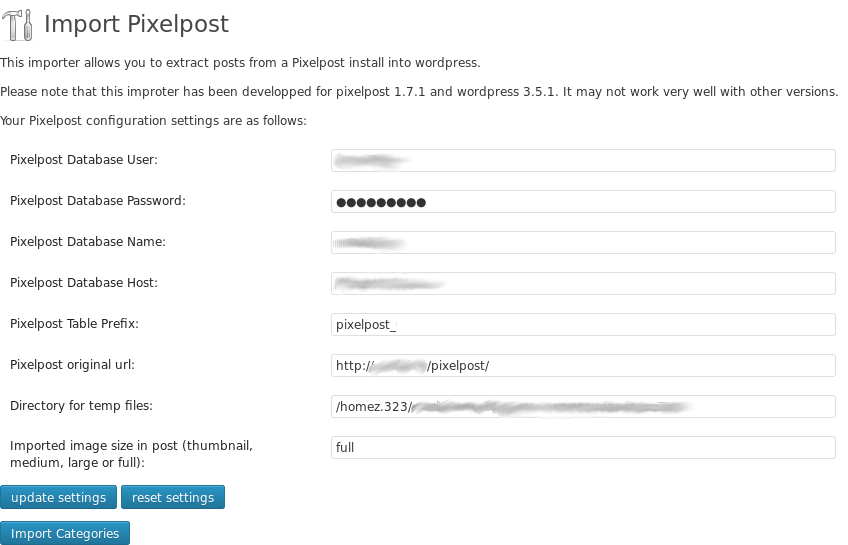
Admin - Set up the PixelPost database information
Changelog
0.1.2
- fix ratings importer