

Plagiarism
Checks your contents (posts and pages) against the web for inadvertant duplicate content before postings. Detects online copies of your older posts.
Plugin info
Maintenance & Compatibility
Maintenance score
Possibly abandoned • Last updated 4528 days ago • 7 reviews
Is Plagiarism abandoned?
Possibly abandoned (last update 4528 days ago).
Compatibility
Similar & Alternatives
Explore plugins with similar tags, and compare key metrics like downloads, ratings, updates, support, and WP/PHP compatibility.
Description
The Plagiarism plugin keeps you from being penalized by Google (Panda) for inadvertent duplicate content.
The plugin searches online for phrases in your posts that may duplicate content already on the web (even in different context or on sites you don’t know).
After you save a post or page click the “Check for Duplicate Content” button. Plagiarism will show a list of duplicate phrases.
A link is provided for every problematic phrase, showing its related search results.
You can also use Plagiarism to check for websites scraping your content after it’s published. Just come back to your posts, clear the Plagiarism box results and check again for duplicate content.
Options Provided
Several search engines are supported:
* Google Search (default)
* Google Blog Search
* Bing Search
* Bing Blog Search
* Yahoo Search
You can also list some excluded websites (e.g. your website itself), to avoid duplicates originating from sources you own (or participate in).
Public and private proxies support is available.
Credits
The plugin initial release is based on previous work of WebwRights‘s WP Plagiarism Pal plugin.
Upcoming features
- Translations
- Alerts in post/page list
- Better option storage
- Uninstall function
- Restore default setting
Installation
Best is to install directly from WordPress. If manual installation is required, please make sure to put all of the plugin files in a folder named plagiarism (not two nested folders) in the plugin directory, then activate the plugin through the Plugins menu in WordPress.
Frequently Asked Questions
Installation Instructions
Best is to install directly from WordPress. If manual installation is required, please make sure to put all of the plugin files in a folder named plagiarism (not two nested folders) in the plugin directory, then activate the plugin through the Plugins menu in WordPress.
Review feed
Screenshots
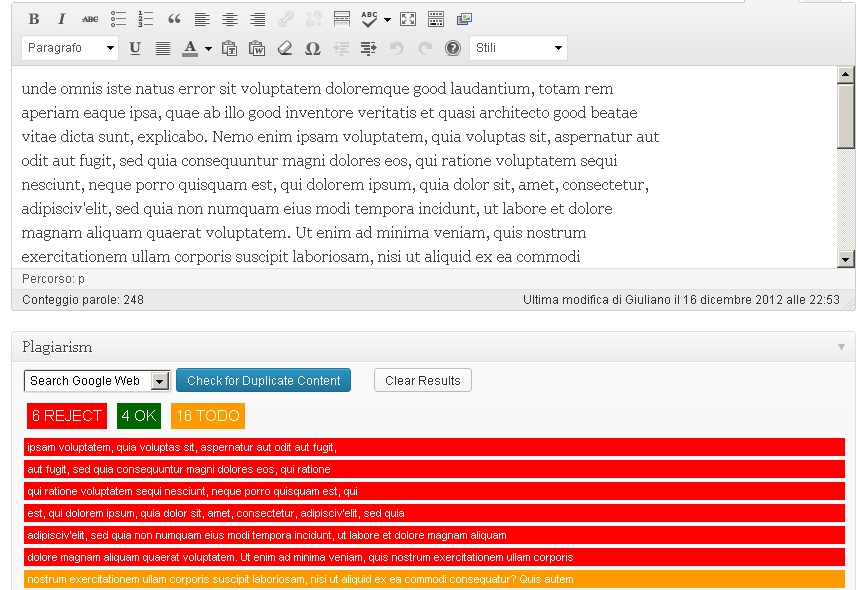
The plugin in action. After pressing "Check for Duplicate Content", a report of Rejects, Ok and Todo phrases is shown, with details for every duplicated text found.

The options page, available clicking on
Settings->Plagiarismin the admin menu.
Changelog
1.1.0
- Fixed: False positives on Google search results
1.0.5
- Fixed: Settings screen sidebar boxes
1.0.4
- Changed: Plugin tested up WordPress 3.6.1
1.0.3
- Added: News boxes
1.0.2
- Added: Blank file to stop directory browsing.
1.0.1
- Added: Screenshots
1.0
- Initial release