

WordPress Plain Mail
Display an email form and send plaintext emails through a shortcode.
Plugin info
Maintenance & Compatibility
Maintenance score
Possibly abandoned • Last updated 4581 days ago
Is WordPress Plain Mail abandoned?
Possibly abandoned (last update 4581 days ago).
Compatibility
Similar & Alternatives
Explore plugins with similar tags, and compare key metrics like downloads, ratings, updates, support, and WP/PHP compatibility.
Description
This is a basic emailer and shortcode, designed to display a mail form for a contact page. It will post a
plaintext email to a provided email address.
Shortcode
The shortcode generated for your account will look like
‘[plainmail header=”a header” mailto=”your_account_name”](introductory text)[/plainmail]’.
Place that shortcode into a page to generate an email form for the email you associated with that account. Between the [plainmail][/plainmail] tags you can put some introductory text for the form. Note that anything
here will be escaped, so html will not render.
Administration
When a message is sent to you, you will see the email headers appear in the settings area. The body of the message itself is not saved. Headers are set by default to auto-delete after 24 hours but you can also delete headers manually. Only up to
50 headers will be displayed.
Installation
- Upload
plugin-name.phpto the/wp-content/plugins/directory - Activate the plugin through the ‘Plugins’ menu in WordPress
- In “Plainmail” under the settings tab, By default, the email
associated with your account will be used as the mailing address. Change
this if you want with the update email form.
Frequently Asked Questions
Can people send html emails with this?
No. Plainmail is intended only to send plaintext emails.
Can I have people send me attachments?
No. Seriously, just plaintext.
Can they BCC other people?
No. Just to the account you set.
Review feed
Screenshots
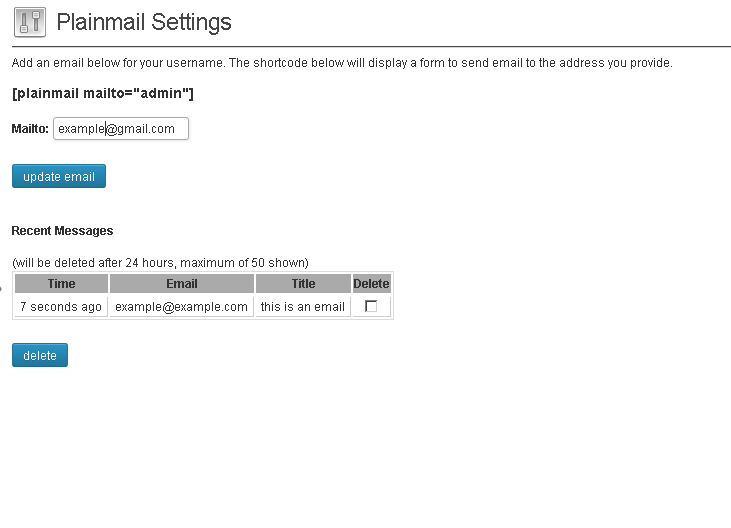
Installation and setup

Shortcode

What the form looks like.
Changelog
1.2 Fixed file include error
1.1 changed to more unique class names to avoid conflicts with other plugins.
1.0 works